Does anyone know if there is a way to link an atlas or book of maps to my default Bible (ESV) (or to any other Bible), so that when I click on a place name the map would automatically come up?
Thanks,
Carolyn
Does anyone know if there is a way to link an atlas or book of maps to my default Bible (ESV) (or to any other Bible), so that when I click on a place name the map would automatically come up? Thanks, Carolyn
I don't think so. In fact, I'm almost certain there is not.
I have often wondered about this, particularly with the prevelance of tagging. Maps, images, graphics and photos could be tagged, thereby allowing the passage guide to generate a list of items in the graphics category that pertain to that particular verse.
Hello Carolyn,
This might obtain theresults you are looking for:
Related Tutorial Links:
Article on how to Define a Collection:
www.logos.com/training/definecollection
Videoonhow to Define a Collection:
http://www.logos.com/media/tutorials/lbs3/DefineCollection.html
Video onhow to use the Reference Browser:
http://www.logos.com/media/tutorials/lbs3/ReferenceBrowser.html
Thanks so much! I'll try this! I've watched the video on defining a collection, but not about the reference browser.
Phillip:
This is a GREAT tip Phiiip. Every day I learn something new with Logos.
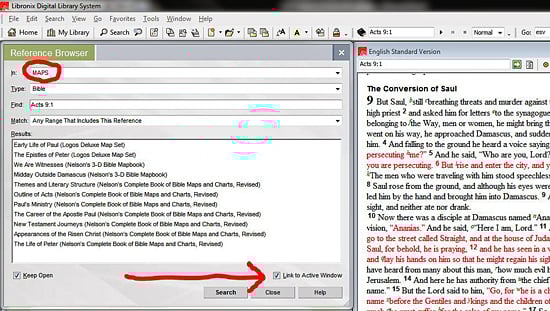
Create a collection of your Map and Atlas books. Open the Reference Browser and select your new Map collection. Check the box "Link to Active Window" As you scroll through the ESV (or other Bible) the Reference Browser will instantly find links to the passage you are reading
That's a neat little trick I wasn't aware of. Now if we only had more and better maps.
Now that's really neat. I was trying to do something like that many times. I would never thought I can use ref browser this way. How many other little tricks like that you have in Logos? Bring them on. I want all of them [:)]
This is a very interesting idea! This can be used with any collection. For example while looking at a text you could at a glance see what theology books have a reference to that verse. It becomes a quick way to run an ongoing partial passage guide search.
A collection of Grammars is another very powerful application of this method.
WOW! Thanks for teaching this old dog a new trick. Works great.
Hello Carolyn, This might obtain theresults you are looking for: Create a collection of your Map and Atlas books. Open the Reference Browser and select your new Map collection. Check the box "Link to Active Window" As you scroll through the ESV (or other Bible) the Reference Browser will instantly find links to the passage you are reading (see image below).
This indeed is a brilliant tip. I am constantly amazed at how, much even after years of use, that I keep learning about the power of Logos. It is truly an amazing programme!
Me neither and I agree. You know that reference browser is an incredibly powerful tool. I just love how easy it makes linking the Church Fathers to relevant scripture. It kind of makes me wish I hadn't spent all that money on the Ancient Christian Commentary.
Actually, I don't wish that at all. I really love that resource.
Thanks Philip!
Thanks phillip, great tip.
Ted
Thanks for the Great tip!
Available Now
Build your biblical library with a new trusted commentary or resource every month. Yours to keep forever.