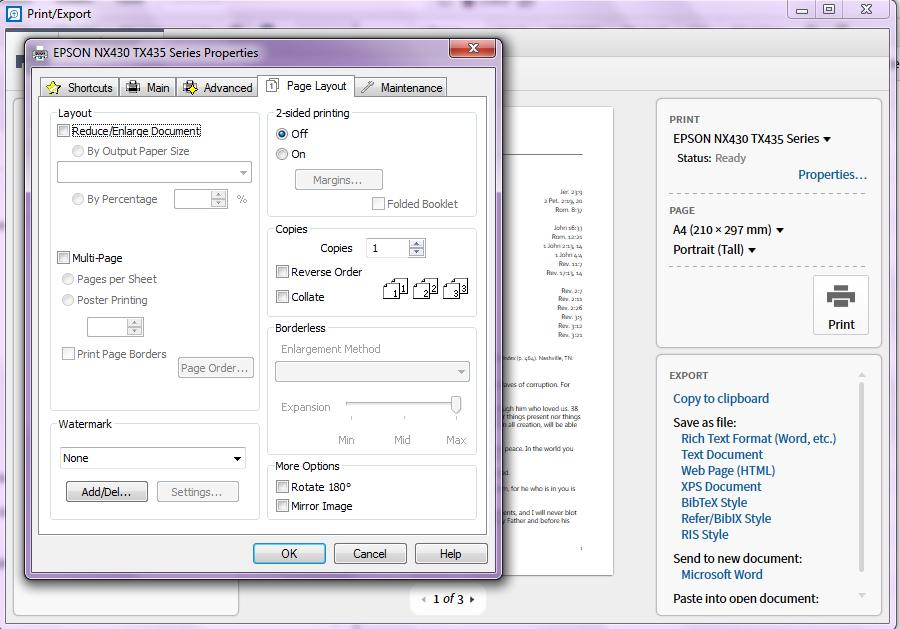
I wanted to print a Clipping double-sided so I clicked Properties in Print/Export and went to Page Layout to check 2-sided Printing ON. After finishing with the dialog I clicked Print and Logos crashed.
Windows Logos 6.1 Beta 5
Steps: Open clipping CTRL+P Click Properties Click Page Layout tab Check 2 -sided Printing Click OK Click Print
Expected a print with instructions to achieve printing on both sides.
6266.LogosPrint-crash.zip
No Crash file.
The Event Viewer shows only:-
Faulting application name: Logos.exe, version: 6.1.0.10, time stamp: 0x54d23768Faulting module name: ntdll.dll, version: 6.2.9200.17046, time stamp: 0x53b4864cException code: 0xc0000374Fault offset: 0x00000000000e9e99Faulting process ID: 0xf24Faulting application start time: 0x01d042ce1a72ddc3Faulting application path: \Logos5\System\Logos.exeFaulting module path: C:\WINDOWS\SYSTEM32\ntdll.dllReport ID: b6a407dd-aec1-11e4-bee1-6cf04971afb5Faulting package full name: Faulting package-relative application ID:
Since the crash is in ntdll.dll (not in Logos code) and it involves the EPSON printer properties dialog, I strongly suspect a printer driver problem. Are there updated drivers for your printer available?
We may be able to get a more accurate diagnosis if you're able to capture a native crash with procdump.
Thanks, Bradley. An update seems to have resolved the issue.
Available Now
Build your biblical library with a new trusted commentary or resource every month. Yours to keep forever.