I have created numerous Collections in my Logos 6. is there a way to printout the contents of a Collection?
Michael
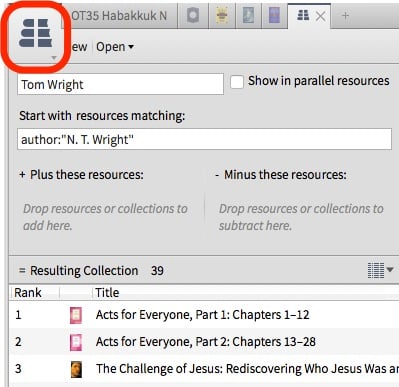
Hi Michael - if you open the collection in Tools>Collections, then click on the panel icon on the top left-hand corner of the collection panel, you should find the Print/Export option which will allow you to print it out.
Edit: here's a screenshot with the panel icon highlighted with a red box.
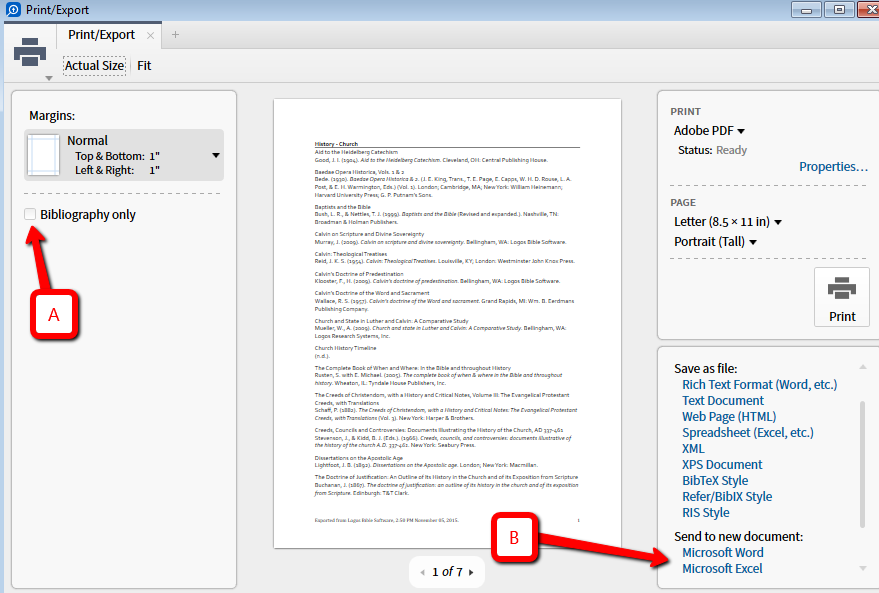
To add to what Greg said, you can print directly as a headed list or as a bibliography (if you leave box A unchecked, you get the headed list; if you check the box, you get a bibliography in the style of your choice), or you can send to (B) MS Word for editing. If you wish to do more advanced sorting, you can even send it to MS Excel.
A big thanks to both Greg and Doc for your help. Exactly what I needed,
Available Now
Build your biblical library with a new trusted commentary or resource every month. Yours to keep forever.