How do I personally send to Kindle when the Logos-supported function is switched off?
Faithlife have announced that on 31 March 2016, they're disabling their "Send to Kindle" service. That means you won't be able to automatically send Logos resource to Kindle. There's good news though. You can still send Logos resources to a Kindle device, it just takes a little longer (about 10 minutes per resource). These walkthrough will guide you through that process.
And there's more good news: It's a lot simpler than it used to be in Logos 5 days.
First, here's the video: https://youtu.be/ANfakC6QSlw
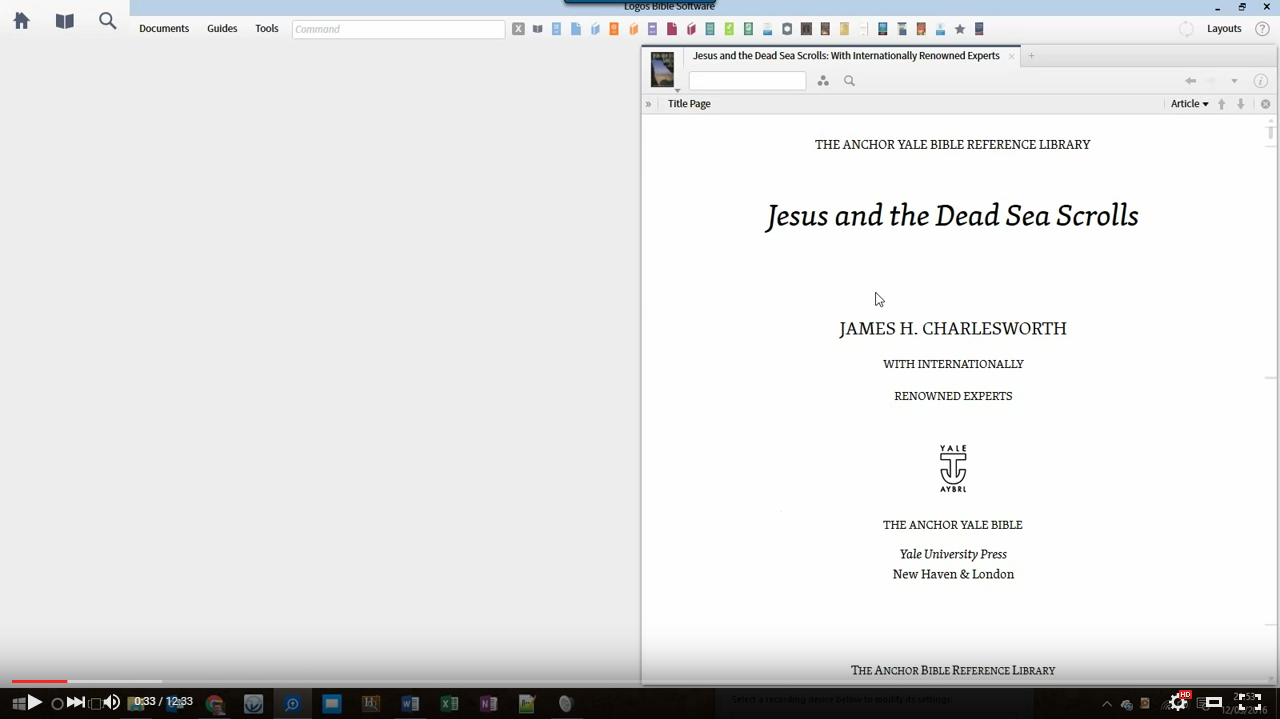
Or, if you prefer, here are instructions:
- Download the Send to Kindle software from www.amazon.com/gp/sendtokindle and install it.
- In Program Settings, make sure "Copy footnotes" reflects your preference.
- Open the resource you want to send, and on the resource menu:
- Reduce the text size to the minimum possible.
- Make sure "Show footnotes on page" is off.
- Choose Print/Export
Change the margins to "Narrow"
Switch the paper size to the largest possible (e.g. A2). Switching to a virtual printer (such as the newly installed "Send to Kindle" printer), will give you more options than a physical printer.
In the reference box type Page i-9999 and press Enter.
Make sure you're not over the 100 page limit, and send to Microsoft Word. If you are over the limit, you'll have to send a second batch containing the missing pages.
Now, in Word:
- Press CTRL+A then CTRL+SHIFT+F9 to remove all hyperlinks.
- If you want, remove the formatting from old hyperlinks by clicking in one, then choose "Select text with similar formatting". The set the font to automatic, and removing the underline.
- Repeat the above step for the footnotes, and for any hyperlinks in italics.
- Find a chapter heading in the document, and again choose "Select Text with similar formatting".
- Right-click on the Heading 1 style and choose "Update to Match Selection". That will ensure your chapter headings appear in your TOC.
- Repeat the step above for level 2 headings, if desired.
- If your document has a Table of Contents, you can delete it (the links no longer work, anyway). Replace it with a Word TOC, by clicking on the References tab and choosing "Table of Contents". The style doesn't matter, but I prefer a custom TOC with "show page numbers" deselected. If you want to show
- Save your document.
Find your document, then right-click on it and choose "Send to Kindle". Enter the title and author, and click send.
That's it! The whole process should take less than 10 minutes.
How do I find στοιχεῖον and πλἠρωμα are within twenty words of each other ignoring verse breaks?
You need to convert it to a basic search. Build your search as a morph search then change it to a basic search and logos will do the conversion of format for you.
It seems you are searching for surface text instead of lemma, which e.g. won't find στοιχεῖα when you're only looking for στοιχεῖον.. . .
the basic search looks like this: (([field bible, content] <Lemma = lbs/el/στοιχεῖον>) WITHIN 20 WORDS ([field bible, content] <Lemma = lbs/el/πλήρωμα>)) but gives only hits in the two verses you already know.
Thanks for the help. I really want to look in a few non-biblical collections to see whether they are used together outside the canon.
In this case it seems you should enumerate the possible surface text forms (i.e. the declension chart) of both words as a list
(nominative sg, genitive sg, dative sg, accusative sg...) WITHIN 20 WORDS (nominative sg, genitive sg, dative sg, accusative sg...) in morph, have logos come up with the ugly-looking basic search and run against your lang:Greek resources
How do I find everything spoken by the crowd in the Gospel?
Note: the original question recognized the presence of multiple crowd to which the search would be applied.
You need to use "{ }" around the terms as opposed to "( )"
So - for example - "{Speaker <Person Crowd calling for Barabbas’ Release>}"

Why does the Lectionary the 1st reading for tomorrow is Daniel 3:14-20, 91-92, 95, yet the reading shows Daniel 14-20, 24-25, 28?
Dan 3:91-92 (NAB) is Dan 3:24-25 in the ESV, which you have selected as the version to read in.
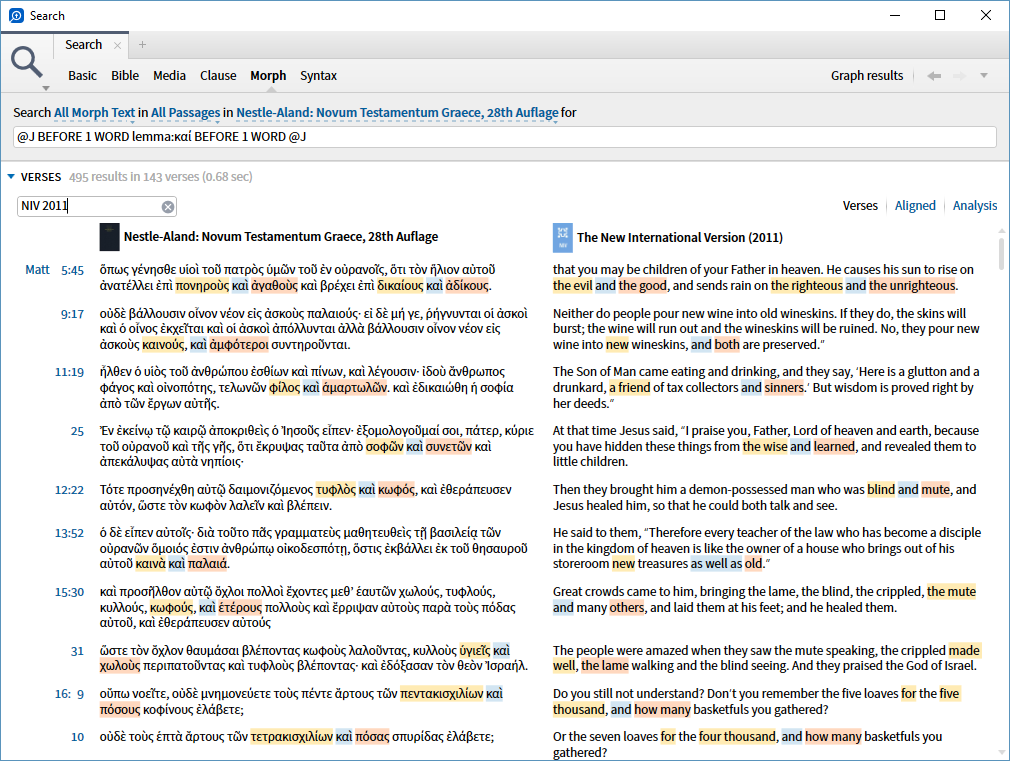
How do I perform a search on two adjectives connected with και?
Do a morph search for @J BEFORE 1 WORD lemma:καί BEFORE 1 WORD @J. Make sure you do the search on a Greek text.
How do I learn to use Logos?
Are you familiar with the (free) 30 day training available at https://www.logos.com/30-day-training ? Just by spending 30 minutes a day for 30 days with the program will quickly teach you how to master the software
plan B. Set aside 20 minutes 2-3 times a week to learn Logos. Each time when you sit don't decide what you want to do in your Bible Study. Each time you run into a problem that you don't know how to do in Logos, stop and post on the forums ... explain what you want to do and you'll usually get a prompt answer. Don't try to figure it out or click on things that you think might possibly be related ... if you don't know, ask. And as you will be asking about things you want to do (as opposed to the best guess of Quick Start as to what you want) you should be surprised as how quickly you can learn to do what you need ... later you can worry about what else Logos can do for you.
Good thing is to change your Homepage into a Help/Learn Side. I would just have these on:

So you can concentrate.
The Best Start for me was
http://www.logosbiblesoftwaretraining.com/
Even talks about Logos 4 it's a great Help. Also the 30 Day Bible Challenger. Here you learn to use Logos practical.
Or try the QuickStart Guide that you've probably got in Logos.
Where in Logos did you find the best detailed map of Jesus' Travels?
If you have these resources, check out: Chapter 18 of Holman Bible Atlas and Chapter 20 of Rose Then and Now Bible Map Atlas.
https://www.logos.com/product/7301/holman-bible-atlas-a-complete-guide-to-the-expansive-geography-of-biblical-history
https://www.logos.com/product/31905/rose-then-and-now-bible-map-atlas-with-biblical-background-and-culture
Harmony of the Gospels and NIV Zondervan Study Bible
https://www.logos.com/product/1204/nelsons-3-d-bible-mapbook
One idea is Media Search of Maps for:
Jesus NEAR travel

How do I keep track of geographical locations?
(NB. I was going to write this post as a TIP, but upon further reflection, I'd thought I'd ask it as a question to see if anyone has suggestions as to alternative ways of doing this.)
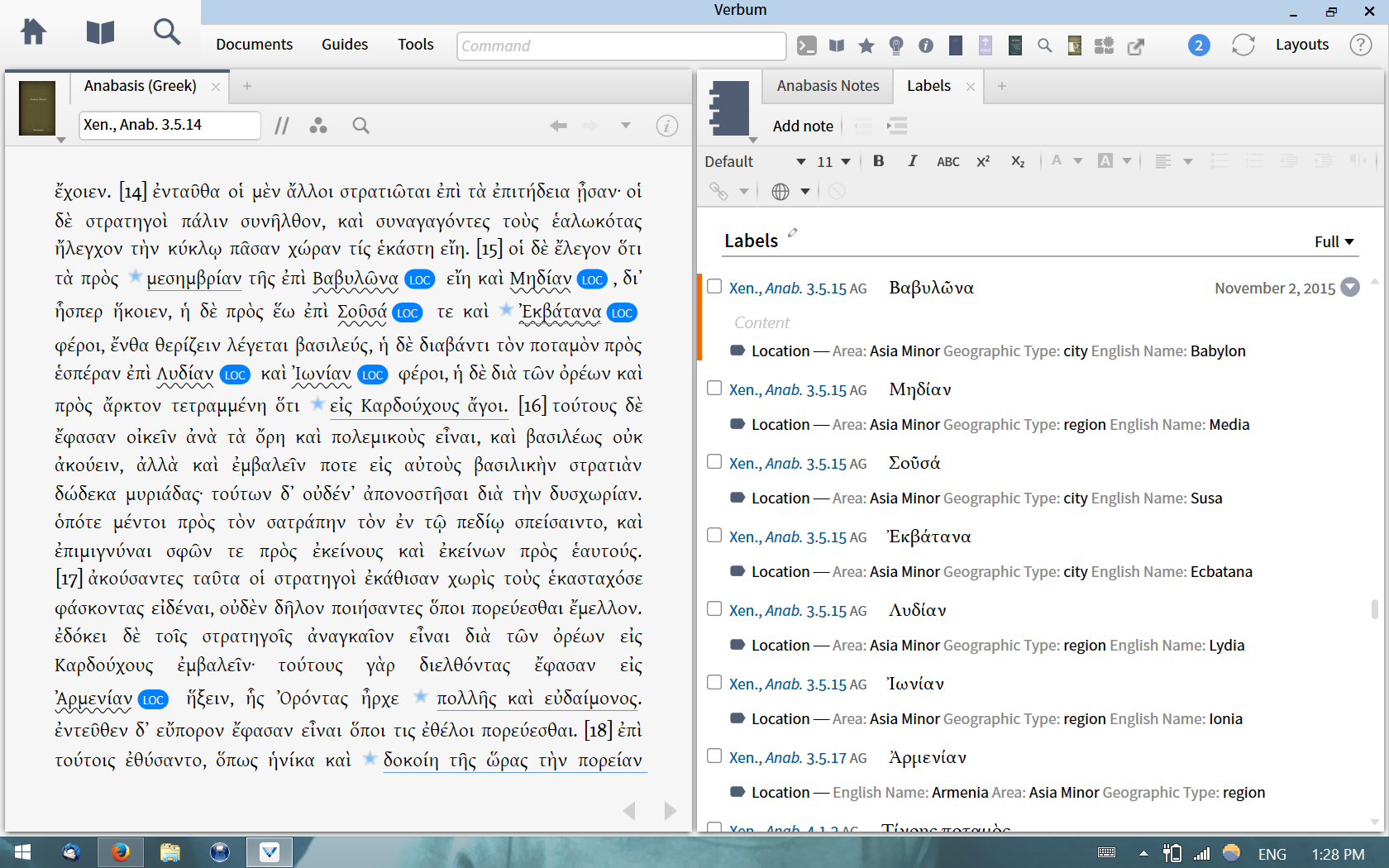
I recently finished reading through Xenophon's Anabasis from the Perseus project, which is basically a travelogue disguised as an war/adventure novel (or the other way around). In order to keep track of all the different geographical locations the Greek armies visit while tromping their way through the Persian Empire and back, I made a new label called "Locations", with three variables: Geographic Area, Type (river, city, region, etc.) and English name.
The labels are nice because they allow me to scroll through the book by geographic location. I suppose you could say all I'm doing is constructing an index of place names, with a little extra information tagged on for each entry. In any case, I thought I'd pass it on as a tip.
That said, does anyone else have other suggestions as to how to make this more useful? I must say I don't really know the differences between tags, labels and community tags, so I might be missing something.
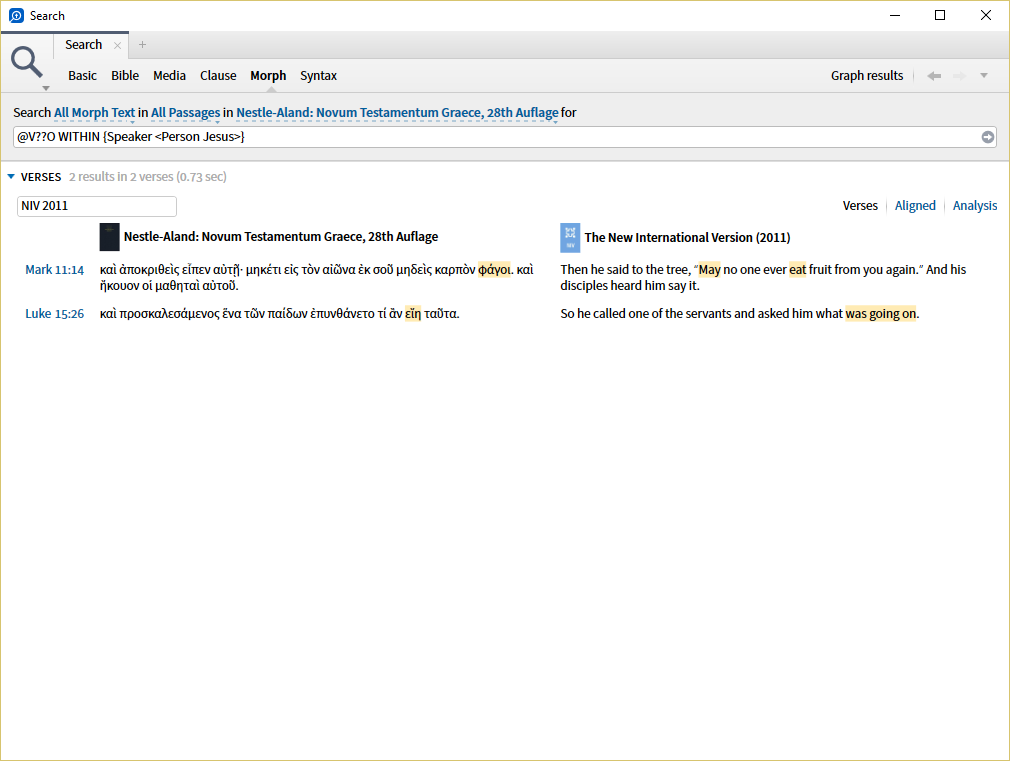
How do I find the optatives in Jesus' speech?
Note: the original question included the LXX which is Old Testament only and therefore has no direct speech of Jesus.
A Morph search for @V??O WITHIN {Speaker <Person Jesus>}
How do I find all the resources in my library except mytag_____?
* -mytag:____
The * finds all Library resources.
Another way is to sort by "mytag" and the ones without tags will show at the top will show with a "-". Expand it and you have all your non-tagged resources.
How do I find the words in the Bible meaning "hell"?
However, using the Logos 6 general search facility (magnifying glass icon) in a Bible search of all text in all Bibles, I used <Sense Hell> and received 445 results in 408 verses in 24 resources. This showed a variety of words in the Bible relating to hell.
If you were interested in only searching the LEB you could choose that Bible alone to search. With your results you might create a passage list for further study.
You are absolutely right that this is the way to go. Or one can get a solid Passage List from the Factbook

How do I use "explain this screen"?
I really like Logos, and now and then it surprises me with an extra little boost of fun. Maybe it has an Easter egg?
I needed help so I pressed F9 to open "Explain this screen," which does exactly what it says. A pretty little capsule/button thingy opens at the bottom offering a sequence of explanations while a pillar of fire with trailing flames wafts about critical points of the screen directing attention to locations of functions that the "Help" is explaining.
It's really cool. Or hot. Certainly worth a look.
Here is a quick video of it in action:
https://www.youtube.com/watch?v=whee-viibLU
This is a feature that was introduced in windows back in Logos 4.0a, it's called Explain the Screen. You can gain access to it by either pressing F9 or clicking on Help in the upper right corner and then on Explain the Screen. It was never implemented on Mac.
How do I search for highlights quickly?
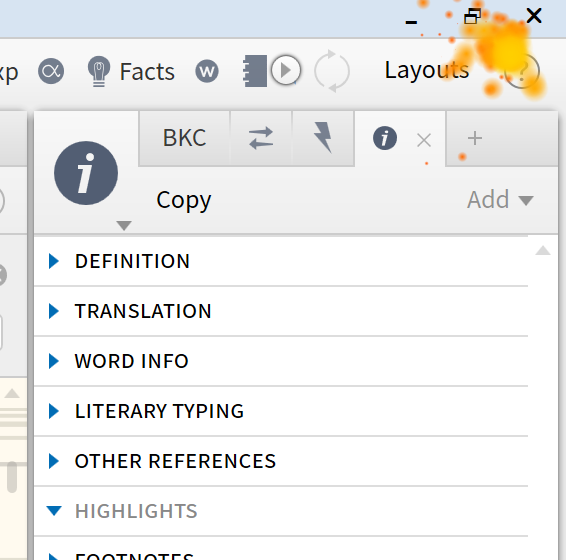
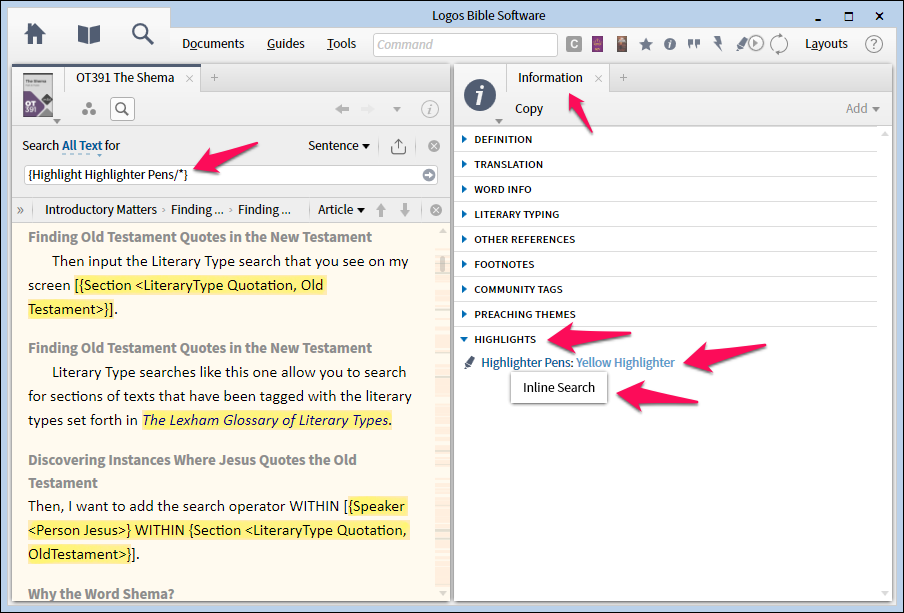
A quick easy way to search for highlights in a resource is to use the Information Pane (From the Tools Tab). Be sure to add "highlights" if it is not present.
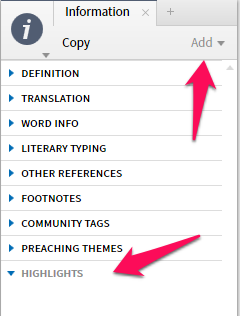
Select any highlighting in an open resource and the highlighter type will appear as a link under highlights. Click the link and your resource will automatically do an inline filter search for the highlight type selected.
How do people compensate for no Journal function?
For this I would use a Notes document.
I would create a Notes document called "Journal" (for example) - use the Notes option in Documents

which will create an untitled Note

which you can rename to "Journal" by over-typing

Then select the passage you are reading, right-click and choose "Add a note to Journal"

You can then type journal entries into the note associated with that passage

Hope that helps to get you started - but please feel free to come back with further questions
I downloaded this journal a few weeks ago (https://community.logos.com/forums/t/79592.aspx). This is set up as a calendar devotional. When converted into a personal book it is organized by date, a separate entry for each day. And it gives you a text box to write down your thoughts etc. Something like that could work for your Bible journal. you could leave it set up as it is and make entries by dates. Or you could play around with it and make one that is organized by Bible books, or a separate ones for each book of the Bible organized by sections/chapters of that book. You then can write down your observations etc. in the text box of each section. If you end up with more than one journal you can collect them using the favorites feature described above.
I haven't checked it out yet. So I don't know how the personal book behaves. For example what happens if the assigned space is full, will it enlarge automatically or not, I don't know. There might be other limitations. Once you have it set up you cannot add more sections to it etc.
Give it a try. Personal books are searchable and I think you can add tags to it as well. So it provides some integration into your Logos library.
once you have downloaded the DOCX open it. There might be a year mentioned on top. Mine for example says Journal 2015. So you want to change that to the current year. Then save and close it.
Next go to Logos, go to Tools, and under the Utilities section choose Personal Books. In the new window click on Add Book at the top. You might have to scroll down to the bottom to see the new book set up opened (see picture below). In that new field fill in the information, like Titel etc. Make sure you choose Type: Calendar Devotional and Language: English. If you can create a book cover for it do so and then go and select it by hitting Change... Then add the DOCX file by clicking on Add File and navigating to the location where the file is saved on your hard drive. Finally hit build book and wait for it to complete.

Then enjoy your journal

How do I find all verses, for any given (English) translation, which have a specific underlying Greek/Hebrew word?
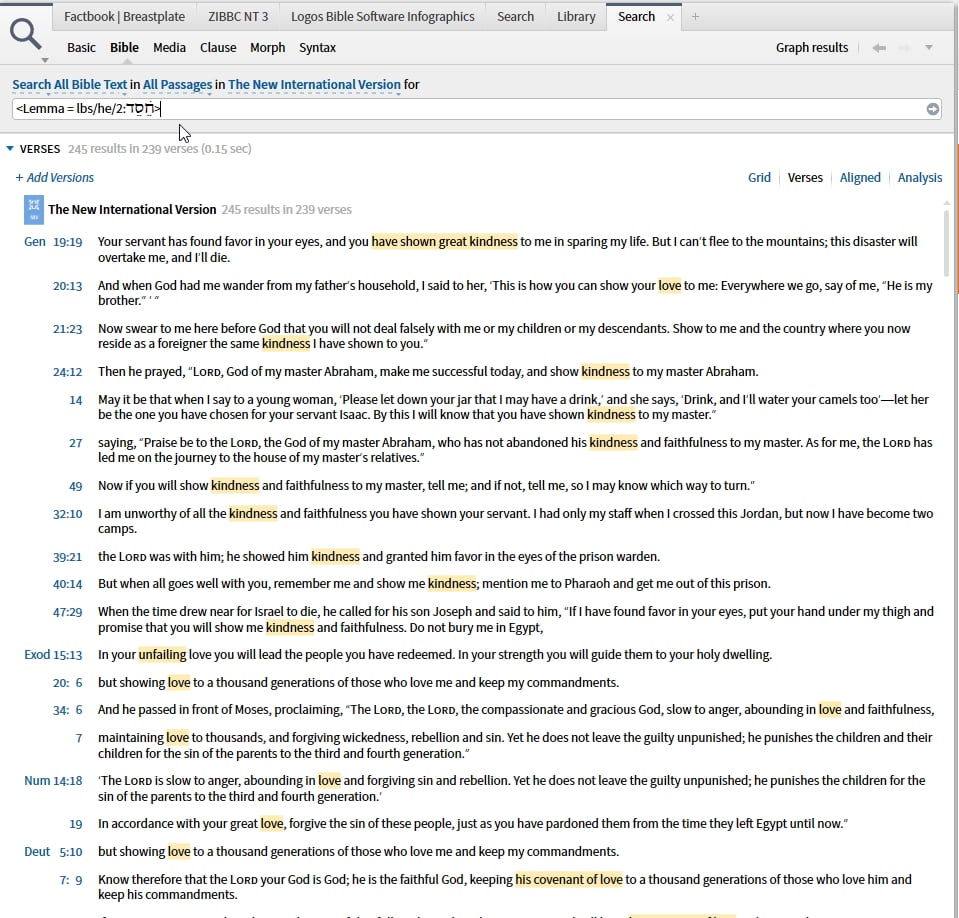
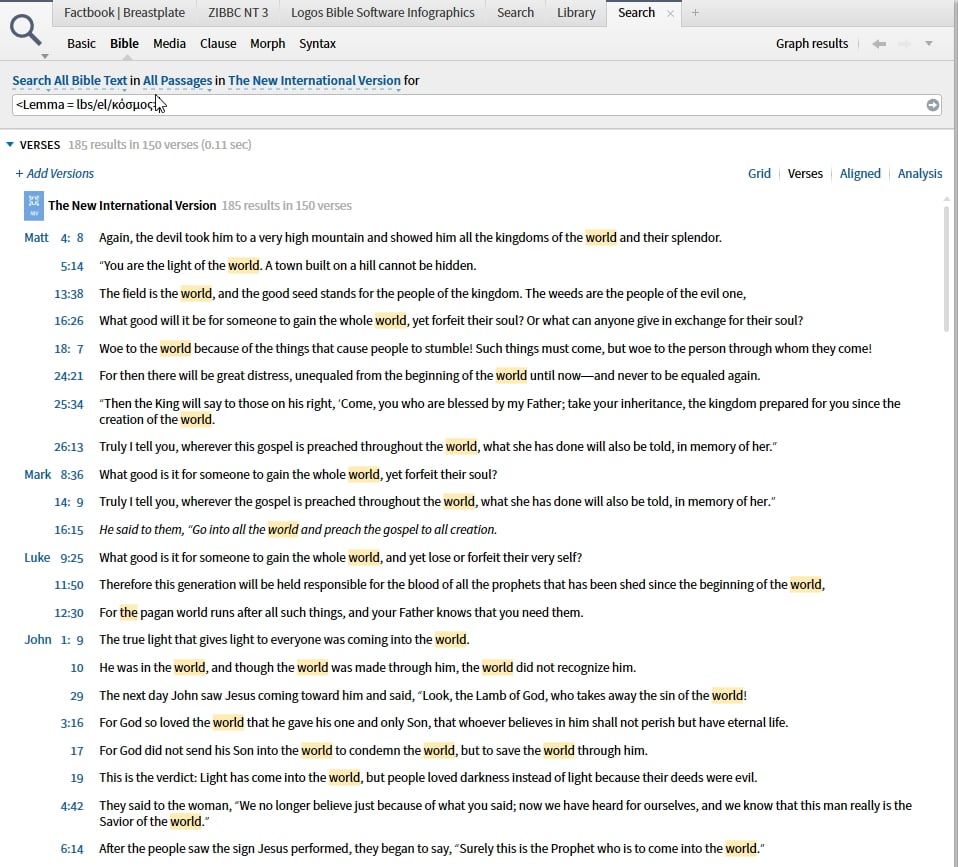
Not sure what you tried but a Bible search (in a reverse-interlinear enabled Bible) should do this for you - the example below searches for the lemma of the word as opposed to a particular form.
The same works for Greek
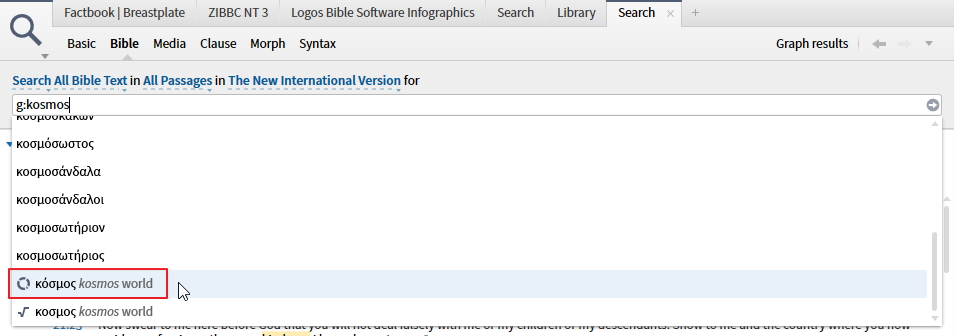
You can either enter the Greek term directly or use "g:" to signify transliteration (h: works for Hebrew), enter the transliterated word and select the Greek one from the dropdown
There are other approaches but does this give you what you need?
Not sure what you tried but a Bible search (in a reverse-interlinear enabled Bible) should do this for you - the example below searches for the lemma of the word as opposed to a particular form.
The same works for Greek
You can either enter the Greek term directly or use "g:" to signify transliteration (h: works for Hebrew), enter the transliterated word and select the Greek one from the dropdown
There are other approaches but does this give you what you need?
