How do I stop my German LU 84 from providing definitions instead of Namen and Orte der Bibel?
The problem seems to be that the LU 84 Bible contains a small dictionary or glossary, and that is opening before your preferred dictionary.
To prevent this, right-click on your LU84 Bible in your prioritisation list and choose "Set Prioritisation Limits (Advanced)". The select "Bible" under the first dropdown.
That should mean that the LU84 Bible won't get in the way of normal German headword lookups.
Where can I find the latest version of Logos?
The release notes https://wiki.logos.com/Logos_6_Release_Notes show current version
And the most recent version can be installed from https://www.logos.com/install
Can I see all my notes with a single tag together?
You can search for them as follows

Note that you cannot separate results for Notes and Clippings
How do I make and use a collection of multi-volume commentaries?
You can't do this automatically, but you could create collections to help.
But it depends on what you mean by multivolume work? Do you mean a volume that's part of a larger series?
If so, create a collection with this rule: series:* type:bible-commentary
Now select that collection in your passage guide Commentary section. Only commentaries that are part of a series will show up. If you don't want to keep having to select the collection, you can create a custom passage guide: https://www.youtube.com/watch?v=jy9taS_QdRI
Note this does not catch multi-volume works published in Logos as a single volume unless you input a series name.
How do I change my background color?
Did you by chance change it in the program settings?

Why does my footnote font size appear larger?
The size of the footnote text appears to be changed by the "Program Scaling" (as opposed to "Resource Font Size"):
Here is 90% —

Here is 110% (I backed off the resource font size)—

Can I control what version of PowerPoint is used in "Send to"?
You might be able to change the default version of PowerPoint (that other applications, including Logos, connect to using COM) by editing this registry key: HKEY_CLASSES_ROOT\PowerPoint.Application\CurVer. Try setting it to "PowerPoint.Application.16".
Back up that key first before editing it.
Why isn't parsing information showing in the Information Panel?
You are looking for this?

EDIT:
The content displayed in the information panel is heavily customizable depending on your needs. Maybe morphology (i.e. the parsing info you are looking for) is turned off in your selection, or drowned in a sea of other info? My selection currently looks like this:

/ EDIT
The word info section of the information panel also works for English bibles with a reverse interlinear:

Note that the Information tool can be set to work on hover or click:

How can I determine resources names of the biggest resource files?
Most (not all) resources have a resource page (which is normally linked from the product page from which you could buy it). Those follow the following format: https://www.logos.com/resources/LLS_xxxxxxxx
with xxxxxxx being your filename. Thus see https://www.logos.com/resources/LLS_CLLBBLCOMPN for the Collins Bible Companion (you could guess some of the file names, as they often are a consonant-only version of the resource names). Note that is those names start with PBB, they are personal books you built. And those consisting of a long string of numbers, starting with 9781 (since they resemble ISBNs) are Vyrso books.
EDIT: and no, the filenames are explicitly given in the third line of the support info, so BDAG is bdag.logos4 - however, those old bible and dictionary resources with a number representation have their resource pages under those, not under the filename. Thus BDAG is found under https://www.logos.com/resources/LLS_46.30.18 not under https://www.logos.com/resources/LLS_BDAG
How do I get glosses in the parsing tooltip?
The bible needs a Search Field called "Gloss Text" in order to appear in tooltips e.g. NA27, NA28
Interlinear bibles (e.g. LGNTI) may have fields called "Lexical Value", "Literal Translation" that you can select for display, and "Lexical Value" would be much the same as a Gloss. NA27 Interlinear has both a "Gloss Text" and "Literal Translation" field.
There is no selection for tooltips! Fields like Lexical Value may be selected for the interlinear panel or inline interlinear.
Why does Copy & Paste give me a reference rather than the text in Word?
Here is a link to the wiki page related to screenshots
https://wiki.logos.com/Screenshot
I think what is probably happening is that reference rather than selection is clicked in the menu that comes up when you right click. Follow these steps:
1. Select desired text
2. Right click
3. Left click on the selection option (top right)
4. Click copy
That should now enable you to paste the selection into your word processor
What do "early" and "late" mean in the timeline?
It just means that there are differing opinions on the dating of an event. Sometimes it has to do with conservative versus liberal scholarship, sometimes not. You would have to read up on the event in a Bible dictionary/encyclopedia to uncover the various opinions and the reasons for them.
https://community.logos.com/forums/p/122228/799021.aspx
"Since most dating begins with a more recent event (like the exile, which is easier to pin down with secular history) and written backwards, the time of the patriarchs largely depends on the cumulative effect of every other decision made. The big issue is the length of the stay in Egypt, whether 430 or 215 years. You can probably find out the arguments for that in most old testament survey books or in commentaries on Exodus."
What is the difference between the Hymn and Praise Psalm types?
From the About button one can see the documentation of the data:

which includes a bibliography of where the data is drawn from

Sorry but not having Gunkel I can't provide a complete answer.
http://biblical-studies.ca/pdfs/Gunkel_Classification_of_the_Psalms.pdf provide some of the Gunkel material
Where do I find a list of Logos Now features and how they work?
We don't have an email sign up for this. But we do maintain a list of all the features, how they work, and tutorials on this page. Each time an email notification for new features goes out, know that you can go to the page I just linked to see the updates.
Where do I find the Pro training videos?
https://www.logos.com/logos-pro?utm_source=blog.logos.com&utm_medium=blog&utm_content=introducingnewlogospropage&utm_campaign=promo-logospro2016
Where are the spreadsheets for resources in my mobile ed courses?
They are in the documents tab of each individual course's Faithlife group (i.e. https://faithlife.com/th221/documents).
what you describe sounds a lot like the Courseware Reading List (link to L6) we maintain on topics.logos.com - but there was only one of the linked courses that contained references to the course material, and that has been changed in the meantime (see the discussion following my post in the respective thread).
Why does my Search "mass WITHIN 10 words Emmaus" return "The City of Corinth" and "Israel and the Romans"?
Remember that a footnote is 0 words long which causes this to be counted as within 10 words ...
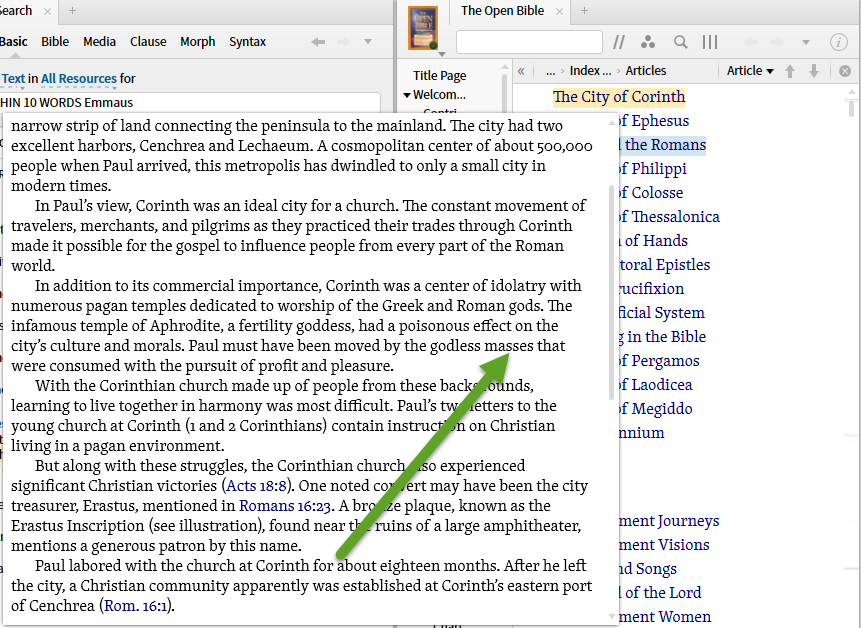

Strictly speaking, distance is measured at the "surface", and the entire footnote has the same surface position.
The footnote indicator itself will be highlighted, not the content within the footnote.
