[quote]
Apparently the passage guides that we run are being saved. This has caused some of us confusion because (as far as I can tell) there is no indication that our passage guides are being saved. When we want to run a new report, L4 first checks to see if we ran a report on the same verses. If so, it pulls up the old report.
Because I use different guides for different studies, this auto saving is very confusing because what I run a new report using the passage guide for a different study, what I expect to be in the new report is not in the guide, and what is in the new report guide should not be in there.
Here are my suggestions:
1. provide a way for us to delete our old passage guide reports
2. give us an option to turn this auto save feature off
3. give us an on demand option to save the report
4. when an old report is being used, provide some information stating that the report was created on 01/01/01.
5. provide the same options for the exegetical and word study guides.
I'm assuming that this request is very old as it is based on several behaviors that are not currently true.
1. we do have a way to delete old guides
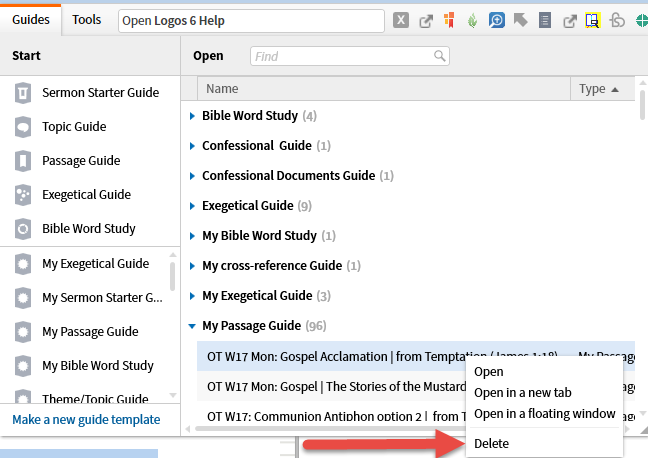
2. We can't turn the saving off but it is always the result of our positive action - renaming the guide, adding notes etc.
3. The saving is based on our positive action (see above)
4. We are shown the date or title only on partial overlaps not apparently on a precise match. There we have to go to the Guides menu to find the date. It would be nice to always have the date shown.
5. I think all Guides work in the same manner but I haven't tested them all. Certainly the documentation makes it sound as if they are consistent.
My opinion is that this request should be replaced by one that to always show the date of a guide - old or newly created.
