My initial estimate is that there are about 60 functions that show up in the Panel Menu ... and I suspect I've missed some. This menu will be handled in multiple posts.
1. To open the Panel Menu you may click on the icon at the upper left of the panel OR use the keyboard shortcut of ALT+-
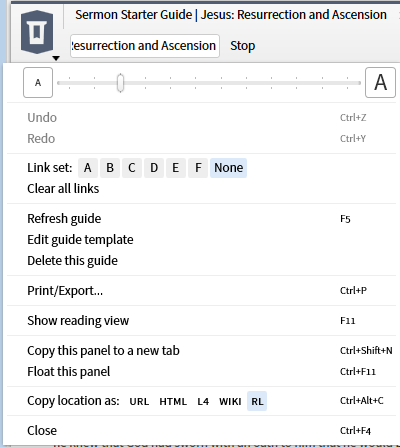
2. The first function is a slider to adjust the font size for the panel. Use Tools ==> Utilities ==> Program setting when you wish to affect the entire application.
3. Some panels have a pair of commands Undo/Redo that may also be invoked through the standard Windows shortcuts ... as given in the right column of the menu.
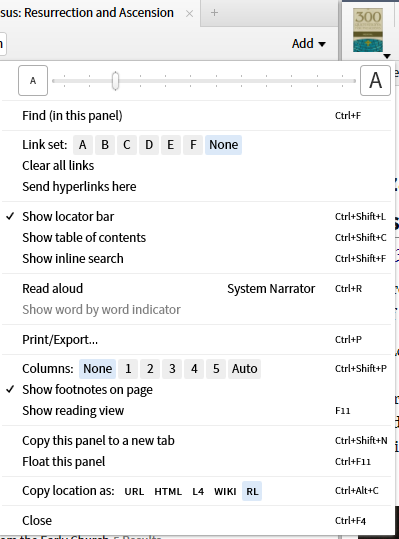
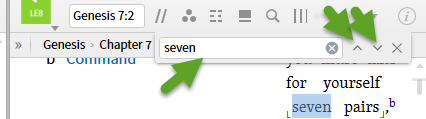
4. Some panels have the Find (in this panel) function. This is a simple string search with a simple next/prior navigation through the results.
5. The next function is the Link Set. Until recently, this was limited to tying resources with the same indices together so that they scroll together. A recent addition has allowed one to link a Greek or Hebrew lexicon to an English Bible Bible New Feature: Link a Lexicon to a Bible (feature). There is no master/slave relationship so that moving any resource in a linkset will move the others. If one wishes to have a master resource, consider using the new multi-view feature New Feature: Multiview Resources (Tool). You may have up to 6 linksets identified by letters A-F.
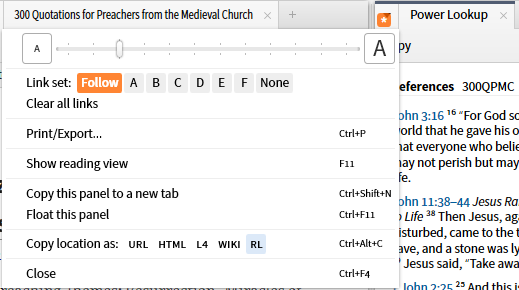
The Power Lookup and Cited By Tools have an additional function "Follow" in which the tool follows the cursor focus.
6. The None function allows you to clear all the linksets for the panel rather than resetting them one by one. Clear All links removes all active links in the window.
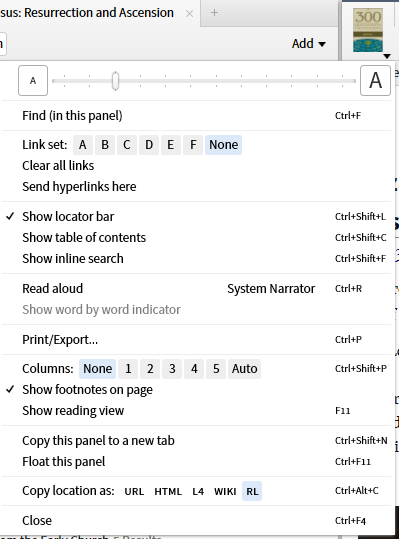
7. If a resource in a linked set has frequent hyperlinks to it, e.g. a Bible, one may have a second copy of the Bible open outside the linked set. If you set "Send hyperlinks here", hyperlinks will be directed to the second copy and not disrupt your linked set.
If links are too rare to justify a second copy, don't forget that the forward/back navigation in a panel can reset your position when necessary.

