When I dream about improved notes, I must say that in many ways, my mind goes to Evernote. Fast, efficient, sharp.
One of the features that is really good is how they handle tags. Tagging itself is such a simple task that it is roughly the same. But here is where Evernote has a significant edge: it generates automatically an index file based on one's tags. In the image below, the index on the right is an alphabetical listing of tags attached to notes. I can double click on a tag and it will present me with a "collection" of the matching notes.
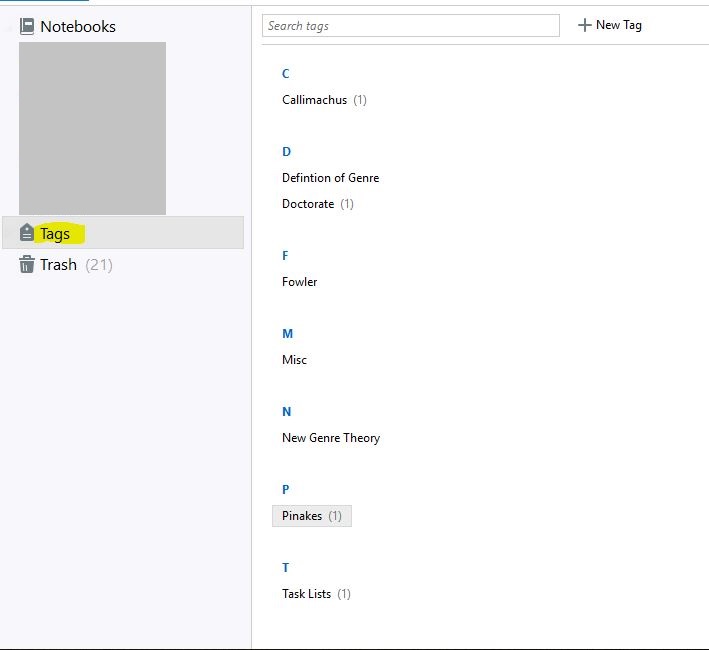
How could something similar be implemented in Logos since user documents are presented differently? Perhaps a way of doing this would be to overhaul the system: instead of the current "Documents" opens a menu with new on the left and existing docs on the left, we could have a Personal Documents Explorer, Evernote style (this style is also used by Outlook): opens a window with existing documents by family on the left (prayer lists, annotations, syntax searches, etc), next (middle section) the actual individual files, and next (left panel) the actual entries. "New" and "Search" buttons (as well as format and other common buttons) would be on top. Tags could easily fit in the left panel.
Or perhaps this would be a form of plagiarism and is not allowed (although the fact that both Evernote and Outlook use a similar approach seems to indicate that it is not the unique property of either). Perhaps there would be another (better) way to implement this. T
The point however is that navigating tags this way is grand and immediate.
