How do I remove this obnoxious feature from my books?
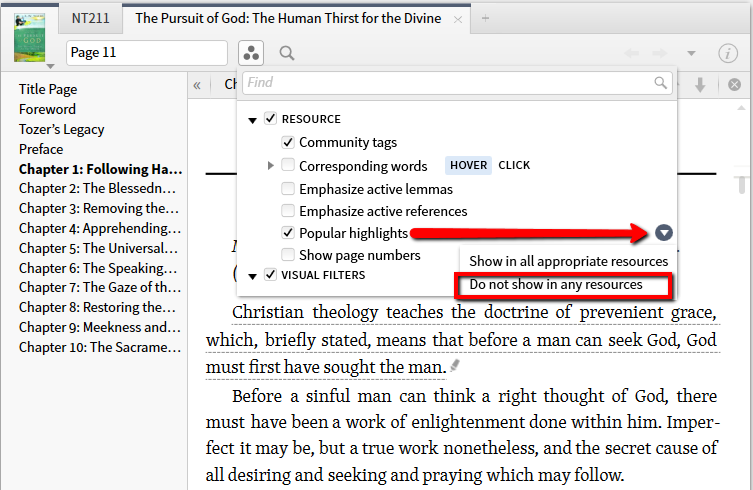
See the space showing the page U are on in the current resource. To its right are 3 circles, grouped in a triangle.
Click the triangle + UNclick popular highlights.
They are rarely popular with me, either.
Welcome to the forums Richard,
Select Visual Filters Icon the triangle of three shaded circles> expand Resource heading find Popular Highlights this is what you use to turn on and off this feature by checking and unchecking.
Just to complete the advice you got: if you really dislike them, you can turn off this feature for all your books in one go:
(and you can turn it back on for all of your books as well)
Interesting - that's where I thought it was but I don't see it in Verbum ... does it appear in all resources or only if there are highlights available to show?
I think the latter.
Available Now
Build your biblical library with a new trusted commentary or resource every month. Yours to keep forever.



.png)