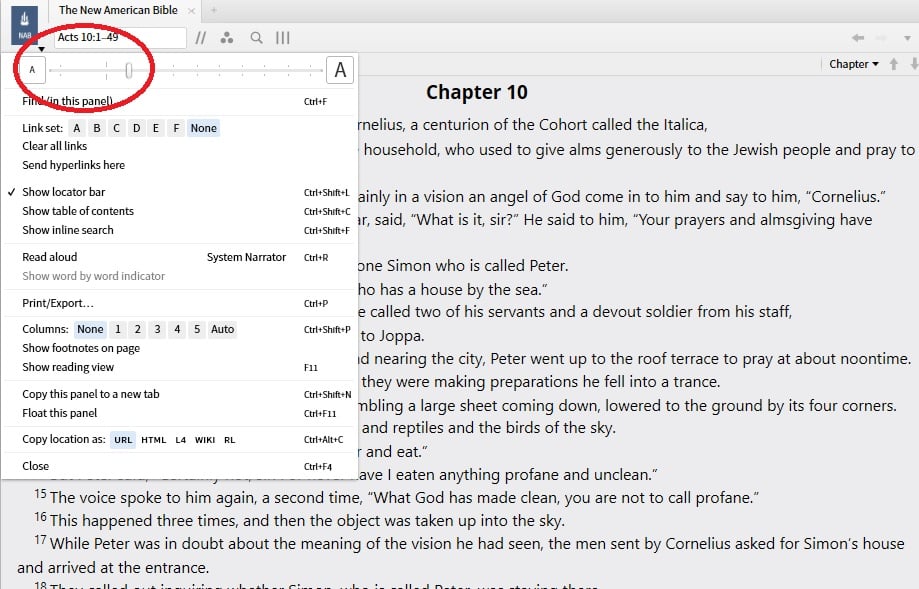
I am not sure when this crept in, but I find that at certain sizes I can change the font size but that is not reflected in what is/will be printed. See attached picture, it seems related to the fact that there are some locations on the slider bar that you can move to to change the size on screen, but that are not "notched".
Notice how left of where the slider is set, there are only two notches, a larger and smaller notch, and a gap in between? You can actually move the slider to the gap, and the text gets smaller - but the size will not show an equal change when you display to print/export - you have to move the slider all the way to the left, and then I get something super small but that again is reflected properly in the font size showing when I select Print/Export.
This seems to be true on all resources, I looked at several bibles and non-bibles and the slider bar looks/acts the same.
So in summary, left of the current slider setting I show below, there are only two settings for changing print/export size, but there are three for display size (as it turns out what I want to print would be perfect for one full page with the missing size, as it is I have to use multiple pages or have a text printing that is too small to read).
I think there is a bug here, that there is a small section on the slider where the font changes size but that change is not reflected when you select Print/Export. It could be related to the fact the bar as shown here does not have notches, even though you can set the slider in there?
I hope this is clear - it's hard to explain :-)