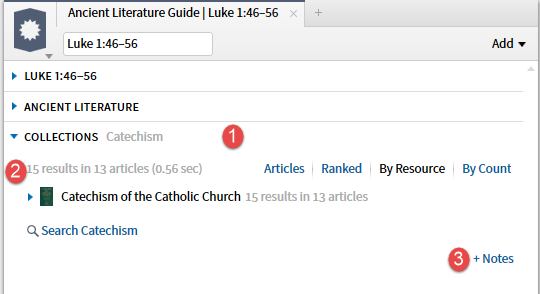
1.A Guide Section contains three parts:
- (1) the Section Bar
- (2) the Body (section content)
- (3) Notes
Whenever Notes has contents, the Guide will be saved.
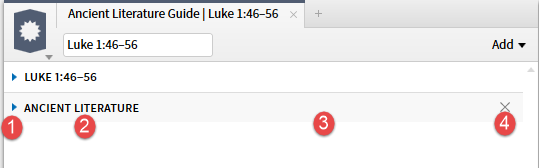
2. The Section Bar contains the following elements:
- (1) the expand/collapse triangle which points right when collapsed and down when expanded
- (2) section title
- (3) variable/blank section
- (4) X to delete the section from this instance of the section.
Contents of the variable section may include:
- setting values
- no results message
- in progress indicator
- settings option
Actions of the Section Bar:
- clicking on the Section Bar will expand/collapse the section
- right clicking on the Section Bar will open the Section Bar Menu
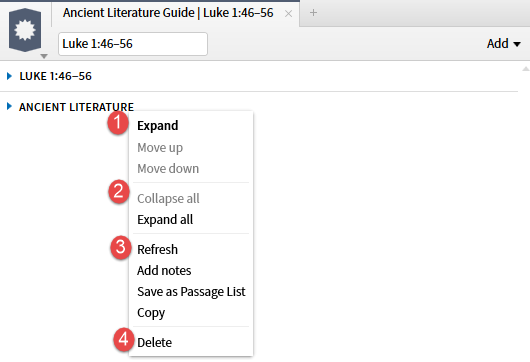
3. Here is an example of a Section Bar Menu, open via a right click on the Section Bar.
- Section 1 will expand/collapse the section and move the section up and down within the Guide.
- Section 2 will expand/collapse all sections within the Guide. Collapsing all sections before dismissing the Guide will speed up the subsequent opening of the Guide. The expand/collapse status of a section is remembered across closure of the Guide or application.
- Section 3 contains section specific functions include Refresh which will rebuild the Section restoring any entries you may have deleted and adding any new resources added to your library.
- Section 4 deleted the section from this instance of the Guide.
For more detailed information see Section Bar Menu.
4. Some Section Bars contain a Setting option. The most common use of Setting is to define the resources used in the Section.

In this example, the Settings option allows one to pick a collection from the standard collection selection drop-down.

5. The variable portion of the Section Bar may show the section settings - in this case a collection name.

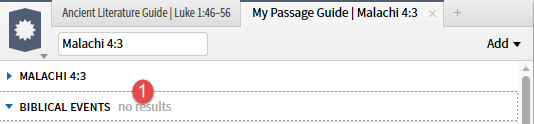
6. The variable portion of the Section Bar may indicate that there are no results in the section.
7. The variable portion of the Section Bar uses a moving highlight bar to indicate the application is at work building the section content.

