Also note:
1. Search for preposition used in a certain case.
Fr. Devin answered; Dave simplified.
it can be περί BEFORE 1 WORDS @(NG, R??G, JG, V??P??G, DG)
2. find the occurrences of the following structure in the Pastoral Letters: eis + article + infinitve verb
You may want to try a Morph search for this one.
You could choose the lemma eis, then use BEFORE 1 WORD, all in caps, then the article, then BEFORE 1 WORD, then @ to pick a verb and specify the infinitive. Something like this:
lemma:εἰς BEFORE 1 WORD @D BEFORE 1 WORD @V??N
If you're looking for a prepositional phrase using syntax search, the easiest thing to do is to use the "Prepositional Object (Cascadia)" template. Open a new syntax search (Documents -> Syntax Search). Look at the right side column. These are templates that can be filled in with what you need. Find "Prepositional Object (Cascadia)" and click it.
The document should prepopulate. You can add options to the query. First is to make the Preposition (the "Terminal Node") εις, after that change the morphology of the "word" to be "V??N" (use '@';, then the morph picker window will display and let you choose what you want). Like this:
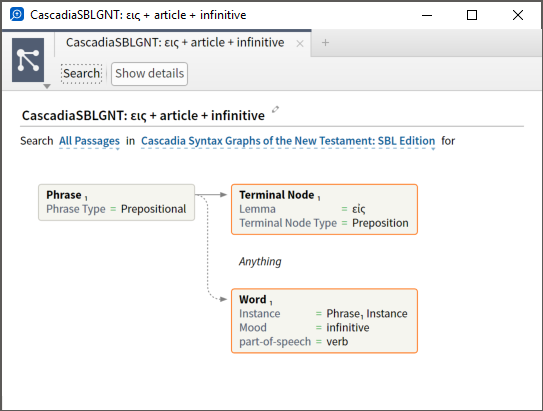
This gets you most of the way there — the only thing left is to adjust to specify an article. But in this case, it might actually be easier to scan the result list and see if there are any anarthrous hits in the results. I didn't see any anarthrous results in my quick visual scan of the 54 hits this returned, but I may have missed something. (EDIT: I saw you asked specifically about the Pastoral Letters. I changed the range, and found no occurrences in that search range.)
Hope it helps. I have published this query to the "Logos Syntax Searching" group on Faithlife: https://faithlife.com/logos-syntax-searching/activity
3. Power Tip: Using variables to Search and Replace in Word
I created a Personal Book from a class I took this semester on the Acts of the Apostles. The professor's class notes used the European format for citing the Bible, where it is common to say Acts 1,1 instead of Acts 1:1.
Given that Logos Personal Books don't understand this format, I found myself with the difficulty of trying to replace all the commas with semicolons. Luckily with Microsoft Word this is extremely easy.
I told Microsoft Word to search for every occurrence of "a number followed by a comma followed by a number" and replace it with the same numbers, but with a semicolon in between.
Here is what the search looks like. Notice that the "Use Wildcards" option is selected.
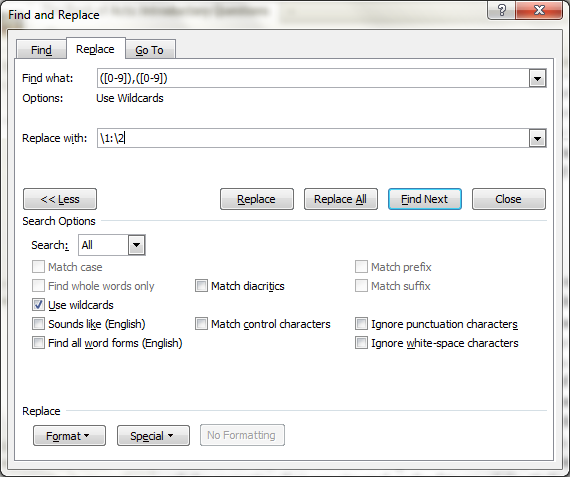
There is documentation on doing this type of search and replace here: http://office.microsoft.com/en-us/word-help/find-and-replace-text-by-using-regular-expressions-advanced-HA102350661.aspx
This technique can also be used to insert the codes which Personal Books need to indicate that a certain heading is, for example, a Dictionary Head Word. If all the head words in your dictionary have the same formatting, in just a matter of a few minutes of work you could apply the information that the Logos Personal Book needs to recognize 1000s of head words.
From what I've been able to discover, in German, French, Italian, Spanish, and Portuguese the typical citation format is Acts 1,1 with a comma, not a colon.
In English of course the colon prevails. Even so, there are certain references to the comma being used instead of the colon as a possibility in English, especially in Europe. BTW, in Dutch it seems that the colon is also standard.
I adapted the technique to remove trailing spaces after superscript verse numbers. Works great!

To remove the trailing space, I added a space at end of the "Find What" term. The "Replace With" term has no trailing space. Problem solved, so long as Logos keeps putting a superscript space after the superscript number. And since I don't care whether the number is single or double digit (this Find What only finds the least significant digit), it works slick.
4. every occasion Jesus quoted the Old Testament
Here is a little more detailed way, related to what Mark mentioned above, but that takes advantage of one of the new Logos 6 Features, that of being able to search for the Speaker. 
1. Run a Bible search in the ESV for {Speaker <Person Jesus>}. This will return 2047 verses. Save this search result as a Passage List. I've named the passage list "Jesus Speaks".

2. Run a Bible Search for * in the HCSB, selecting the search field "OT Quotation" and then limiting your search range to the Passage List you just saved! You'll get 90 verses back.

3. Now, there are actually at least 2 more Bibles that have the OT Quotation field, so it is always good to compare results! They are the NA27 and the NA28. The NA28 is included in some Logos 6 base packages. Interestingly, these give more results than the HCSB! You'll get 112 results. Just add the ESV or some other translation using the "Add versions" button.

4. Finally, we can compare these two results to see where they differ. To do so, save both search results as Passage Lists. Note that the search will be rerun when you do so, so it will take a bit.

5. Now, last step. From within either of the Passage Lists, select "Merge". Then, select the other Passage List, and finally choose "Symmetric Difference". This will display the results that are in one list, but not the other...

Interestingly, there are 28 results in this list! Which means that there are results in both lists that are not in the other! These you'll want to double check especially close, and this type of difference is a reminder of how it is always a good idea to check in two different sources if we need really reliable information. In this case, these mainly seem to be texts where it is debatable whether it is really a "quote" or not:

You can also run "Merge" again, and this time select "Union" to get the results that are present in both lists. Those results are going to be results that are pretty clearly an OT Quotation, as two different versions agree on them.
It turns out that it is now actually possible to directly search for when Jesus quotes the OT in just one search, using the Literary Type feature! Search for this:
[quote]{Speaker <Person Jesus>} WITHIN {Section <LiteraryType Quotation, Old Testament>}
Here is what the results look like:

I figured this out today watching this video here, which I highly recommend, on literary typing: https://www.youtube.com/watch?v=sxC8MY2RAZU&list=UUZFF0RGvkG-G5_SACnkN_5w. After watching the video I was playing around a bit with the feature, and noticed that "Quotation, Old Testament" was one of the LiteraryTypes. Nice!
Check out the Lexham Glossary of Literary Types here: logosres:lxhmglssryltyps;hw=Quotation,_Old_Testament. This is really the type of thing that opens up so many possibilities!
I agree with you - hopefully for Logos & Verbum 7 (or sooner) we can have an advanced search pane where these can be constructed using dropdowns and such.
But, until then, here are a couple of tricks that can help.
Oftentimes, but not always (yet), you can right click, select the tag like "Literary Types" or "Persons", and then run a search, and your query will be constructed for you.
For example, I discovered that the Literary Types had the Old Testament Quotations when I ran a Passage Guide on Matthew 1-5. Try it out. In the Literary Types section, right click on a Literary Type. Then select the Literary Type in the context menu. You'll get an option to search for that Literary Type.

Here's the search that will be built for you automatically: {Section <LiteraryTyping = Quotation, Old Testament>}
Similarly, if you right click on the name of a person, you can do the same with the Person tag, or other tags that might be present:

Which will create the search for <Person Jesus> (these are also available in the dropdown in the search itself, just typing the name).
The {Speaker} queries can be created from the right click menu as well. Running a search after selecting the speaker icon like this...

...will create this query:
[quote]{Speaker <Person Jesus>}
So, the entire query to search for Jesus quoting the OT can in theory be created by right clicking, running searches, and then combining the automatically created search queries with the WITHIN operator.
The reason there is a variation in results is because LiteraryType tags whole verses, whereas Speaker labels are more precise.
So Matthew 4:4 looks like this:
<LiteraryType=QOT>Jesus answered, <Speaker=Jesus>“It is written: ‘Man shall not live on bread alone, but on every word that comes from the mouth of God.’”</Speaker></LiteraryType>
So, Speaker WITHIN LiteraryType would return the verse, but LiteraryType WITHIN Speaker would not.
In practice, LiteraryType=QOT WITHIN Speaker=Jesus will only return results where the entire verse consists of Jesus' speech.
it would be great to have the ability to automatically insert the Old Testament Scripture References in these search functions
A search can identify where they are but extracting them is a manual task e.g. in bibles they can be found in footnotes. They can also be found in LLS:OTQUOTESINNT (OT Quotes in the NT) but good luck extracting them. On the web I found this list which you can easily copy and Add to a Passage List (from clipboard). Sort the list to separate NT from OT and then delete the NT references.
But you could keep the NT references in another PL and compare them against the passages you get from the Search {Section <LiteraryType Quotation, Old Testament>}, as the web list includes all OT Quotations. Then you can be selective about accepting NT passages you don't get from your search.
5. scripture references where "God" is referred to as "Father"
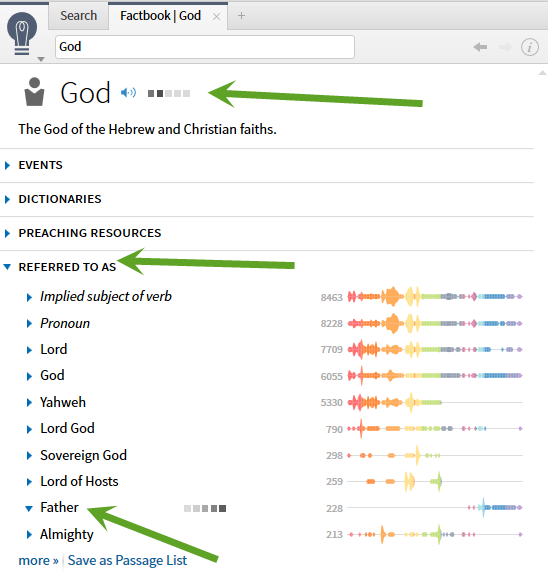
I think I devised a search that gets everything, and even improves a bit on the Factbook "Referred to as" list:
<Lemma = lbs/el/πατήρ> ANDEQUALS Father WITHIN 0 WORDS <Person God>
This gets all the Factbook passages, and it also returns a good number of passages that should be in the Factbook with God referred to as Father, but aren't:
Mt 6:14, 26; 12:50; 15:13; 16:17; 18:14, 19, 35; 23:9; Mk 14:36; Lk 11:13; 22:29; 24:49; Jn 5:37; 6:44; 8:16, 18, 41, 42; 12:49; 17:11, 25; Ro 1:7; 8:15; 1 Co 1:3; 2 Co 1:2; Ga 1:1, 3, 4; 4:6; Php 2:11
Note that "Match all word forms" is off, to avoid a couple of hits that have "fathers" or something like that with incorrect tagging of <Person God>.
BTW - Notice how this search reflects recommended practice for using ANDEQUALS and WITHIN 0 WORDS. ANDEQUALS is good for finding how a word is translated, but practically for nothing else. So, here I use it to limit Father to the Greek pater. Then, WITHIN 0 WORDS is used for finding other data that overlays words, like Factbook entries.
This does a decent job of finding NT passages - are there no OT passages?
Here's a good one for the OT:
<Sense = God ⇔ father>
Interestingly it doesn't work for the NT.
<Lemma = lbs/el/πατήρ> ANDEQUALS Father WITHIN 0 WORDS <Person God>
Note that "Match all word forms" is off, to avoid a couple of hits that have "fathers" or something like that with incorrect tagging of <Person God>.
If I understand things correctly, Acts 22:14 is not an incorrect tagging of <Person God>. Rather, the entire phrase "God of our fathers" is tagged as <Person God>, and therefore will return a hit if you have "Match all word forms" turned on.
In addition, I didn't check all the results listed above, but for at least the first few, Factbook does list those verse, but they are under "heavenly father" not "father" since that's the complete phrase that is used.
Here's another possible search for consideration:
{Section <Culture God as father>}
6. Summary of Search Improvements and Syntax in Logos/Verbum 6
In this post I hope to summarize the new search syntax and options for Verbum and Logos 6.
Hopefully this can be helpful as a sort of hub. I'm probably missing things so feel free to complete or correct if it were the case (This is a sort of double post, but given that post is in the General forum, I wanted to repost here in Logos 6, with a more specific title as well, to make it easier to find and reference).
Where do I learn when to use {} and when to use <>?
There isn't much documentation available, but let me try to summarize how these differ.
The <> is used to indicate a datatype. An introduction to datatypes is here. A relatively complete list of datatypes is here. When you search for a datatype, you are searching for a "reference". The most common type is the <Bible> datatype, where a search like <Bible John 3:16> will find all "references" to John 3:16, regardless of whether they are in a Bible, a commentary, or even if they are within a larger reference, like John 3:10-20. Datatypes also allow for prioritizing resources, so a single datatype reference can open many different resources to the correct place, and show each person the resource they have highest prioritized.
The {} is used for what I like to call "search extensions" (not an official name, BTW, but the best I've found so far, and I don't think there's an official name yet). Each {searchextension} "extends" the functionality of search. Let me try to explain what I mean.
Each "search extension" can have its own search syntax, and can do something entirely different. They are actually analogous to "search tabs", like the Basic, Bible, Morph, Clause, etc. search tab. For example, when you go to the Morph Search tab, when you type g:logos and then @, you will see a dropdown menu with all the morph options. If you do the same thing on the Basic tab, it won't work the same - no morph dropdowns! And the search syntax between the two tabs changes. Each search tab has different functionality, different search syntax, etc.
Well, the {search extensions} offer all of that power - each one can have an entirely different syntax, drop down options, etc. So, instead of creating a lot of new search tabs - one search tab for searching Milestone, another for Speaker, another for Passage Lists, etc. - Faithlife created a new type of search syntax, the {searchextension}.
The great thing about this is that it allows us to use lots of different {searchextensions} together. So we can do great things like search for {Speaker <Person Jesus>} WITHIN {Section <LiteraryType Quotation, Old Testament>} to find all the instances in which Jesus quotes the Old Testament.
What options are available besides <Person Jesus>
<Person Jesus> - Factbook tagging of persons.
<Place Jerusalem> - Factbook tagging of places
<Thing dog> - Factbook tagging of things
<Event The Israelites cross the Red Sea> - Factbook tagging of events
{Section <Event The Israelites cross the Red Sea>} - Returns a different selection of texts... I'm not sure if the difference between these two is by design.
<Sense knowledge> - Returns words in the BIble that are tagged with a certain "sense". The senses can be found in the Bible Sense Lexicon. NOTE: <Sense = knowledge> returns words that have exactly the sense of "knowledge" (1654 hits in my library), while <Sense knowledge> (without the  will return all "child" senses as well (171,636 hits in my library). See the child senses here.
What options are available besides speaker?
{Speaker <Person Jesus>} - Texts where Jesus is the speaker. cf. https://community.logos.com/forums/t/92764.aspx
{Milestone <John 3:16>} - Will find texts where the milestone is John 3:16. This is particularly powerful combined with the WITHIN operator. So, you can search all your commentaries on the Gospel of John, but ONLY in the parts of the commentaries that comment on John 3:16. For example:
[quote]faith WITHIN {Milestone <John 3:16>}
will search your commentaries for the word faith within the sections of the commentaries that deal with John 3:16.
cf. https://community.logos.com/forums/t/92761.aspx
{Label} - Will search within labels. This is quite broad, and can be applied to the Sermon labels, Journal article labels, etc. that Faithlife has applied, or to user made labels as well. cf. https://community.logos.com/forums/t/92700.aspx and https://www.youtube.com/watch?v=M26fXiGd_Sw
{PassageList} - Searches your library for articles or sections of books that have a high number of hits to the references contained in the Passage List. cf. https://community.logos.com/forums/t/92765.aspx
{Highlight HighlighterName} - Will find texts that have the highlighter applied. This feature has not officially shipped yet, so results may not always be reliable!
{Section <Culture XXXX>} - Will find the Culture tagging. These tags are listed in the Lexham Cultural Ontology Glossary.
{Section <LiteraryType XXXX>} - Finds literary type tagging. cf. https://community.logos.com/forums/p/94023/654255.aspx#654255 and https://community.logos.com/forums/p/94264/658635.aspx#658635
What options are available for <literaryType>
In theory anything that is in the Lexham Glossary of Literary Types can by searched using the {Section <LiteraryType XXXXX>} search extension.
And... finally, for those who want a good intro to search... this has not yet been updated for Logos and Verbum 6, but everything in this Wiki page is still valid - https://wiki.logos.com/Detailed_Search_Help.
Here are two more <Factbook> searches (cf. here), and one more {Section} search (which I think up to now may have gone undocumented):
<PreachingTheme God: Love> - Returns non-Biblical texts which are tagged with the Preaching Theme of "God: Love". At least for the moment this seems to generally corresponds to the texts that the Sermon Starter Guide and the Factbook return in the "Preaching Resources" section, as well as Media and Illustrations as well:

Now, notice that there are no hits for the Scripture! And yet, if we run a Sermon Starter Guide on the topic of "God: Love", there are Scripture hits in the "Passages" section. How can we search for those? Like this:
{Section <PreachingTheme God: Love>} - This search will return the Bible texts that have been marked up for this PreachingTheme. Nice! Here is a photo. Notice that while there seems to be fewer hits in the "Passages" section of the Sermon Starter Guide, the SSG is counting the pericopes, while the search is counting the number of verses.

Here is another type of search:
<Topic Marriage> - This will search for texts marked up according to a certain Topic. Like the <PreachingTheme> search, this seems to be mainly focused on tagging up media, illustrations, and preaching resources. The results of this search appear in the Factbook entry at the end. For more detailed markup of texts, especially in the Bible and the ANE texts, the {Section <Culture Marriage>} search is used.
Note how for different types of data, Faithlife is using different types of markup. In some cases, even for the same topics, Faithlife is using one type of markup for illustrations, media, preaching resources, etc., and another type for Scripture and ANE, etc!
This helps to illustrate why tools like the Factbook now become so important, as it draws together all the different types of markup related to a certain theme or topic, without the enduser having to know exactly what searches are being run, or what type of markup is being used for each topic. I personally still want to know what is going on behind the scenes, and hope this helps you do the same!
7. list of every location mentioned by name (proper noun) in the book of Isaiah
In "Lexham Hebrew Bible", open an inline search, filter your passage range to Isaiah. Switch to the morph search type, type @ to bring up the drop-down, then select Noun - Proper, and search!
In the upper-right hand corner of the inline search, select the little "Send to..." button, and send the search results to a word list. You'll end up with a word list of around 175 words, all proper nouns.
Or, even more powerful, if you have Logos or Verbum Now, you can also run the Concordance against a Bible with reverse interlinear. Filter down to Isaiah, then select Lemma, then filter by proper nouns. Then you can order in alphabetical or count, and even see the specific hits for each lemma.
I noticed you wanted only locations, such as cities and such. So, that would be done like this...
Open up a full blown search panel, and choose to search in The Hebrew Bible: Anderson-Forbes Analyzed Text. Switch to the morph tab. Search for @NP to get proper nouns.
Then you need to switch to "Analysis" view, which will display an Excel-like grid.
Drag the "Semantic Domain" tab up and group by it.
Then drag the "Lemma (Hebrew)" tab up and place it to the right of the "Semantic Domain" tab to subgroup by it.
Then, on one of the header rows in the results, right click and choose "Summary view". The results under Geographic Name / place are what you are looking for. You can also then export these results to EXCEL.

You might also be interested in the Concordance in the "Biblical Entity" view, although that includes any reference to a place, city, etc., even if a pronoun is used.
It is also worth knowing that if you're ever trying to do this sort of thing in the New Testament there's an easy way of doing it with Louw-Nida semantic domains. This can be used for all sorts of things, but works very well for place names. I'm aware you are asking for Isaiah so it won't work for that, but if you are new to Logos it's worth being aware of as it can simplify searches greatly in some cases. Unfortunately I'm not aware of anything similar for the Old Testament. See screenshot below for details.

If all you want is a list, you can get it through the Explorer under Biblical Places as so:

Type "Explorer" in the command box. Note: the screenshot above is only partial.
Nice idea! Note that it won't limit to proper nouns, but could include references to places that don't use proper nouns... so depending on specific needs, you may want to combine with the searching method.
As well, note this, which allows you to copy and paste the list the explorer produces:

Now if you want to learn study or try them ... don't just glance through them. And yes, this is just the tip of the iceberg.

