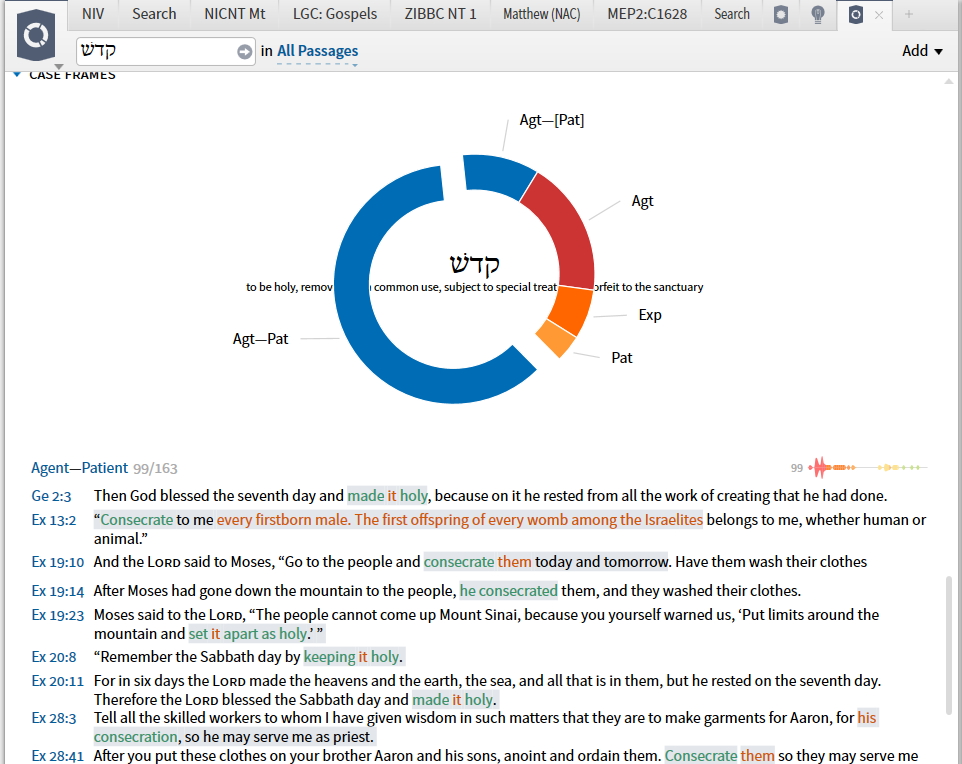
I was watching the video on case frames at https://logos.wistia.com/medias/efgg2rlvq3?utm_source=academic.logos.com&utm_medium=blog&utm_content=2017-03-16-case-frame-analysis&utm_campaign=promo-logospro2017 and following along in Logos. At 52 seconds into the video, the narrator clicked a section of the graph which exposed the list of occurrences. The text that came up had colors to represent different aspects. In Logos, my occurrence had no color. How do I get the color to show on my Logos?
The text that came up had colors to represent different aspects.
Do you mean like this?
What version of Logos software are you running?
What base package / library / feature sets do you own?
I think by "base package" you must mean the Logos 7. I'm not sure how to answer your question about "library." And I often see the term "feature set" but don't really know what it is (I'm sure I've seen them. I just didn't recognize them as being this term.) so i don't know where a feature set comes in.
I use Bronze Logos 7 on my Desktop (Win10, if that's important). I just go back and forth from the tutorial on my browser (which I would put on pause) to my Logos Program to duplicate the step I just learned. Then back to playing the tutorial until the next time I have to pause it to duplicate steps in Logos. My duplicators were matching the tutorial exactly until I got to this step. When I got this far in the tutorial, I was surprised that my Logos version didn't have color. The tutorial looked just like your example above but mine had no color. Perhaps I need a higher version than Bronze to show the colors (I wish the tutorials would let you know what level you need to use the feature in the tutorial. If I really liked the feature and it was just one level above me, i might buy the next level).
As always, I appreciate your efforts to help.
Pat
Where is that video? How did you get to it?
Okay, I think I found it. Was it in the recent LAB article?
It was at https://logos.wistia.com/medias/efgg2rlvq3?utm_source=academic.logos.com&utm_medium=blog&utm_content=2017-03-16-case-frame-analysis&utm_campaign=promo-logospro2017.
While watching the video on my browser, I'd put it on pause and go to my Logos program to duplicate the steps in the video. Then I'd go back to my browser and watch more of the video. I'd go back and forth like this, duplicating each step. About 50 seconds into the video, the narrator clicked on a section of the circle "to expose the list of occurrences." Those occurrences were marked in color. Mine is not.
Available Now
Build your biblical library with a new trusted commentary or resource every month. Yours to keep forever.