I have encountered a problem when I try to apply different colored boxes to words on the same line. Here is a demo palette I've created. It just draws a green box around selected words:

Here is a sample from the LEB with 5 green boxes:
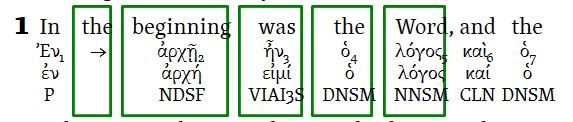
If I now try to add a border to another word using a different color, things go awry. Just what happens depends on if I add the new box to a word before a green box or after it.
Here is what happens when I add a black box from the Emphasis Markup palette to the word "In" before the green boxes:
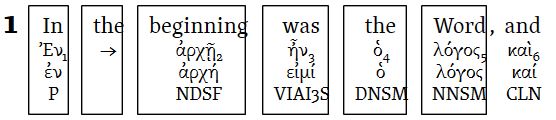
All the green boxes following "In" are changed to black boxes! This only happens to boxes on the same display line. Any green boxes on other lines are not changed unless I add a black box to their lines.
Here is what happens when I add a black box from the Emphasis Markup palette to the word "and" after the green boxes:
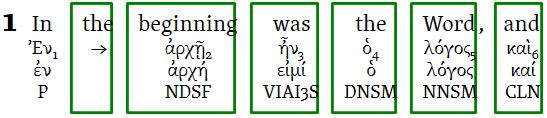
The intended black box around "and" isn't black but green! Once again, only boxes on the same display line are affected.
Playing with single, double, and triple lines reveals that Logos seems to group together line types. What I mean by this is if the different colored boxes all have solid lines, the above happens. The solid line boxes can be a mix of single, double, and triple solid line. The same goes for mixed line counts for dash, dot, dash dot, etc. line types. The problem isn't only with boxes. Other border configurations have the same problem (e.g., bottom, top, bottom-top, left, right, left-top, etc.)
This really limits the usefulness of highlighting.
Is this in fact a bug or am I missing something?
Thanks,
Terry