Hi Fabienne and welcome to the Logos user forums.
Let me suggest that you view the relevant QuickStart videos. You probably already have them installed. This link will open them up.
If you don't have them, they're free here: https://www.logos.com/product/126578/mp-seminars-logos-7-quickstart
All of the areas of interest you describe are covered in one or more of the videos. You'll also learn other areas. Then, come back here if you then have specific questions.
[Edit] I should also add the observation that sometimes the instructional videos will mention books and other resources that are not in your library, so be aware of that. I haven't viewed the video you refer to. When you return with questions, let us all know what base package or resources you own.
Also, the Logos Help system is much better than it was in the past. I only have experience with the English interface, so I don't know how elaborately the help files have been translated, or if you use a localized (non-English) interface. The Help system is found by clicking the ? in the circle at the top-right of the main window. This link will also display it.
hello all;
Welcome [:D]
•Start a Note file for your study of Jonah 1:1–16
LT270 Video => https://ref.ly/logosres/lt270jonvideos?art=art001 shows mouse click on Documents to create a Note (about 2:51 to 3:02)
FYI: my Documents are sorted by Type then Name within Type (column headers have ^ to indicate sort order).
Screen shot of LT270 video at 03:01 after New Note document has been renamed:
begin reading the passage regularly, and start adding notes to your passage answering the investigative questions we spoke of earlier
LT270 video shows notes and highlighting between 03:03 and 08:36 that includes several user created highlighting styles (along with showing/hiding highlights).
If have two screens on computer, one idea is watching video in one, pause video, switch to other monitor, followed by doing what video showed.
•Use the library type search to find your favorite Bibles, commentaries, Bible encyclopedias or dictionaries, and lexicons and prioritize them in groups (first your top 5 Bibles [LEB, ESV, NIV, NASB, Message, LHB, LXX, NA28], then your top 5 commentaries [Tyndale, continental commentary, ACCS, Hermeneia, BST], etc. [LBD, Anchor Bible, Baker Encyclopedia of the Bible, Holman Illustrated, Oxford Dictionary of the Christian Church])
LT270 video at 08:37 starts showing Library (with Home Page displayed below)
Right click on Library icon shows a pop-up menu:
Sorting Library by Type (clicked column header) groups resources by Type: e.g. LT270 video is in Courseware Media Collection:
Clicking Prioritize shows resource prioritization: (LT270 video at 10:21 shows one resource prioritized along with dragging resource to desired priority)
Personal priority preference is:
FYI: screen shot shows my Faithlife account with order total of $ 0.00 that includes Basic packages, Free Book of the Month, and some coupons. Thankful for a demonstration installation, which has been shown to some people plus used for forum discussions.
•Add a shortcut for your favorite Bible
LT270 video at 10:41 shows resource icon being dragged from Library to shortcut Bar.
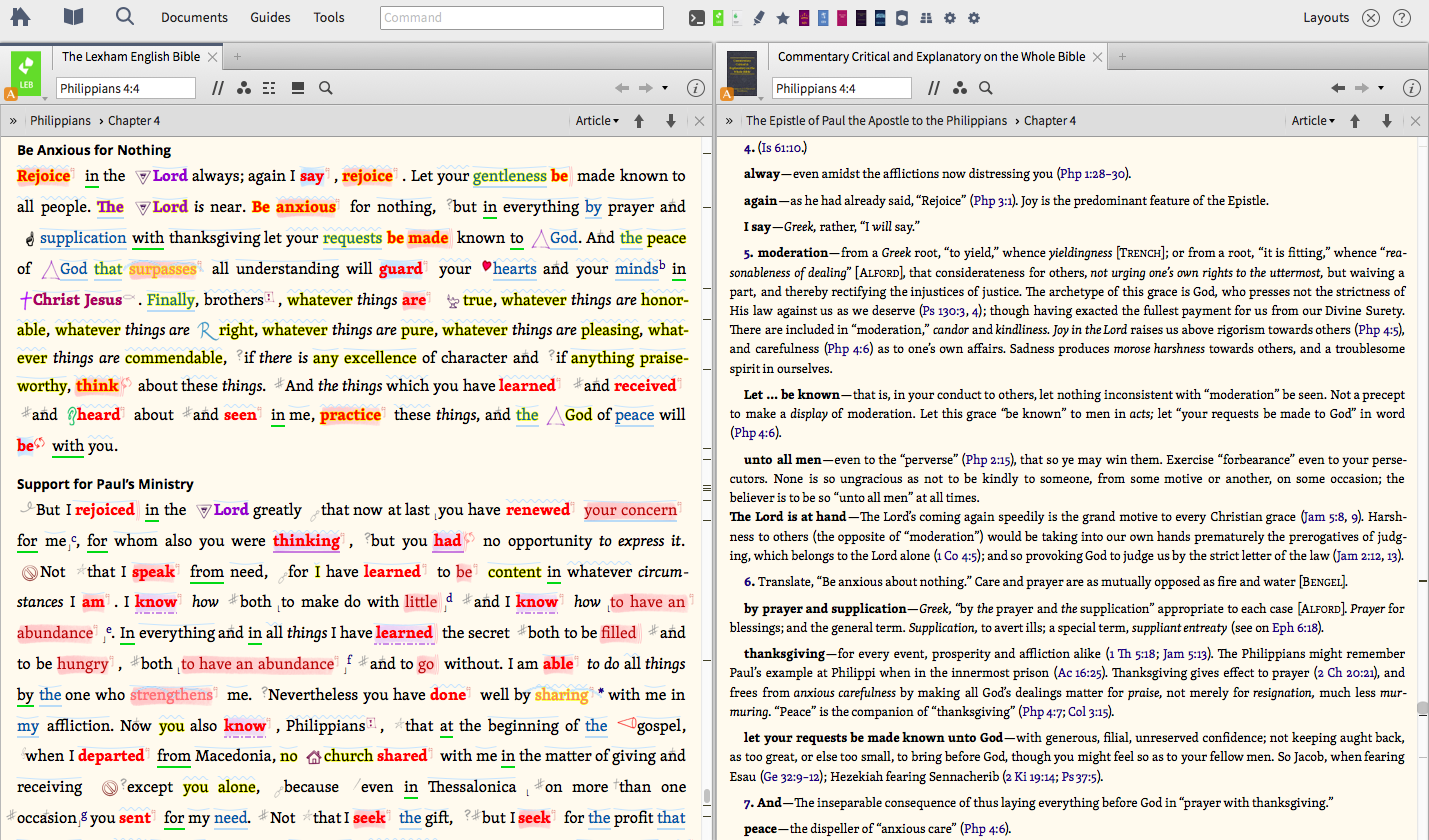
•Create a layout with your favorite Bible beside your favorite commentary and link them together
Suggest opening Quick Start Layout for "Bible and Commentary" (by clicking "Layouts" then click "Bible and Commentary")
After opening "Bible and Commentary" QuickStart Layout, changed location to php4.4
FYI: Logos Help has Bible Book Abbreviations => https://ref.ly/logosres/logos4help?hw=How+do+I+enter+a+Bible+book+abbreviation%3f&off=8905
Keep Smiling [:)]
Available Now
Build your biblical library with a new trusted commentary or resource every month. Yours to keep forever.