When I select text with a note or highlight and choose Open Annotation from the Context menu, the note or highlight will not be shown if I have a notebook open other than the one used for the resource.
Here is an example of a note I had taken in the Bible on Romans 8:30 some time ago. In the Notes tool, I had recently been using the Notebook for the Baker Exegetical Commentary on Revelation. When I select Open Annotation, nothing changes in the Notes panel. I cannot see the note on the Bible because I am in the wrong notebook and the Notes tool does not change to a different notebook or otherwise give any indication that I need to change to a different notebook. The existing Notes filters prevent me from seeing the note.
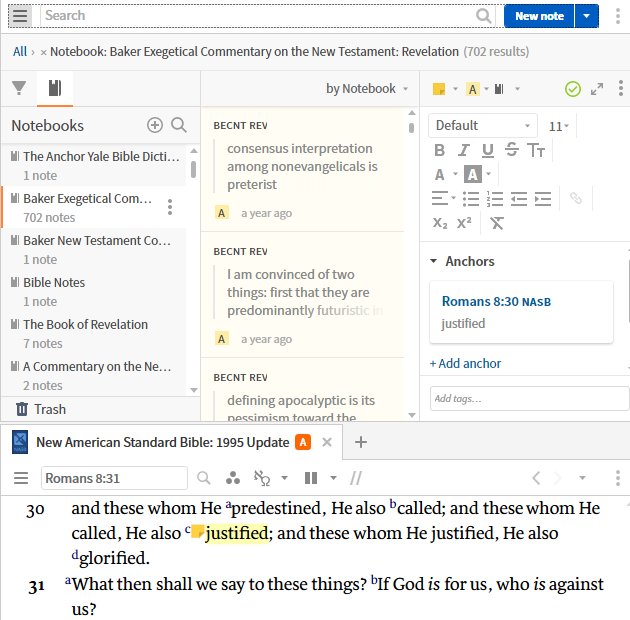
The only way I can see the note is to know which Notebook I put the note in and to change to that notebook or remove all filters in the Notes window before I select Open Annotation.
This behavior is confusing and it also wastes time to have to find the right Notebook to view the note. The only way I can be sure to find my note if I have a notebook open with filters is to have a second copy of the Notes tool with no filters. Then the second copy of the Notes tool will properly shift to the corresponding note.
Logos 8.3 beta 1 on Windows 10