While still on 4.0dB2 yesterday, I got a message that there was a 470 kb update, so I accepted the download.
On restart, Logos4 was "hung" with a partly redrawn screen, and "Not Responding". I was unable to use it of course, as the application was not responding.
I could see the disk was busy, so I decided to wait a little and see from disk I/O if I could get a hint of what might be going on.
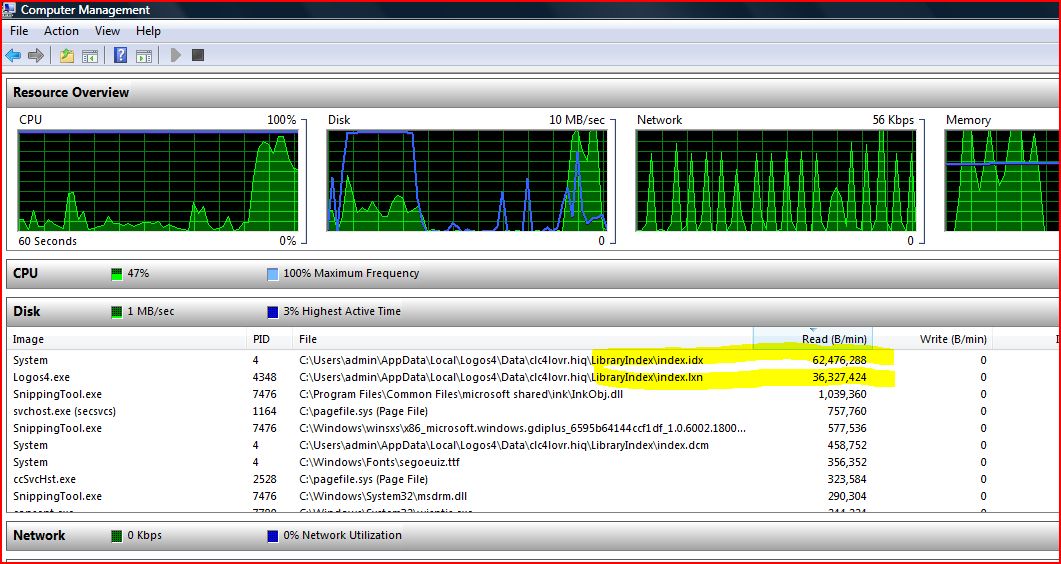
Based on the file read/writes, it gave a look not unlike when a reindex is running. Lots of reads from the index, and writes to temp files.
After maybe 10-15 minutes, the window redrew fully and the system was operational, but the CPU and disk continued to run near max and was ongoing. The file read/writes still had the same general look.
Anyway, I discovered I still had a Visual Filter defined for "<af = *>" which I had been playing with the day before. That was created after a search which took about an hour to complete.
At the time of the restart, after the 470 kb update, only 2 or 3 panels were open and none had that visual filter applied.
I deleted the visual filter from the Files menu and my system went back to idle disk and CPU within seconds.
Clearly, Logos4 was doing LOTS OF WORK to rebuild the hitlist or other indexing related work for the visual filter, even though nothing was using it.
My guess is that this background rebuilding of Visual Filter Hitlists is a possible source of the performance issues and "Not Responding" seen by many users of Logos4.
My point of reporting this is NOT so that something like <af = *> runs well (but that would be useful), but to focus on the background reprocessing of visual filter hitlists and related that I expect is impacting performance and the general user-experiences at times.
This all above offered in good faith in the hope its useful.
[ Example below is during a search for "the" in "Entire Library" for information/interest, for anyone wondering about how to watch file I/O on Vista32, and I assume Windows 7 too ]