While working through some of my existing searches and Visual Filters, I discovered that Logos allows the older search syntax for morphology without complaint or recommendation of a change to the new syntax.
For example, the older search syntax for a Greek noun was @N, whereas the new syntax is morph.g:N. If I search on a reverse interlinear Bible, the search for @N works perfectly well. However, I was surprised to discover that it highlights Old Testament as well as New Testament matches. Apparently Logos searches for Hebrew and Greek nouns with this search.
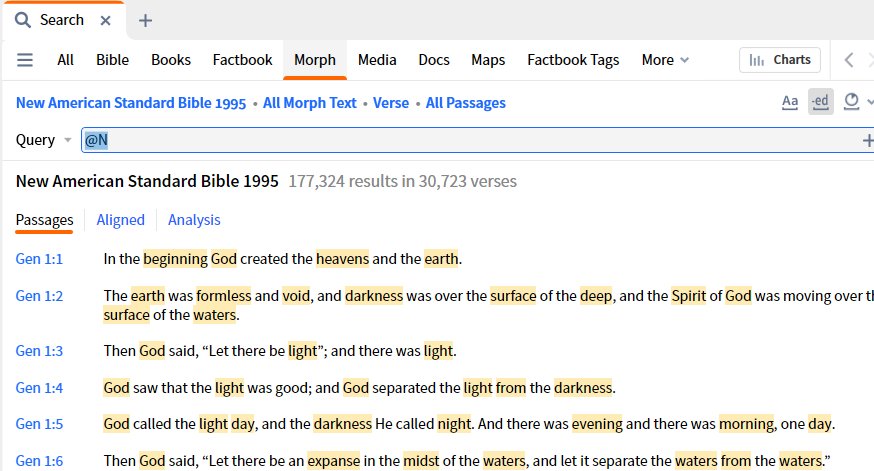
This is not a problem for nouns, even though it was unexpected behavior. But other parts of speech can be more problematic. For example, @D refers to a Greek article, but a Hebrew adverb. So a search for @N NOT AFTER 1 WORD @D would find nouns that do not follow an article in the New Testament, but nouns that do not follow an adverb in the Old Testament.
The odd thing is that Logos will let me enter @N or even the more complex @N NOT AFTER 1 WORD @D without converting the search to an unambiguous search in one language. For many other searches, Logos suggests the new search syntax. For example, if I enter the older <bible John 3:16>, Logos will ask "Search for bible:"John 3:16" instead? This is a helpful way to familiarize users with the new search syntax as they transition to Logos10. But the more complex morphological searches, which are by their very nature more prone to search syntax errors, have no such suggestion to convert to the new syntax.
I would consider this to be a bug. If I enter @N and the Logos Greek morphological picker pops up, I would expect that hit the Enter key would select the highlighted morphological feature ("noun") from the pick list and convert my search to the proper syntax. For example, if I enter @N, hitting Enter should convert the search to morph.g:N, so that the search is not ambiguous.
It is interesting that many of my Visual filters have been converted in Logos 10 to reflect the ambiguity of some morph by converting a simple morph search to one that takes into consideration every possible option of language. Here is an example:
- Logos 9 Visual Filter: @N
- Logos 10 converted Visual Filter: term:(morph.af.h:N OR morph.af.a:N OR morph.bht.t:N OR morph.cal.a:N OR morph.fr.g:N OR morph.ins.a:N????+S???G OR morph.ins.h:N????+S???G OR morph.sw.g:N OR morph.g:N OR morph.h:N OR morph.a:N OR morph.l:N OR morph.gr.g:N OR morph.west.h:n????+S???E OR morph.west.a:n????+S???E OR morph.lpi.s:N OR morph.rob.g:N OR morph.s3.s:N???+S???E?F?Y?T?D?R OR morph.sesb.a:N????+S OR morph.sesb.h:N????+S OR morph.wivu.a:N OR morph.wivu.h:N)
Wow! That conversion really shows how ambiguous this simple search is.
Personally I prefer the simplicity of @N to morph.g:N. Logos still allows this format, but the user must make sure that the search does what they expect. For single language Bibles, such as a Greek New Testament or Hebrew Bible, there is no ambiguity. But many users will prefer to use reverse interlinear Bibles so the results are displayed in English. When a Morph feature is entered with @ in a Reverse Interlinear, it would be good if Logos would recommend an unambiguous search using the new search syntax.