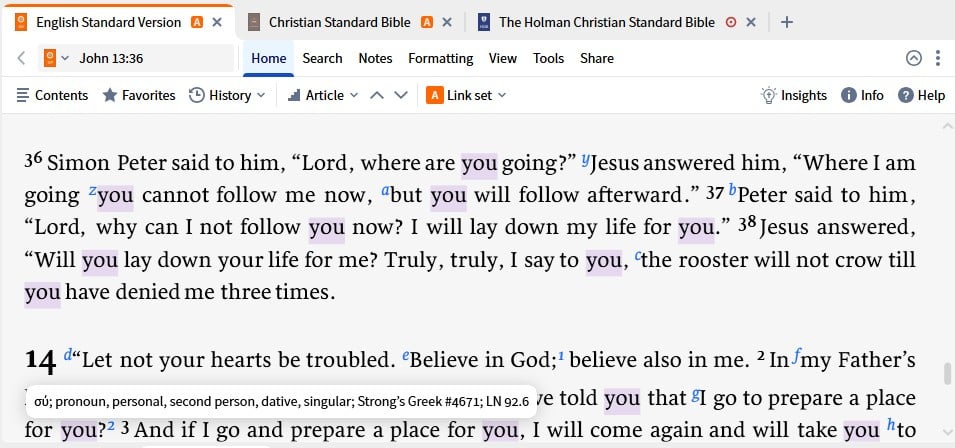
For some reason when I hover my cursor over a word in my Bible the word is highlighted along with every other occurrence of that word in the window. (see picture) I don't know what I did to make that happen or how to stop it. Suggestions????
Turn it off (or change the settings from Hover to Click) under Formatting > Emphasize > Corresponding Words.
THANKS!! I thought I had looked everywhere, but I had missed that one
Available Now
Build your biblical library with a new trusted commentary or resource every month. Yours to keep forever.
I just watched a recorded webinar on using Collections. It was a good webinar, and it made me want to start creating and using collections. Unfortunately, I have no idea what I would do with a collection. The webinar demonstrated how a collection could be searched. That is not something I would find useful. What else can…
I use favorites for reading. I deleted one accidentally (thinking I was deleting another). I don't remember what book I deleted. How do I recover this deleted favorite link?
Older versions of Logos pointed to the source for personal books from within the program. How do I now go find the source for the book?
I have received an email that appears to be from a legitimate Logos company email address. It is requesting information about the change of email address on my account as part of their audit process. I am happy to provide the information, but it does seem a little unusual, and I would like to confirm the source of the…
I used the highlight panel to change the color of the text. I want to change it back to black but I can't find a way to do that.