How do you enter a message or build a message in notes and send it to a printer to print it
What operating system are you using?
Hi Randall, welcome to the forums!
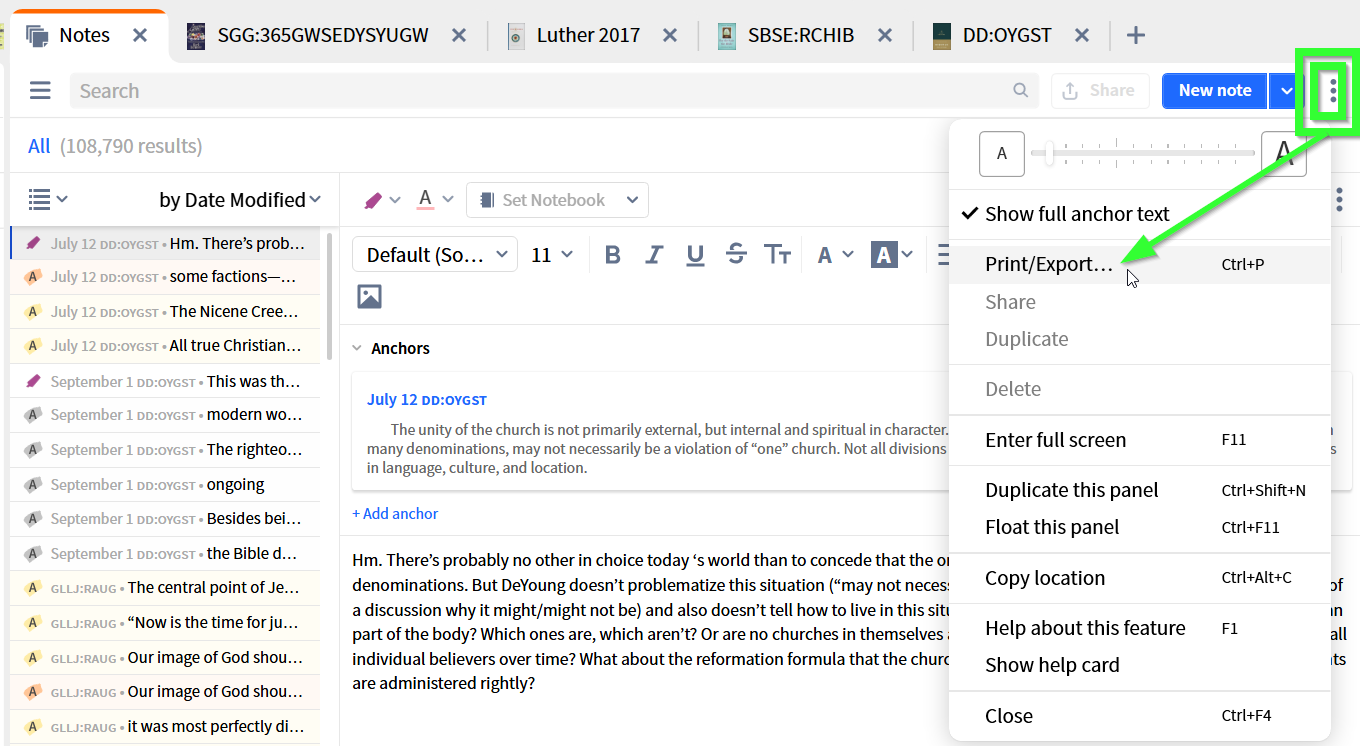
I'm not sure whether it's the best idea to use notes for "building a message" (the sermon editor may be more geared to that, but I have no real experience with that tool). Printing individual notes is easy: while editing the note, or having it selected from a list of notes, go to the "kebap"-menu (three dots in the top right of the Notes Tool pane, not the three dots below for that indvidual note), select Print/Export from there.
Alternatively, you may simply hit Crtl-P (or something comparable if you're a Mac user). In both cases you'll land in the Print dalog where you can send the note to the printer - or e.g. to a Word document if you want to make it look prettier.
This all assumes the desktop version of Logos - there may be ways to print from the browser app or a mobile device, but I have never tried that.
Available Now
Build your biblical library with a new trusted commentary or resource every month. Yours to keep forever.
If I search for figurative language occurrences in a Concordance Section I get a search for Your Bibles as opposed to my Top Bible This seems unnecessary Is there a particular reason for this?
I am trying to create hyperlinks to Logos resources in a Microsoft Word document. I have a couple of questions. First, when I click on the hyperlink in Word 2016, I get this error message: My computer is my own personal laptop, so there is no "organization". Are there group policies that need to be set in Windows to enable…
The new Reading Plan Wizard looks really encouraging. I have a few questions: When setting up a Bible reading plan there is the option to split the plan into chapters, could pericope be added as an additional option? Would it be possible to have the option to rename the plan within the wizard when creating it (I know we…
@MattMattox In Release Notes what is the meaning of "Citations from unlicensed resources will now include a tooltip indicating the resource isn’t licensed with a buy badge."? I don't see any changes!?
The release notes for Logos 49.0 beta 1 describe conversation sharing in the Study Assistant: I think this is a really helpful and useful addition to the tool. But what happens if the conversation includes references to books that you person receiving the link doesn't own. Do they appear in the conversation as locked or…