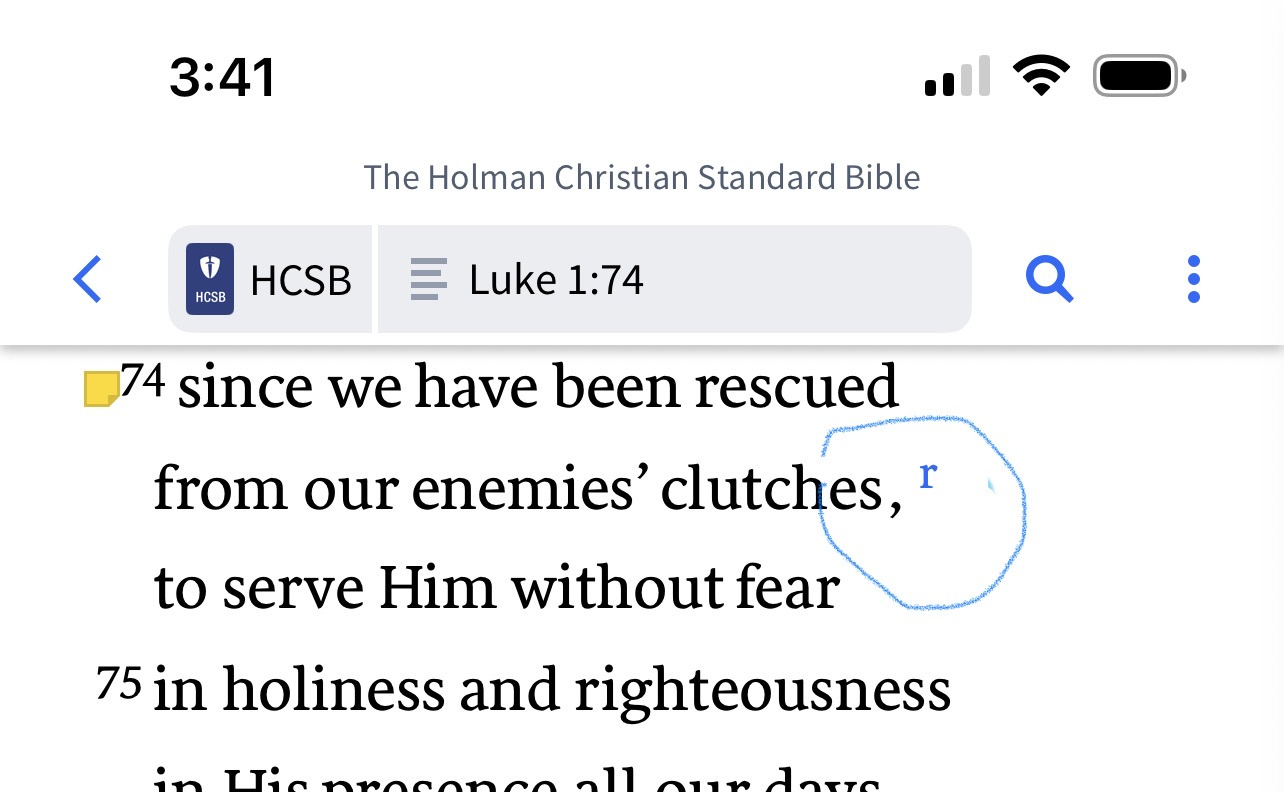
How do I turn on the cross reference letters / links to show in the text of my bibles. See example below the letter r that is circled. I know I must have turned this off some time, because it shows in some of my bibles and not others.
It looks like this is on mobile.
If so, for a Bible not showing these indicators, tap the three dots icon at the top right and open View Settings from the dropdown
Do you have Reformat Text turned on?
Thanks so much. I did have "reformat text" turned on in "view settings", but didn't have the footnote indicator turned on. I'm sure I turned it off at some point, but forgot. I appreciate it very very much.
Available Now
Build your biblical library with a new trusted commentary or resource every month. Yours to keep forever.
Why do I have to specify a tag to make a post when the tags are a curated list rather than open-ended, and none of them apply to the post???????? @Jason S. (Logos) , that's a nutty way to run a railroad… I'm going to start using random, unrelated tags as long as this is the policy.
Attached is a comparison of a search using my books vs all books. I was surprised at the number of limited resources available under "All books." I'm not sure if this is supposed to be this way, and if not, who I should send this to. I remember on the last "what's new" video, they talked about putting stuff like this on…
The CSB Connecting Scripture New Testament Notes: A Study Bible of Biblical Allusions and Quotations is now available on Kindle, Barnes & Noble, and Lifeway. I downloaded the sample for the iPhone Kindle and B&N Apps, and noticed there are no verse links to the Bible passages and the formatting is really bad. Has anyone…
I am a retired academic in the area of Health Education/Epidemiology. My area of emphasis Religion and Health Education (Epidemiology) and I have published works dealing with the Black Church and Health. I am currently seeking assistance in locating Journals with a scriptural and Bible content that would have an interest…
On the top tool bar on the right hand side, about 6 icons from the far right corner, I used to see when files were updating, a list of updated books, the version number etc. I accidentallyclicked on that and everything went away and now the icon is grayed out. Nothing I've tried will turn it back on so I can see that…