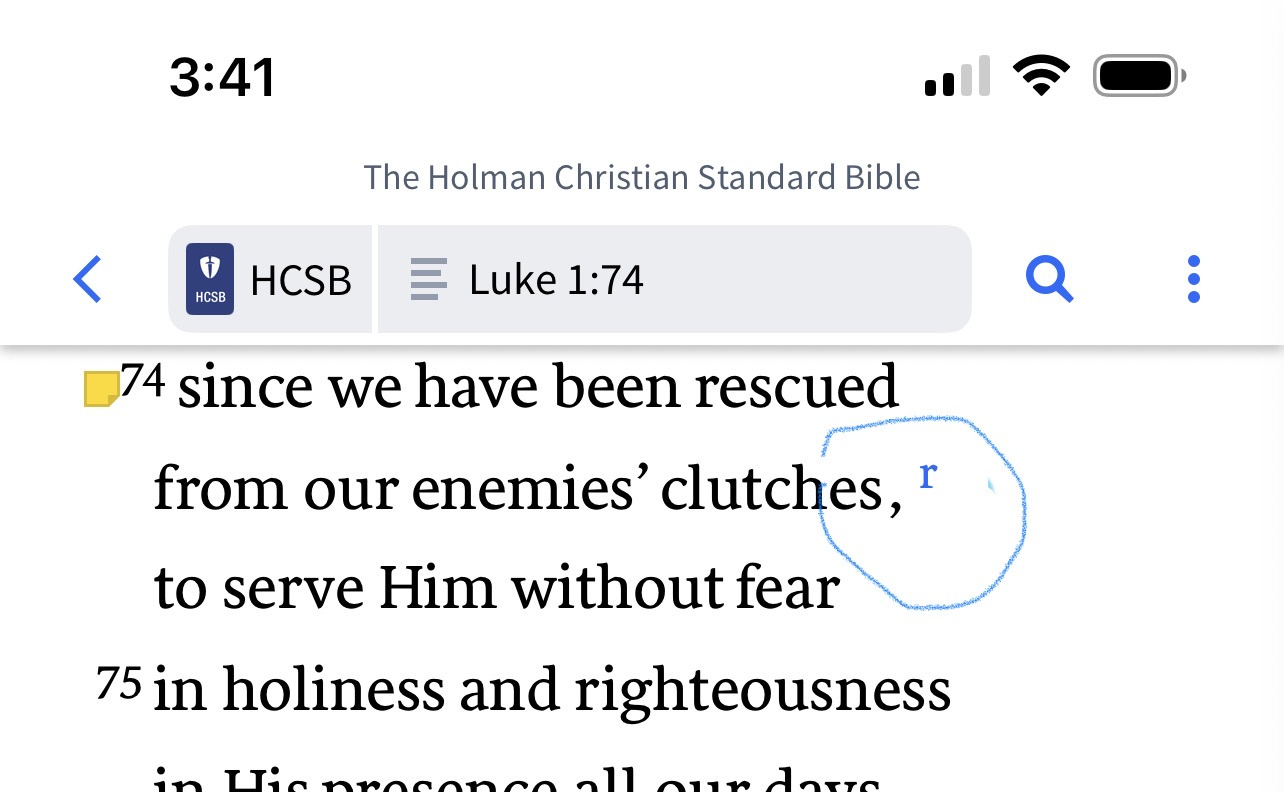
How do I turn on the cross reference letters / links to show in the text of my bibles. See example below the letter r that is circled. I know I must have turned this off some time, because it shows in some of my bibles and not others.
It looks like this is on mobile.
If so, for a Bible not showing these indicators, tap the three dots icon at the top right and open View Settings from the dropdown
Do you have Reformat Text turned on?
Thanks so much. I did have "reformat text" turned on in "view settings", but didn't have the footnote indicator turned on. I'm sure I turned it off at some point, but forgot. I appreciate it very very much.
Available Now
Build your biblical library with a new trusted commentary or resource every month. Yours to keep forever.
How do I mark a forum as "read" without having to go through every item?
Hi all, even though I am subscribed for Logos emails, I have not received any promotional emails lately. Please could anyone let me know when they receive the coupon (I think it's expected tomorrow)… Thanks…
I have Logos on desktop, my iPad, and my Android phone. I do a lot of my reading on the iPad, including my daily Bible-reading plan. The desktop and the iPad are in sync with each other on the reading plan, but the Android app is not updating. I have tried clearing the cache in the app, but that did not make a difference.…
My Mac is running low on disk space, and it looks like the Library/Application Support/Logos4 folder is taking 20GB in /Data and 15GB in /Documents. I'm guessing that one of those is my library and the other is my notes and highlights. Is there a way to see the size of all the things in my library so I can get rid of those…
How can I set up the Bible Recap Reading plan to go by the days laid out in the resource, so I am current with the podcast meaning Logos feeds me day by day according the the appropriate day of the year the current reading? When I set the plan up myself, it goes by page numbers in the book and not by the book's already…