Hi everyone,
I’m on a Logos Max subscription and I think I’ve found a Desktop vs Web parity issue that affects Morph Search.
Environment
- Platform: macOS
- Logos version: 47.2.2
Issue summary
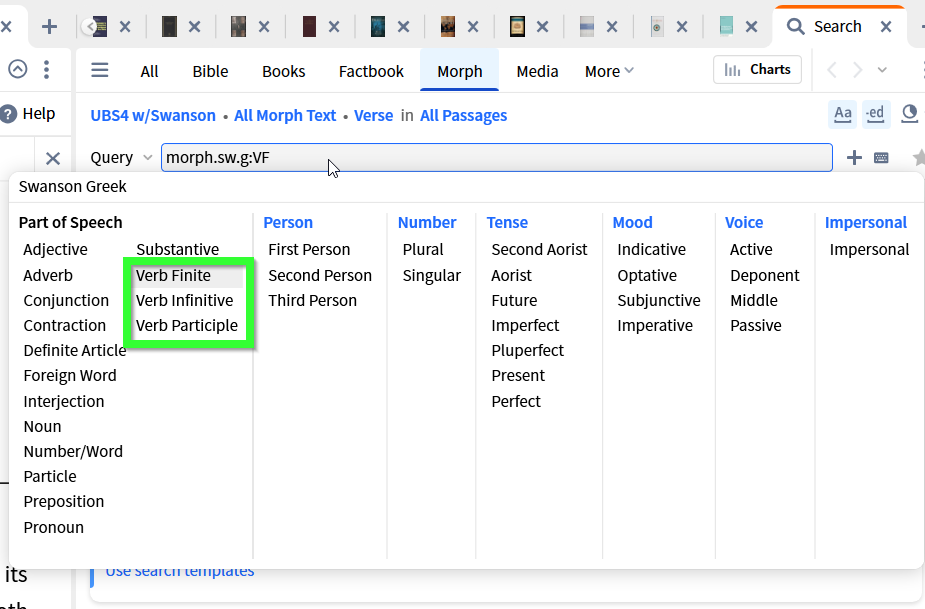
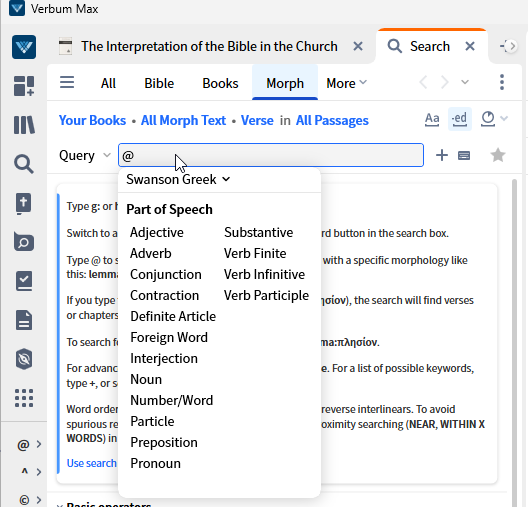
In Morph Search using Swanson NT Greek morphologies (either WH or UBS4), when I click the “@” selector to choose morphological categories, the verb part-of-speech option and its sub-types (e.g., finite / infinitive / participle) appear in Logos Web, but do not appear in Logos Desktop.
Why this matters
This is inconvenient because Analysis view for Morph Search results is only available on Desktop, not in the Web app—so the platform that supports Analysis is missing key verb-type selection options.
Steps to reproduce
1. Open Morph Search (Desktop, macOS).
2. Select a Greek NT resource that uses Swanson NT Greek Morphology (WH or UBS4).
3. Click the “@” selector in the morphology picker.
4. Look for Verb → finite / infinitive / participle (or equivalent verb-type options).
5. Repeat the same workflow in Logos Web — those options appear there.
Expected
Desktop should show the same verb-type options as Web for Swanson WH/UBS4 morphologies.
Actual
Desktop does not show those verb-type options; Web does.
If this is a known limitation or there’s a workaround (e.g., a different way to access verb-type filtering on Desktop, or a recommended alternate morphology), I’d appreciate any guidance. Otherwise, I’m hoping this can be logged as a bug/parity issue.
Thanks!