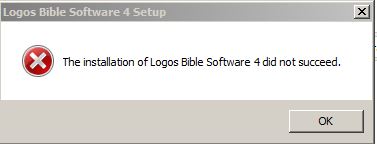
I can't install the latest update. Windows Installer starts to run, and after about 5 seconds it just stops and I get this error message:
I am running Windows 7, 64 bit.
Please enable Diagnostic Logging and then upload your logs. Some of us will take a look at them and we might be able to determine what is going on.
Here are my logs:
4863.logos4setup.log
0257.DigitalLibraryInstall.log
Your failure message on line 153 is the same as in this thread:
http://community.logos.com/forums/p/22044/164886.aspx
[quote]RunCommandInstall MsiInstallProductW returned 1618: failure
Bryan Albert's response mirrors your digitallibraryinstall.log line 13 and indicates that for some reason this is a second install, the first of which is locked.
I have no idea how to unlock it.
But with this information perhaps you can contact tech support by phone or email and give them this thread's address and see what they say.
I have a hard time getting help from tech support. First of all they don't even seem to know about beta testing, then after a lot of waiting around they come back and say they don't support beta testing over the phone but only on the forum. Hopefully somebody can help here. It looks like maybe I need to just keep opting not to install the update until another one comes out. And then after downloading the next update, I will copy my logs files - before, during and after the update, as the other thread suggests.
Here are my logs: 4863.logos4setup.log 0257.DigitalLibraryInstall.log
The log files show that Windows Installer is returning the error code 1618, which means "Another installation is already in progress. Complete that installation before proceeding with this install." This is consistent with the "Failed to grab execution mutex. System error 258." error listed in your DigitalLibraryInstall.log file. The logos4setup.log contains no evidence that the other installation is in fact a Logos 4 installation, so it's probably something else. Perhaps there's some other installer that has run into trouble and won't finish, which is blocking your Logos 4 install. If you restart your computer it might free up Windows Installer.
Bryan
I have a hard time getting help from tech support. First of all they don't even seem to know about beta testing, then after a lot of waiting around they come back and say they don't support beta testing over the phone but only on the forum. Hopefully somebody can help here. I
It sounds like you've got a plan Wyn. Unless of course Bryan or one of the other devs can offer a workaround.
Wyn,
Try rebooting your computer as Bryan suggested before installing Logos 4.2a Beta 2 http://wiki.logos.com/Logos_4.2a_Beta_2
YES! That was the problem - Windows Installer was locked in "started". The problem happened when both Logos and my Antivirus software tried to install updates at the same time. This is apparently a known bug in Windows Installer with Windows 7 and 64 bit machines. It doesn't get reset on reboot. So the solution is to open "Services" (type "Services" in the Start Menu and run it). Then select "Services (Local)" and "Windows Installer". Double click on "Windows Installer" to open it. Then in the "Startup type" select "Disabled". Hit "OK" and reboot computer. Then go back into Services / Windows Installer again and change the "Startup type" to it's previous setting. Mine is set to "Manual". Hit OK, and reboot computer again. This should solve the problem.
Thanks to everyone for their help in finding the problem!
Wyn that's excellent!
Thanks too for your detailed steps in solving the 1618 error! [y]
I just got this error message. I fixed it on my own, but it should be a much more friendly message for less tech-savvy users.
Available Now
Build your biblical library with a new trusted commentary or resource every month. Yours to keep forever.