I am trying to copy off the bible search list to the note or clipping, is there a way to do it?
The only way to copy at the moment is with a screenshot. I don't think that we can paste the resulting file into either notes or clippings though.
Don't know about the Beta.
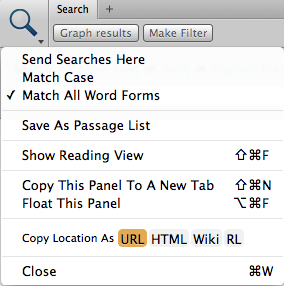
Directly No, but can via Passage List => using Logos Bible Software 4.0b SR-4 (4.10.4.9457), can save Bible Search results as a Passage List - In Passage List, can highlight and copy desired verses - then paste into Notes.
Noticed Clippings also has capability to save as a Passage List (merge possibilities).
Tedious observation: Bible search results has chapter & verse reference - can click to open Bible to reference - highlight desired verse(s) - right click - option to Add a note or Add a clipping.
Keep Smiling [:)]
I'm not using the Mac version, so I don't know if this is implemented yet on the Mac, but the Print/Export command is the way to do this on the Windows version. I thought they'd already brought the Mac version up to par with the Windows version as far as that feature was concerned, but I might be wrong.
EDIT: Print/Export --> Copy to clipboard --> paste into a Note.
I'm not using the Mac version, so I don't know if this is implemented yet on the Mac, but the Print/Export command is the way to do this on the Windows version. I thought they'd already brought the Mac version up to par with the Windows version as far as that feature was concerned, but I might be wrong. EDIT: Print/Export --> Copy to clipboard --> paste into a Note.
For Mac, Print/Export is part of current Beta cycle (with known issues). Wiki has Beta information => http://wiki.logos.com/The_Logos_4_Beta_Program
Current Logos 4 Mac stable release lacks Print/Export for Search:
Available Now
Build your biblical library with a new trusted commentary or resource every month. Yours to keep forever.