I posted about this previously, 6 months ago or so, but no one was able to help me so I thought I would try again. In the pictures below, I used the insert text option in sentence diagramming. I am currently in a Greek Exegesis class and we are diagramming the book of Philippians and I use this tool frequently as we put understood subjects, verbs, etc. in the diagrams.
As you can see, any time I enter Greek text, whether it be Greek text copied directly from the Greek NT on Logos or using the Greek keyboard option on my macbook, the text drops down below the text box.
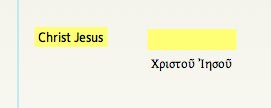
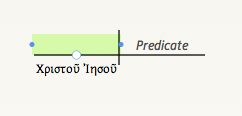
Does anyone know a way to fix this? I work around it but it is pretty annoying because if I want the text line up correctly I can never attach the inserted text to the actual diagram, it just hangs loose.
Also, I noticed a couple updates ago that pasting rarely works in sentence diagrams. I like to do each class assignment in separate documents, but after the assignment is turned in, I like to merge the ones that go together. I used to just copy and paste the diagrams from one sentence diagram window to the other, but this no longer works for me. Any suggestions in this area are welcome as well.

