There is still a problem when selecting by left and right arrow keys the parallel resources in a collection. For example, I have a "Favorite Bibles" collection designated to "show in parallel resources". The ESV is the first in that list, as determined by the priorities set in the Library. I have previously opened the ESV and already selected the "Favorite Bibles" collection rather than the "All Parallel Resources", so now whenever I open the ESV, it already has the "Favorite Bibles" collection checked as the selected collection, as shown below:
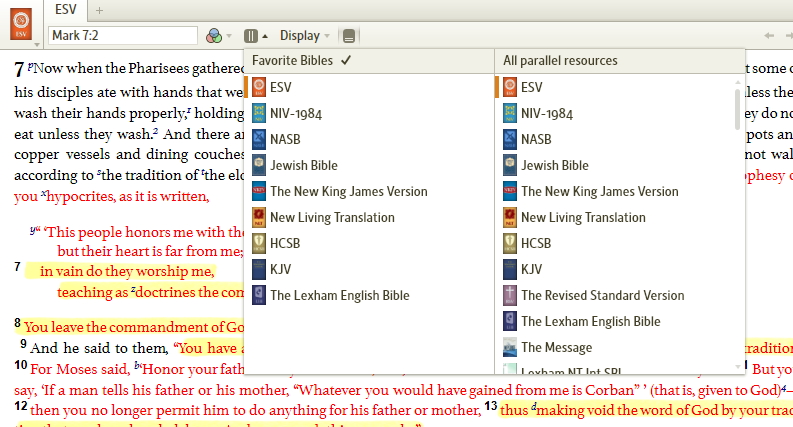
The problem is that whenever I open a fresh copy of the ESV and hit the left arrow key, it does not go to the Lexham English Bible as it should, but instead to Wescott and Hort's Greek NT, which is the last on the list of "All Parallel Resources". If I then click on the "parallel resources icon" I can see that the "Favorite Bibles" collection is indeed already selected, even though the left arrow key did not select the proper resource. After clicking on the "parallel resources icon" (even though I do not click on either of the collections, since the correct one was already selected), the left and right arrow keys then work properly. So for some reason, the left and right arrow keys do not function properly unless the "display parallel resources" icon is first clicked.
I get this same behavior with other parallel resource collections too.

