I ran "rebuild index" (to test whether some other bug had been fixed).
I got this error message:
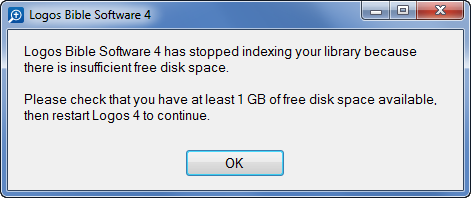
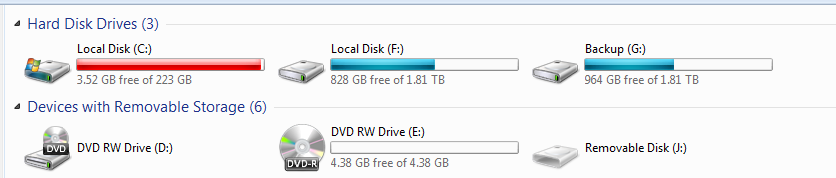
It turns out I was indeed low on disk space on my C: drive (though not on my second hard drive, where I have over 800GB free).
So I deleted all my browser history, and that cleared up 100GB!!
Before:
After:
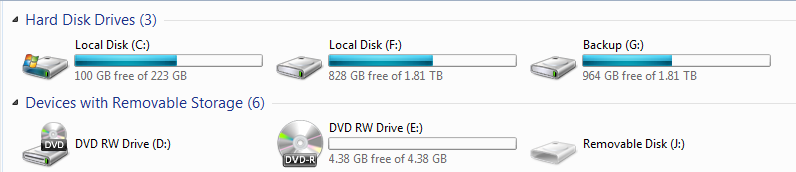
Next, I restarted Logos and the indexer began again. It stopped again and claimed to be out of disk space again (same error message box). But this time, that was patently not true, as demonstrated by the second disk space screenshot above.
Log files from the first time the indexer pooped out: 8321.IndexerStopped20120421.zip
Log files from the second time the indexer pooped out: 1488.IndexerStopped20120422.zip
Interestingly, the second try, after I'd cleared up gobs of disk space, it got through indexing only "786 of 9,190 resources" before failure. The first time, it got through "4,179 of 9,190 resources."
If the failure of the indexer the first time left things in such a state that caused the failure to occur the second time, then the indexer needs to be better about cleaning up after itself in a failure case.
NOTE: I see someone else reported this problem before (and another one chimed in that he's gotten that error when unwarranted too). But nobody from Logos ever responded to that thread, and there weren't sufficient log files uploaded to track it down anyway:
http://community.logos.com/forums/t/38351.aspx




