I have "Automatically Download Updates" turned off. I am on the beta channel.
I got the notification that there were some updates to download (which would include 4.5c Beta 1 plus a recent prepub that shipped). I clicked to download those.
After the download completed, I got the notification that there were new updates to be installed. I right clicked on the Logos icon and chose to Install.
Partway through the installation process I got this warning message (I've dragged the warning message box away from the progress box that was underneath so you can see what it was in the middle of doing when this warning came up):
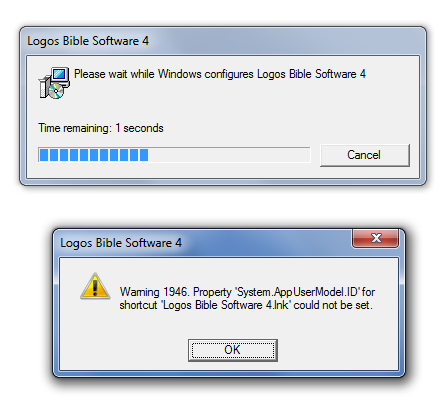
I grabbed a snapshot of all the log files at this stage and attach them here: 0116.InstallWarning20120518a.zip
Couldn't find any such warnings mentioned in logos4setup.log. And PrerequisitesInstall.log was not touched today; it was an old version so I haven't included it.
Logos did go ahead and start itself up just fine after this warning, so perhaps I should not be alarmed. But it's the kind of thing that would still worry most users and it's a sign of some underlying problem, so it should be taken care of.
NOTE: I just found this explanation of the warning: http://www.logos.com/support/windows/L4/warning1946
Since it's a non-fatal problem, then I suggest you not bother users with the warning at all. Users don't need to know this and wouldn't know what to do with it. So Logos should just ignore the problem and keep on going on its merry way. It'll probably cut down on support calls to not put up that warning message. There seems to be no point. Output the warning in a log file instead of up on the screen.



