Every time there is a new update of Logos, my firewall software (AVG) asks for confirmation to allow "Logos Bible Software 4 Setup" to access the Internet. This is in spite of the fact that every time I select "Save my answer as a permanent rule, and do not ask me next time."
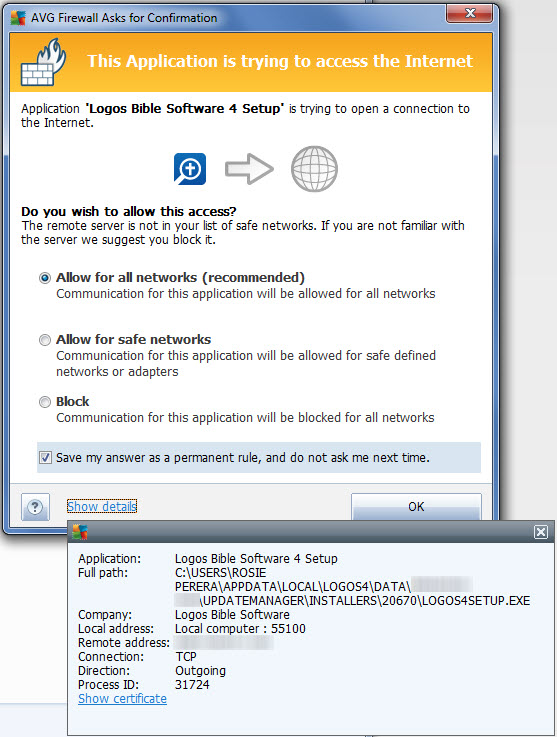
This is because the full path to the installer changes every time. There's a new numbered folder created in LOGOS4\DATA\{random}\UPDATEMANAGER\INSTALLERS where LOGOS4SETUP.EXE is placed.
There's no reason I'd ever need to rerun an old version of LOGOS4SETUP.EXE, so why keep all these old ones around? Why not just overwrite the last installer with the new one?
The current method means I have to accumulate a new rule in my firewall for each new version of the installer, and I can never permanently mark it not to ask me next time whether it can allow Logos4Setup.exe to access the Internet. And none of these old rules will ever be referenced again, so they are pointless.

EDIT: Clarification - My firewall software happens to be AVG, and I gave detailed description of how I interact with it, but that wasn't the point. The same issue could happen with any firewall software that lets you make rules for what programs are safe that you don't have to confirm access to the Internet with each time. And how that is done is immaterial. So disregard all the pretty graphics above. The point of the problem I was describing was that LOGOS puts the installer in a new folder each time, which doesn't seem necessary to me and makes it impossible for firewall rules to work. Any firewall that uses rules, not just AVG. I haven't tried it with other ones but I suspect there would be similar issues.


