Description:
Setting the font size to very large causes text in the search box, reference range box, and range title box, to get clipped.
Repro steps:
1. Tools > Program Settings > set default font size to 240%
2. Do a search.
Result:
Notice how the search text I had typed ("sit") gets clipped off, as do the "Reference range" text and "Range title" text when I drop down that menu. Same goes for the "Search in" box (not shown).
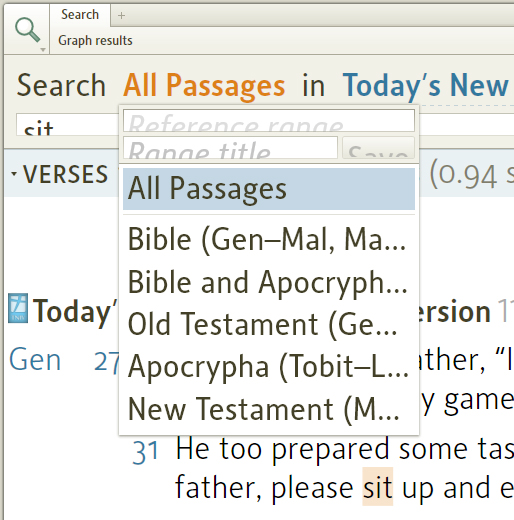
Expect:
The font size should not be changed unless the size of the edit controls is going to be changed to accommodate it. I noticed that the navigation edit boxes at the top of Books don't have this problem, because they still use the system font size. There is another feature in the program that makes the whole UI bigger (under Accessibility in Program Settings), and changing the font size for these search edit controls should only happen in that situation, not when you're just changing the resources' Font size.
Perhaps the UI should be made a bit clearer in Program Settings, too, so that it's more obvious precisely what you're going to affect when you change Font size or Program Scaling.
