Since using Logos 5 in some of my book there is an underlined line or two followed by the notation of the number of hihglights. Can anyone explain what this is about and is there anyway to get rid of them from my book.
Regards, Mike <><
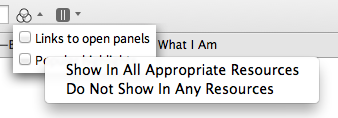
I believe somehow "popular highlights" got turned on to your account. You can turn this off in your visual filter menu (three circles icon).
Please see this thread for more info:
http://community.logos.com/forums/t/61098.aspx
FYI: questions related to L5 should be posted in the L5 forum: http://community.logos.com/forums/109.aspx
is there anyway to get rid of them from my book.
Bama was correct for an individual resource. If you wish to turn them off in every resource, right click on the visual filter and select do not show in any resource
Available Now
Build your biblical library with a new trusted commentary or resource every month. Yours to keep forever.