I have been learning about Syntax Search, as part of that I have been looking at the wiki
http://wiki.logos.com/Setting_up_a_Syntax_Search
and the three video lessons linked to from that page (Syntax Searching For Everyone parts 1/2/3).
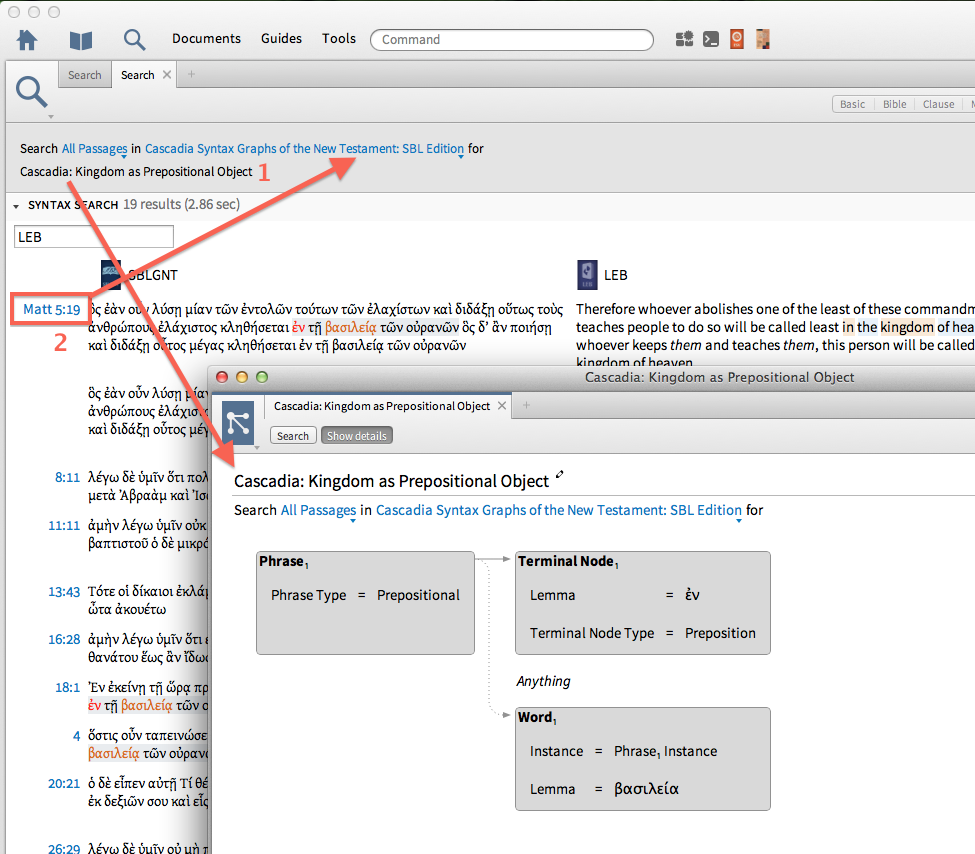
I noticed in the video different behaviour and functionality between Logos 4 and Logos 5, the functionality in Logos 4 seemed better to me than that now in Logos 5 WRT two specific points — pls refer to screenshot below:
- When you create a 'Syntax Search' document and give it a name run it you get a query result window. In the video the name of the Syntax Search is clickable in the search results window and user is able to click on it. When one does the Syntax Search document comes up (usually in a floating window) so it can be iteratively fine tuned. It's very handy. In Logos 5 the name of the Syntax Search document is no longer a hyperlink — can't be clicked.
- In Logos 4 in the query results window if one clicked on a verse number (red box) the resource which opened was the Cascadia Syntax Graph of the New Testament. This is handy to see the syntax flow of the verse obviously with reference to the syntax query. In Logos 5 however it now brings up the SBLGNT.
I don't believe I am missing anything, are these changes intentional/oversight in Logos 5, can the operation go back to the Logos 4 way of working which seems to me to be more functional.