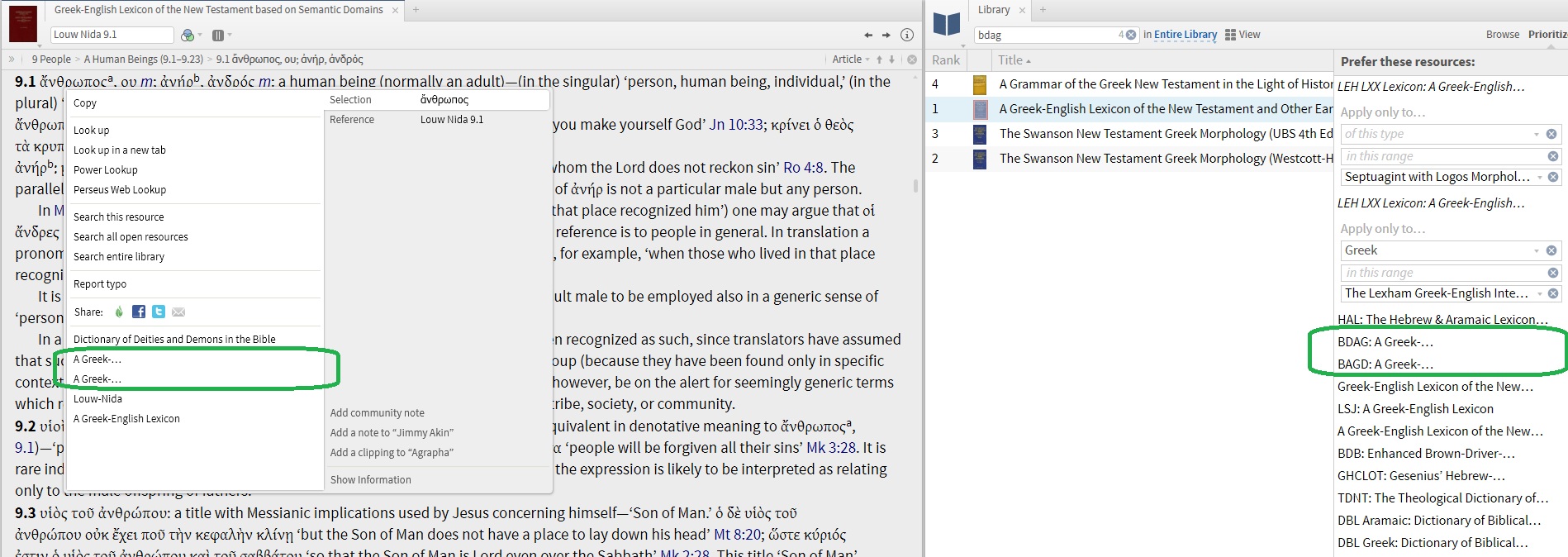
I don't remember Logos doing this before...why are BDAG and BAGD names truncated so severely? I sure would be nicer if they used the space on the line to complete the name as much as possible? Even if the pane is very wide it still looks the same!
I am unable to duplicate using the latest release candidate. (5.0.2.0562)
I am on the same version of Logos.
Do you have a short title set for this resource? Library/bring up BDAG/click Resource Information/click on Browse - short title is next to full title
The problem is in the Priority List. This is made difficult by the fact the Short Title cannot be deleted; but I have been playing around, putting the large title in the short title, deleting it and having the short title come back (exampkle: BDAG), and removing/re-adding it to the Priority list. I have BDAG showing properly now, but I can't duplicate what fixed it. BAGD is still truncated though. It's doing something weird with the short title first...
This seems really funny the way it works. Also, why is it sometimes, the name int he Priority list is Short Title: Long Title, and sometimes it is Long Title only?
You should figure how you got it to use the short title as a TIP! BDAG is especially tiresome in a list of greek lexicon titles. I have BDAG as short but to no avail.
I was just going to report that it appears to use the Short Title first and Lynden's does not - I never tried to get it to do that! The problem is definitely related to the use of Short Titles and the Priority list - the right-click context box just uses what's in the Priority List.
Can anyone else see this behavior?
No. In your screenshot Louw-Nida is a short title, and "A Greek-English Lexicon" also appears to be a short title; but what lexicon is it with many sharing that name in their full title?
The first one is BDAG, and the second one is BAGD.
Now check this image out - all I have been doing is removing an re-adding the same resources into the Priority List in the same place and order, look at these names - this is unusable lol. There's no way to know what they are!
Since you wouldn't know otherwise, the 5 resources circled are, in order:
BDAG
BAGD
Louw-Nida
Liddell's Greek-English Lexicon
Thayer's Greek-English Lexicon
I am having trouble reproducing this behavior. Would you mind including a screenshot of the info panel for BDAG and BAGD? You can view this in the Library, by selecting the resource (click the row, not the title) and toggling the ( i ) "info" button.Example::
Sure - here is the latets of everything. First are 3 images, the three resources BAGD, BDAG, and Louw-Nida:
Next is a view of this part of my Priority list:
Last, you can see how it looks when I bring up the right-click context menu on a word say in the ESV. Note how truncated they are!
Thanks for looking at this, this problem makes it very difficult to use the right-click menu on lemmas!
My best guess is that you typed/pasted in a custom title for these resources using non-breaking spaces instead of regular spaces.
Re-type them, making sure to replace each "space" in the title with a regular space.
If you want to reset the title to the default, click the pencil icon, delete all the text, then press Enter. It will delete your local changes and reapply the "official" Logos title to the resource.
Thanks Bradley. That was the clue to fix it! I did hit the pencil on the SHORT title many times, and retyped it; I got to thinking, maybe the problem you describe is with the LONG title. So I hit the pencil and now it looks correct!
Now one question - I am sure many have prioritized BDAG, BAGD, and Louw-NIda...since they all start "A Greek-English Lexicon of the New Testament", and that's pretty much all you see, what do you do - do you add "BDAG:" "BAGD:" and "LN:" to the beginning of the long title, or will that mess things up? Or do you just leave as is, and find the resource you want by hovering over it?
Thanks again!
Bradley will probably have a better answer, but while you were trying to find the missing spaces, I tried just putting the abbreviations on the front of the longer title. Seems to work great so far anyway.
EDIT: Ok, this is getting pretty arcane. The abbreviations on the front of the longer title work great, especially for the right-click menus.
However 'the ole codgers' hold onto their old titles in the tabs (e.g. Gesenius and HALOT CD-ROM edition).
The younger wipper-snappers use their new spiffy titles on the tabs.
I'm talking about the mouseover titles; not the abbreviations on the tabs.
There's no "right answer" on how to do it. I personally haven't renamed many books in my library, but I also don't own all those resources on my personal account (they still cost money, even for Logos employees), so I haven't experienced this problem in the same way you have.
If I did use them frequently in my own study, I'd probably change the long titles to just "BDAG", "BAGD", etc.; there's no harm in doing so, and it would make tab titles and hyperlinks throughout the software concise and clear. But that's just one possibility; the right answer is whatever helps you find the book efficiently and use the software effectively.
Thanks Bradley and DMB - I think I might just append the short titles to the beginning of the long title, and try that out. Thanks for your suggestions!
Peace to all! *smile* ... and ..... Great Joy in the Lord!
I think it might be very helpful that in the future one might be able to find some of this information at Wiki.Logos.com. This is all so new to me! Especially about how easy to "change back" from a previously self-directed name.......
I know I've benefitted a lot from Don's inability to put 'real' spaces in the names. Thanks Don!!
There's a LOT of benefits from renaming the LONG title of many of the frequent books a person uses:
- In the library, if you manage using tags, by clicking the TAG heading of course it groups the resources by tag. But the automatic SECONDARY sort is the title. I renamed many of my resources so the title would sort without a secondary shift-click.
- If you use the Text Comparison panel (I do a lot, using my tag groups), the sort is by title. So if you rename the titles, you can manage the sort. In my case, I put the Bible version abbreviation on each one so that all my KJVs are together, LXX's, coptics, Catholic-related, etc. Very handy for quick comparisons.
- When I do Bible searches and I want to do it on a specific one that's open (I have many open on different windows) and find it fast, they're listed in 'my' order grouped as I like (greeks together, hebrew, english, etc).
- As noted above, I keep multiple windows open all the time. In Windows7, a mouseover or alt-tab shows the current resource in use which is often a mystery. The updated titles show up there too!
Likely there's even more nifty uses.
Available Now
Build your biblical library with a new trusted commentary or resource every month. Yours to keep forever.