Issue 1:
Is there a way to create a field/section of text in a Personal Book that can be toggled on and off?
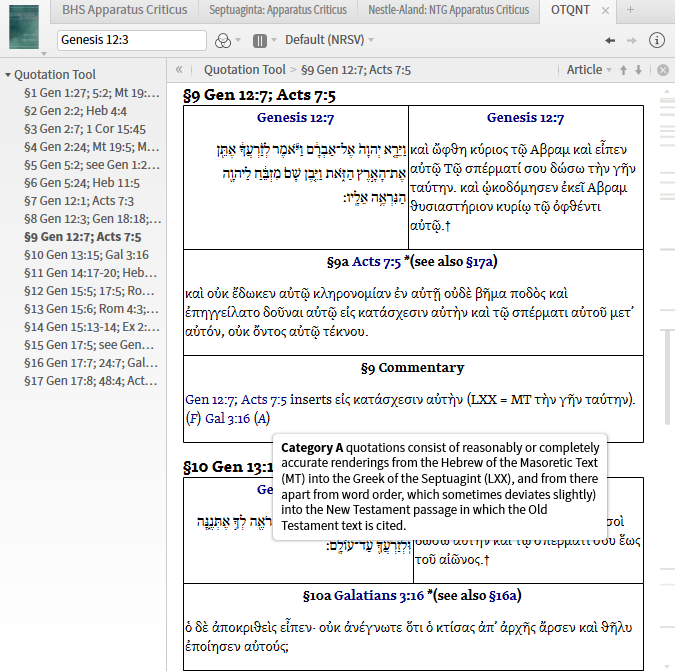
For instance: In the Screenshot Below, I'm working on putting together a resource that gathers information on OT quotes in the NT. (I received permission from Moody Press years ago to digitize Archer & Chirichigno's Old Testament Quotations in the New Testament, and I plan to make this available when I'm done with it). In my adaptation, I'd like to be able to toggle a view of the English text found in the table cells pictured below, so that I could display on-the-fly rather than taking up screen real estate. Is there a way to have 'hidden text' or text that's 'behind the curtain' until you click a button/link? I can somewhat achieve what I'm after by linking the references correctly (for the Hebrew text, it defaults to the NRSV [or whatever my default version is], but I've hardwired the LXX text to link to the LES).
Issue 2:
As seen in the screenshot above, I have the text laid out in tables. I'd like to experiment with having different background colors for MT / LXX / NT / Commentary for the sake of layout (rather than the black solid borders). Is there a way to manipulate the background colors of personal books?