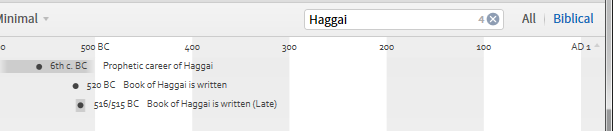
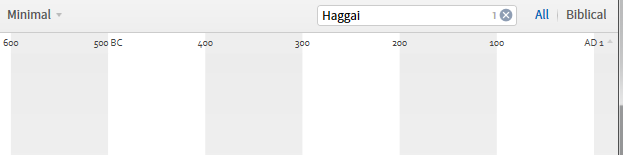
This may be a bug, but when I select "biblical" as opposed to "all" to display events in the timeline tool, Haggai is not to be found (searches for Haggai have hits in all display and none for biblical display).
Confirmed
The discussion at http://community.logos.com/forums/p/72125/502199.aspx#502199 provides insight into why this is happening - Haggai timeline events are not linked to the Bible Facts database.
Logos would need to advise on whether they are going to expand this linkage.
Another odd element is that as in the image provided by MJ, I also had a count of 1 in the search box but nothing showing on the graph.
That is strange - and in the "All" display - it says there are four but only shows three.
Having checked on a few other filters it looks as though the Timeline is adding one to the actual number of events!
Perhaps the search term itself (from the box) is included in the count.
In order to help reduce clutter, the timeline tool hides events that are very short compared to the current date range of the view. In this case, you are probably not seeing the event at Aug 29, 520 BC. You can zoom in on that date, or you can use the find tool (either from the panel menu or with Ctrl-F on Windows) to navigate between the events. The find tool will automatically zoom as needed to ensure that the items become visible.
Thanks for the explanation, Andrew.
I fear it doesn't make me warm any more towards the current Timeline as I had not intentionally entered any time frame and precise dates are usually the most verifiable and, hence, the most valuable piece of information.
Thanks Andrew
In this case, you are probably not seeing the event at Aug 29, 520 BC
That is the case
You can zoom in on that date,
But I have no way of knowing that there is an event there so I wouldn't know where to zoom.
or you can use the find tool (either from the panel menu or with Ctrl-F on Windows) to navigate between the events.
I couldn't get this to navigate between the events. Can you expand on this please?
Graham
In order to help reduce clutter, the timeline tool hides events
Trying to reduce clutter is understandable but hiding items is problematic. Can't a system similar to maps be used: dots indicate there is something but only zooming produces names when the thing in question is too small. That or whatever else that alerts the user to the presence of not immediately perceivable items. Moreover, if a specific search is done for an item (a filter) it should zoom to it instead of doing it through CTL-F only. The fact that all three of us here who are not newbies with Logos could not find the reference to Haggai says long about how likely it is that most users would. It follows that improvement is sorely needed.
Type Haggai first in the filter box. Then use CTL-F and type Haggai again and thou shalt see. But I agree with you nonetheless as I state in my reply to Andrew as well.
Type Haggai first in the filter box. Then use CTL-F and type Haggai again and thou shalt see
Thanks Francis - that works
You can also use the up/down arrows to the right side of the find box to navigate between matches.
I know there has been some ideas bounced around to give the user better control over the events being displayed. I'll pass along your feedback.
Thank you, Andrew.
First, Pluto is no longer a planet and now Haggai is not a prophet. It is a conspiracy!
Available Now
Build your biblical library with a new trusted commentary or resource every month. Yours to keep forever.