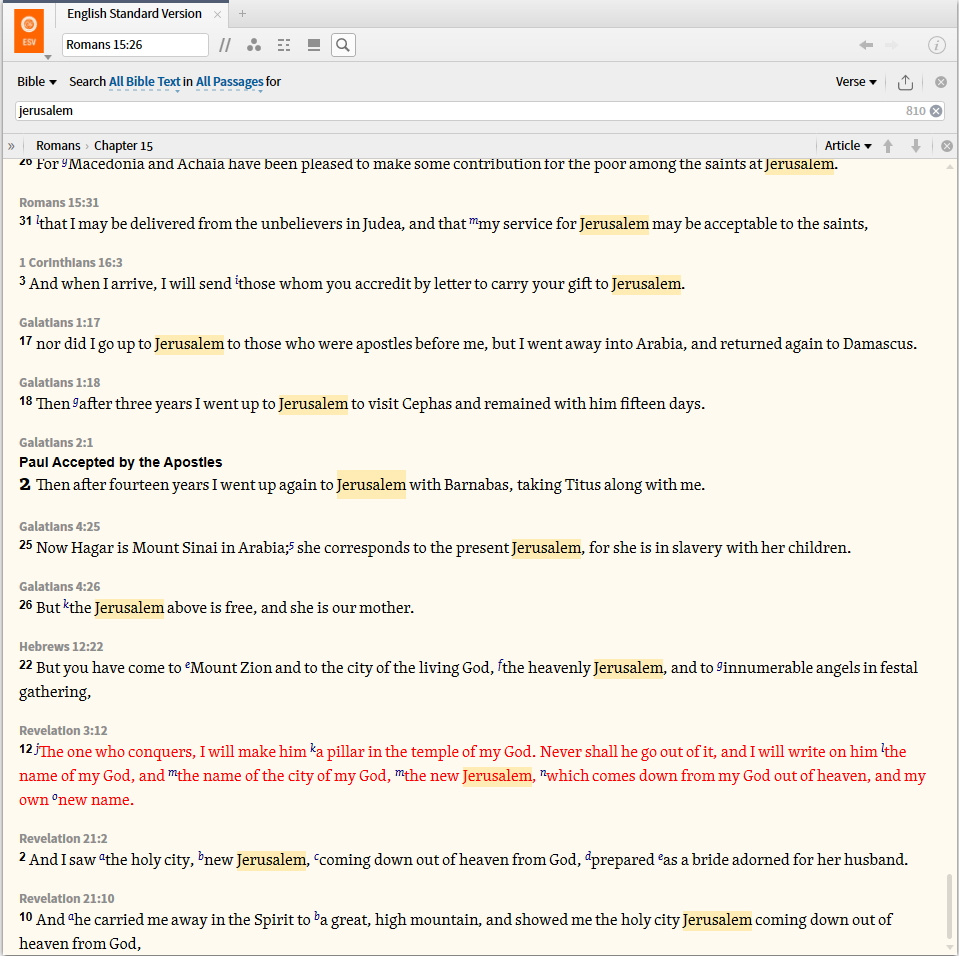
The inline search seems to be getting stuck and not allowing me to scroll to the top or the bottom of the page. Certain hits cannot be scrolled to. I can hover over the hits on the slide bar to view them, but scrolling is limited.
I've noticed several posts now involving scrolling issues in different places in Logos. I've experienced what you describe while trying to scroll in Psalms Explorer.
The inline search seems to be getting stuck and not allowing me to scroll to the top or the bottom of the page
Can you give example search where this happens and post screenshots? I am not seeing this behaviour
I can hover over the hits on the slide bar to view them, but scrolling is limited.
Which "slide bar" are you referring to?
I've experienced what you describe while trying to scroll in Psalms Explorer.
Faithlife have acknowledged this and will fix it - https://community.logos.com/forums/p/93421/648786.aspx#648786
I've experienced what you describe while trying to scroll in Psalms Explorer. Faithlife have acknowledged this and will fix it - https://community.logos.com/forums/p/93421/648786.aspx#648786
This is actually a different bug from the Inline Search bug.
There is a MAJOR problem with Inline Search, and it is precisely the bug mentioned by the OP. To test the bug out, open up the ESV and run an Inline Search on the Entire Bible for the word "Jerusalem". Then, scroll down to the very bottom, and try to navigate to Revelation 21:10. It's absolutely impossible. Even if you click on it, there is no way to open it. There is no way to scroll to it, etc.
If you click on it, the heading will change to Revelation 21:10, but then when you close inline search you will be in a different passage.
I think that ideally, the little grey headings that appear within the Inline Search above each of the search results would be hyperlinks that would close the Inline Search and take you to that passage. As well, when you click inside a search result and the heading changes, the Inline Search needs to actually navigate you there, not just change the heading.
Agreed - I just wanted to acknowledge it had been recognised and being worked on
I can view Rev 21:10 in the scenario you describe
As well, when you click inside a search result and the heading changes, the Inline Search needs to actually navigate you there, not just change the heading.
Absolutely agree. This is a real issue which I believe Faithlife have acknowledged.
I think that ideally, the little grey headings that appear within the Inline Search above each of the search results would be hyperlinks that would close the Inline Search and take you to that passage
I'm not sure that I would want that - I see them as markers as opposed to links. And I don't think I would want clicking on them to close inline search
I can too. I was just pointing out it's impossible to navigate there.
There are lots of different ways that Faithlife could choose to implement Inline Search, and that could work relatively well. I am just suggesting this one as one that would work particularly well and make it much more useful for me.
Let me see if I can convince you. [:)]
If it were implemented I imagine it working as it currently does in the full Search Panel:
1. The mouse cursor would change to a little hand when you hover over the little grey heading above each search result.
2. A pop up window would appear with more text from the selected location.
3. If you click on it, you would navigate there, and Inline Search would close.
This type of behavior would be consistent with how search works in other areas of Logos, and would make Inline Search something I would really enjoy using.
I can't see any disadvantages - you could say that you might "accidentally" close Inline Search, but that would just be a matter of getting used to how it works. And all the other current features would still be present. And clicking inside the text would NOT close Inline Search, but should navigate you there.
Personally, when I search Inline for something, I almost always want to actually navigate somewhere. And even if I don't, I always eventually want to navigate somewhere. If Faithlife doesn't make it easy to navigate somewhere in Inline Search (and even clicking inside of a region and then going and turning off Inline Search is not really that easy), I can't ever see myself using this feature much.
I can view Rev 21:10 in the scenario you describe I can too. I was just pointing out it's impossible to navigate there.
I don't really understand what is meant here. When in the inline search panel - somewhere other than Rev 21:10 and type Rev 21:10 into the verse box then the panel scrolls there. Is this not what you are seeing?
If it were implemented I imagine it working as it currently does in the full Search Panel: 1. The mouse cursor would change to a little hand when you hover over the little grey heading above each search result. 2. A pop up window would appear with more text from the selected location. 3. If you click on it, you would navigate there, and Inline Search would close. This type of behavior would be consistent with how search works in other areas of Logos, and would make Inline Search something I would really enjoy using.
That would work well[Y]
Let me see if I can convince you.
I like your suggestion - and can't really see any downside in it.[:)]
Personally, when I search Inline for something, I almost always want to actually navigate somewhere. And even if I don't, I always eventually want to navigate somewhere
Agreed - and this does need to be addressed.
I can view Rev 21:10 in the scenario you describe I can too. I was just pointing out it's impossible to navigate there. I don't really understand what is meant here. When in the inline search panel - somewhere other than Rev 21:10 and type Rev 21:10 into the verse box then the panel scrolls there. Is this not what you are seeing?
I'm glad we agree on the proposal. Hopefully Faithlife will as well. [Y] It would, I think, make Inline Search into the killer feature it is just dying to be.
Let me try to explain what I was referring to with Rev 21:10. Normally Inline Search actually does navigate to the results as you scroll through them. For example, in the above example I searched for "Jerusalem" when I was in the Gospels. I started scrolling down all the way to the bottom. As I scroll, Inline Search really does navigate the resource. So, if I then close Inline Search, I will be in the last place I scrolled to (which is at the top of the screen in the Inline Search results).
When clicking in a text, it only appears to navigate the resource. So, that is one bug.
But, there are some texts that are too far down to be "scrollable". Rev 21:10 is one of them. So, you can't scroll to it, and if you click in it and close the Search, you will actually be somewhere else (but your header will say you are at Rev 21:10!). So, in fact, the only way to actually navigate to Rev 21:10 from Inline Search is to type it into the location bar. But this is not the case with other passages, only those passages that are at the end of Inline Search results. I think this is what the OP was getting at as well.
Got it [I]
Thanks for your patience.
Devin,
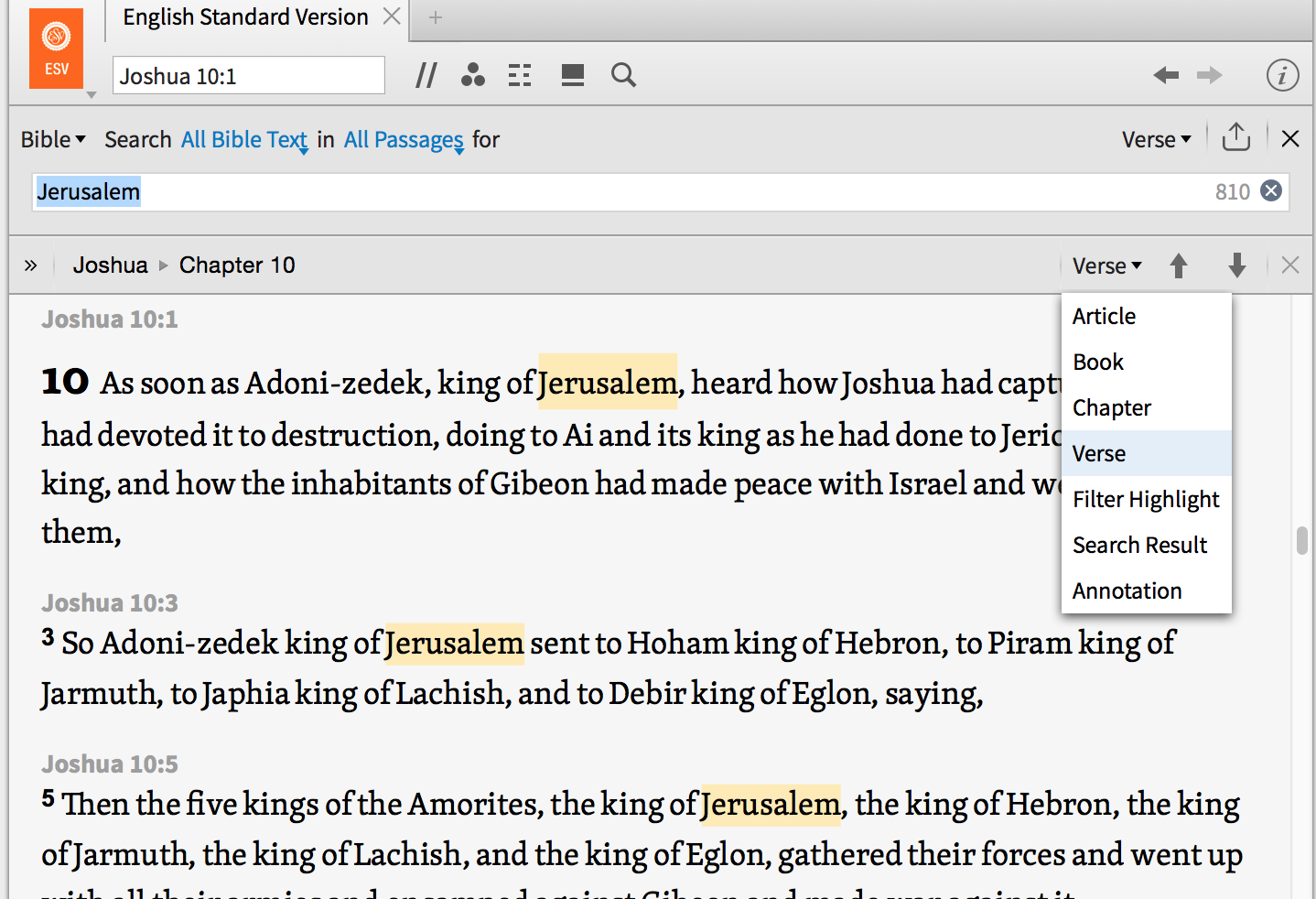
I completely agree with your proposal. In fact, I would also like to suggest that the navigation tools in the locator bar actually work within the context of the inline search filtered results. Currently it is functioning as if the inline search or filtered results were not there going from Josh 10.1 to 10.2.
Good suggestion. It should only jump to results that are actually search results when Inline Search is active.
This is coming! [Y]
I recall this being discussed (but it may have been during the closed beta process and I can't find the thread).
I completely agree with your proposal. In fact, I would also like to suggest that the navigation tools in the locator bar actually work within the context of the inline search filtered results. Currently it is functioning as if the inline search or filtered results were not there going from Josh 10.1 to 10.2. Good suggestion. It should only jump to results that are actually search results when Inline Search is active.
The locator functions are not active for Inline search, but it should just use "Search Result" which is specific to the required task. It would be especially useful in Monographs where you can't even see a result until you scroll, due to the large articles!
EDIT: "Search Result" works - sort of! I'll experiment some more.
Let me see if I can convince you. If it were implemented I imagine it working as it currently does in the full Search Panel: 1. The mouse cursor would change to a little hand when you hover over the little grey heading above each search result. 2. A pop up window would appear with more text from the selected location. 3. If you click on it, you would navigate there, and Inline Search would close.
#2 isn't needed. In a Commentary (BKC) Inline search allows you to select the context as Sentence, Paragraph, Article. For a bible you can also select your context! But you get plenty of context in some Monographs with large articles and no choice of context. The issue for a popup is how much context and would it tend to interfere with the navigation click #3. I would prefer to select context and use the "Search Result" locator to move around.
The reason some resources do not support other contextualization options is because they have not been rebuilt with the required "semantic boundary data" (i.e. phrase/sentence/paragraph boundaries). This same data is used for smart select, so those resources won't support that either. The bulk resource update was in part to support these two features (among other things), but it wasn't comprehensive. More and more resources will be properly tagged and updated as time goes on.
The reason some resources do not support other contextualization options is because they have not been rebuilt with the required "semantic boundary data" (i.e. phrase/sentence/paragraph boundaries).
Thanks for the clarification Alan.
Would it be possible to build in the "Search Result" navigator so that we don't have the extra height of the Locator bar and then have to select it?
The reason some resources do not support other contextualization options is because they have not been rebuilt with the required "semantic boundary data" (i.e. phrase/sentence/paragraph boundaries). Thanks for the clarification Alan. Would it be possible to build in the "Search Result" navigator so that we don't have the extra height of the Locator bar and then have to select it?
I like the suggestion. [Y] I can't promise anything, but I will make a case and see if I can argue for previous/next navigation built into the Inline Search panel.
The reason some resources do not support other contextualization options is because they have not been rebuilt with the required "semantic boundary data" (i.e. phrase/sentence/paragraph boundaries). Thanks for the clarification Alan. Would it be possible to build in the "Search Result" navigator so that we don't have the extra height of the Locator bar and then have to select it? I like the suggestion. I can't promise anything, but I will make a case and see if I can argue for previous/next navigation built into the Inline Search panel.
I like the suggestion. I can't promise anything, but I will make a case and see if I can argue for previous/next navigation built into the Inline Search panel.
This is a great suggestion. During the beta I proposed that Logos change automatically the previous/next navigation tool to "Search Results" and then switch it back after closing the Inline Search, but that is so problematic on so many levels. Dave's suggestion here would be a very nice and clean way to implement it. [Y]
Available Now
Build your biblical library with a new trusted commentary or resource every month. Yours to keep forever.