The course videos play but do not show in the desktop app. All I see is a white screen. The videos run as expected in Google Chrome browser.
Sorry about this, Harold. These troubleshooting steps may help. https://support.logos.com/hc/en-us/articles/360008520751-Troubleshooting-Media-Problems
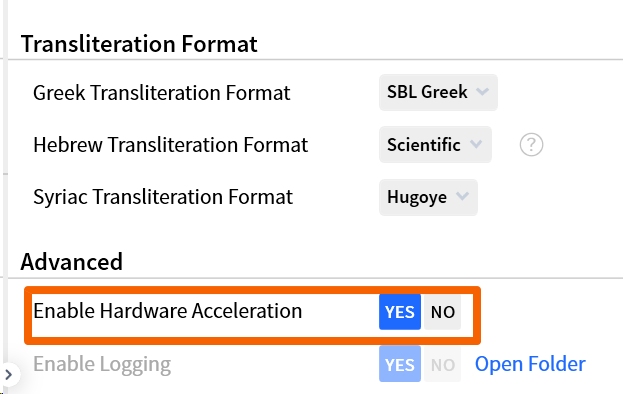
@Harold Guptill Hi Harold. I had the same issue, and what resolved it was going into Logos' program settings and enabling Hardware Acceleration which is listed in the article @Adam Borries (Logos) shared. The solution does say it is for video windows that are black, but mine was white like yours.
Best, Pat
Thank you,
I cannot find Hardware Acceleration any place. Using Windows 11. I have exhausted the link that Adam supplied. It looks to me that I will just use the logos.com internet site.
The setting should be right at the bottom of Program Settings
Does that not show for you?
Well, don't I feel like a fool . I missed the Logos setting that Pat pointed out. Thank you, Graham. That solved my issue!
I was focused on the Windows 11 settings, not the Logos ones.
Available Now
Build your biblical library with a new trusted commentary or resource every month. Yours to keep forever.