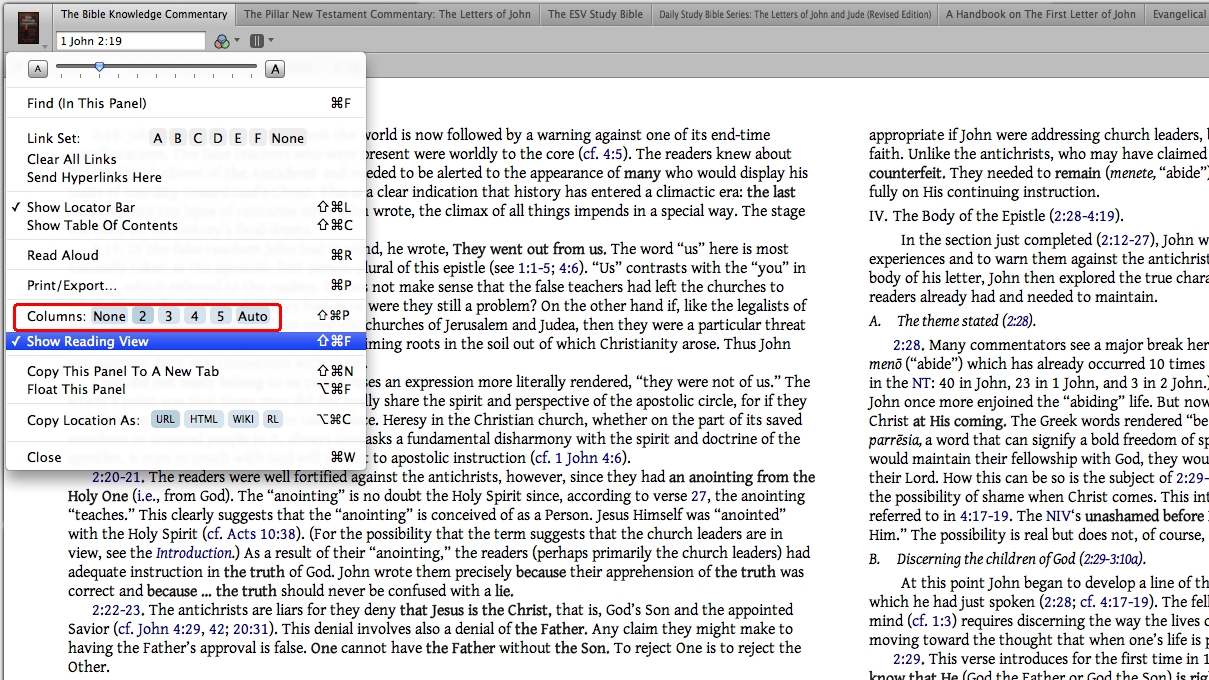
I was reading back in April 10 that columns were possibly being added to the reading view mode. Has any progress been made on this as it is tricky to read in the current view. Also a nicer way to turn the page would be good
Dan
Yes, it is available in the current beta 4.2. I do not know when this beta will be going gold, but you can be confident that this feature will soon be available.
great thanks good to know
Yep, good to know!
But as far as I can see the columns cant be changed when you go to Full Page mode unless you mess about with resizing the window. Not ideal
In the current beta you can choose two to five columns whether you are in the full page reading mode or not. It also has an automatic mode which will choose the number of columns for you. As was mentioned above this should be released to gold soon. It is nice that Logos is giving us control over the number of columns. I have a 22" monitor and can have two columns in the full page reading mode with nice spacing between the columns.
Hi Jerry
I may be doing something wrong but how can I choose to have only two columns in full screen mode?
Hi Jerry I may be doing something wrong but how can I choose to have only two columns in full screen mode? Dan
When in fullscreen mode, move your mouse to the top of the screen and the window icon and tabs will appear (they will drop down from off-screen). Then click on the icon to get the window menu, and select 2 columns.
(edit: sorry, I'm on Windows...I don't know if it works the same on the Mac beta)
In Reading Mode, use the menu under the book icon in the upper left corner. I am in 4.2a Beta 6.
thanks, I should have worked that out![:P]
Available Now
Build your biblical library with a new trusted commentary or resource every month. Yours to keep forever.