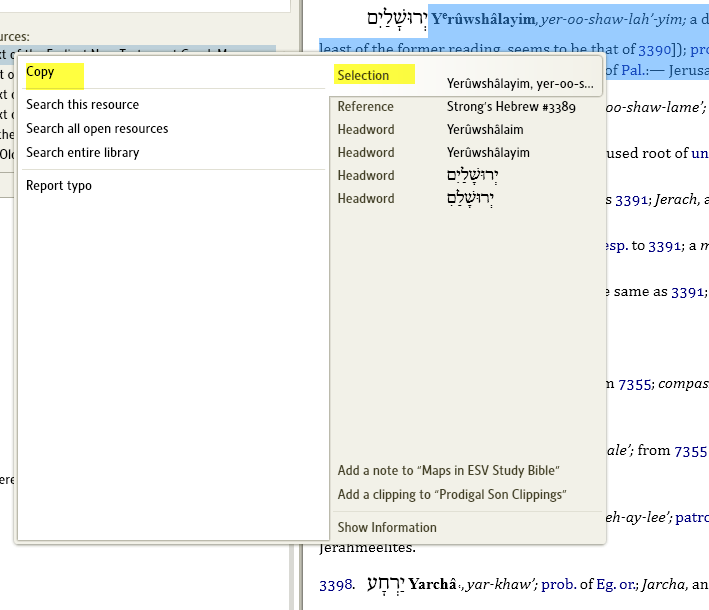
There's no right click copy/paste feature when I try to copy a definition into a Word document. Can someone help?
You should:
This video covers copying/pasting in more detail: http://www.4-14.org.uk/logos/tutorial-videos#desc-17178004
Normally you highlight the desired text in Strongs (Logos4), right click, and then select 'copy', with 'Selection' highlighted on the right-side of the menu. In Word, then it's the usual paste. Sometimes 'Selection' isn't highlighted on the right-side of the menu.
That's what I have been doing. The only problem there is no "copy" function when the window opens.
so, does this mean I have to click selcetion every time, or is there a way that the selection option stays selected.
Someone please explain why LOGOS has abandoned the "keep it simple" format?
No, Logos will remember what you had selected last time, so you won't have to click it again.
Logos 4 is not less simple, it's just different. Some people would say it's actually simpler than L3. If you're knew to Logos 4, can I suggest you want these training videos. I'm sure you'll find the investment of your time helpful in understand how and why Logos 4 works:
http://www.4-14.org.uk/logos/tutorial-videos
Debbie, you should be seeing something like this:
Available Now
Build your biblical library with a new trusted commentary or resource every month. Yours to keep forever.