How do you increase font size within Logos 4 Mac to make reading easier?
How can you increase the font size in things like text comparison, notes, etc.
Rod
For now you will have to use the the system zoom.
System Zoom?
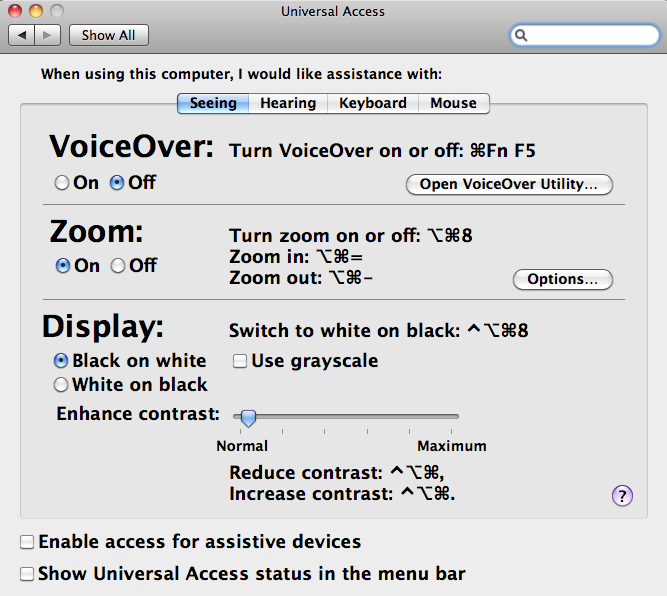
Mac OS X has several accessibility options, including screen magnification zoom + / - with option-command keyboard shortcutsSetting Mac OS X screen resolution smaller effectively magnifies everything (amount of fuzziness for using smaller resolution depends on monitor)
Keep Smiling [:)]
Thank you!
It would be nice to change the default font size in notes. Are you working on this?
Well neither KS4J or myself are - we are just users of the program who chip in with 'helpful' comments at times.
However I am sure that the developers have this on their radar.
Perhaps I am missing something obvious. However, the only place I have found in which I could adjust font size is in the System preferences. However, that seemed only to affect the Notes font. The box that is almost unreadable is the one with resources, as well as other windows. How does one get to the displayed slider panel? I am going to continue to look myself, but if you could point me in the right direction, that would be great. This font issue is the one big problem I have with Logos being usable.
The box that is almost unreadable is the one with resources, as well as other windows. How does one get to the displayed slider panel?
Welcome [:D]
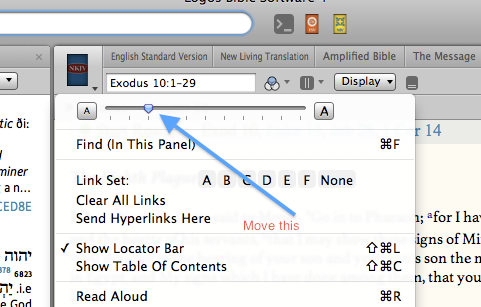
Logos has a Mac video => http://www.logos.com/videos/2527/logos-4-mac-font-scaling that shows clicking resource cover (upper left in a panel) to display and adjust resource font scaling. Video also shows program scaling that was removed due to several issues - linked on Wiki page http://wiki.logos.com/Mac_Troubleshooting#Program_Scaling
How does one get to the displayed slider panel?
By clicking on the down arrow beside the Book Icon - top left of my screen shot earlier in this thread.
Thanks, Mike, for taking the time to explain. However, the part of the screen that I would love to be able to adjust is not a "resource", book or reading that comes up when I click on the list of available things. The actual list of resources, within the window that I assume probably has a name, is tiny and, to my 61 year old eyes, almost unreadable. I am guessing that there must not be a way to make that larger, as it is not listed in System preferences, and in the upper left hand corner there is a magnifying glass for searching. There does not seem to be a way to adjust the size of this resource list. It is the same font, and size as the History list on left hand side.
If Logos has a "suggestion" box, that would be my recommendation. I can't be the only one who has difficulty with the size. If I am missing something, let me know. I looked at the Wiki page, and it had something that involved using Terminal to affect something about the display in Logos. However, not being sure to what they are referring, and not being very conversant with Terminal program, I am hesitant to mess around with system level adjustments.
Thanks,
Danny
That's the main thing Logos 4 Windows has over mac version, imo. Can adjust passage guide panel (I call it the "left panel" b/co of its location) and text comparison in one but not the other. Strange developers have left this off. Anyone know why? I'm sure it's been listed somewhere, just probably missed it.
There does not seem to be a way to adjust the size of this resource list. It is the same font, and size as the History list on left hand side. If Logos has a "suggestion" box, that would be my recommendation.
There does not seem to be a way to adjust the size of this resource list. It is the same font, and size as the History list on left hand side.
If Logos has a "suggestion" box, that would be my recommendation.
Tom Philpot is a Logos developer - copied reply on 7 Jan 2011 in thread http://community.logos.com/forums/p/28263/209867.aspx#209867
General text zooming for more than resources & library is on the list with or without 10.7.
Concur Logos 4 PC has program scaling option that works well along with Font Sliders in Passage Guide and Text Comparison. Wiki has Program Scaling - including links to several forum discussions.
Mac OS X System Preferences has Universal Access:
Can press 3 keys to zoom in: option + command + =
Likewise can press 3 keys to zoom out: option + command + -
Thanks for the suggestion and the info. Does Tom's January post mean scaling will be included in Logos 4 Mac like in Logos 4 windows once Apple updates OSX? (Fingers crossed).
If not is that in the works? Having this in Mac version would truly put Logos 4 Mac on par with it's Windows older brother (at least for me).
That said, truly grateful for Logos and the tremendous blessing it is!
Agreed. This needs to be an added "feature." My Bibles and some other text I can adjust the zoom, but other items I can't and the default text is soo small. Should be an easy fix. We'll see if Logos will help those of us who like to read easier.
Should be an easy fix. We'll see if Logos will help those of us who like to read easier.
Program scaling fix needs Apple font rendering improvements (was removed from Logos 4 Mac alpha 20 pre-release in May 2010). Wiki Mac Troubleshooting => Program Scaling includes: "Logos 4 Mac AppleScript Application can show, then change Program Display Scaling to default 100 % or custom % (includes note: Logos recommends 100 % for readability)"
Caution: Apple's font rendering can be blurry or fuzzy when not using 100 % (also clicking drop down menus can become challenging).
Available Now
Build your biblical library with a new trusted commentary or resource every month. Yours to keep forever.