Delighted to discover that Religious and Theological Abstracts is due to ship 8/17/12!
http://www.logos.com/product/8652/religious-and-theological-abstracts
Anyone have a quick first impression now that its released? I've alway been intrigued by this resource and since the price hasn't risen much from pre-pub, I'm still intrigued!
I'll try it out once the indexing is complete and see if I can post some results.
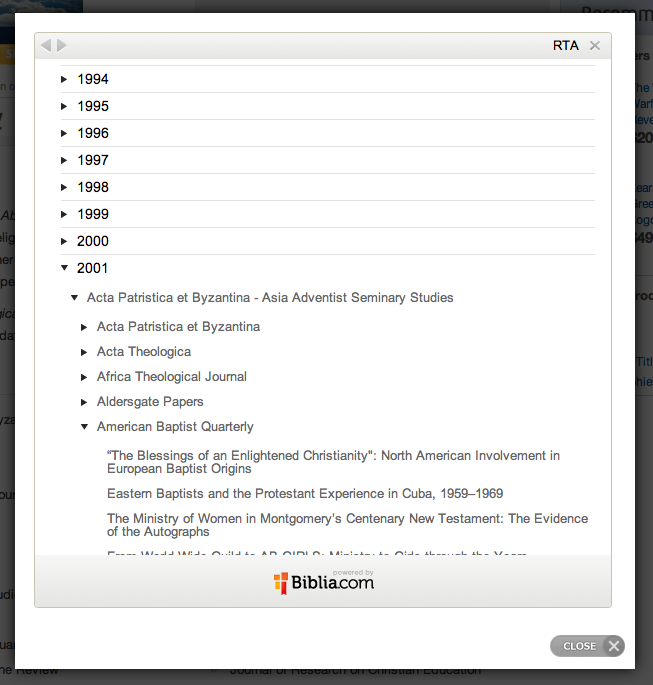
It's 263 MB so it's a pretty impressive first impression! I'm pretty happy with it. The abstracts are pretty brief and to the point which is good but may be too brief at times. They were written by a multitude of people over the years so obviously there is some variation in style and emphasis. The table of contents is arranged by year and then journal title and then articles. This makes it easy to navigate chronologically, not so much if you are going through a particular journal.
Unlike ATLAS there isn't a list of related biblical passages so if you're searching for abstracts related to a particular reference you're going to have trouble. Searching "Galatians" will return 1453 results in 644 articles. Thankfully related to Galatians. However if you are working on a book that is also a personal name you're really going to have trouble because it's going to return author's names as well. e.g. James, Mark. Presumably you are expected to already know which abstract you are looking for.
Another annoyance is that all the article titles are in CAPITAL LETTERS so if you cut and paste it for your bibliography you'll have to retype it.
At the end there is a section "miscellaneous abstracts" which is a grab bag of various journals. Unfort, none of the abstracts tell you what year they are from because they have been removed their context (I guess). You'll have to match the volume number to a year in order to locate it.
Those are my first thoughts. I would definitely buy it again and hopefully Logos will update it soon - 2012 currently includes only four abstracts.
The links to the articles in the Westminster Theological Journal appear to broken for me on the IOS application (I have the resource and it works on dektop, although it seems to open in thw rong place (but near) sometimes), are they hot linked to library resources on the mobile app?
... if you are working on a book that is also a personal name you're really going to have trouble because it's going to return author's names as well. e.g. James, Mark.
Since the Scripture passages are hyperlinked, you can locate references to Mark's gospel by searching on:<Mark>with the angle-brackets.
This returned 2732 hits in 1614 articles.
And re changing case, if you use MS Word, Shift+F3 should cycle through case options rather than retype it.
HTH.
Thanks Tom (and others). I fogot about the preview we have access to on the product page, and I'm a little confused by the TOC. When you expand a year and then expand what looks to be a journal for that year, there seems to be yet another list of journals which then reveal articles. Is this the way it is set up in the resource? What is that first list of journal titles under each year?
Is this the way it is set up in the resource? What is that first list of journal titles under each year?
Yes it is set up this way. The first heading is similar to what you find in some other Logos resources. It is a sub-heading which lists the range of journals found under it. Makes the TOC much shorter. You just expand the section where a journal you are interested in would be found.
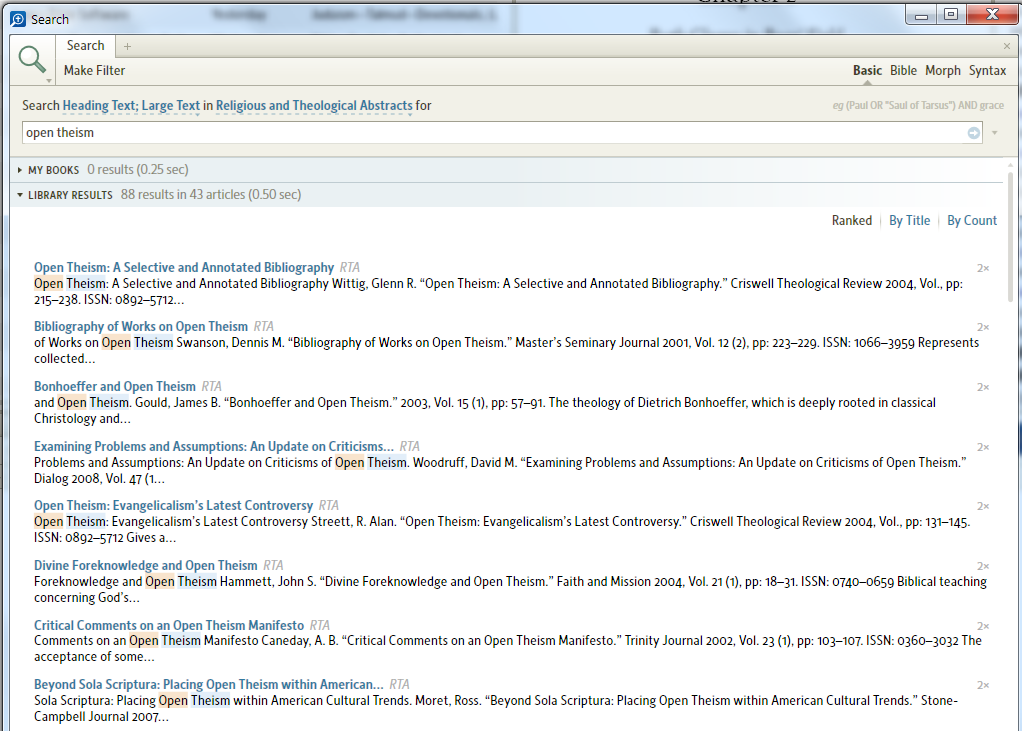
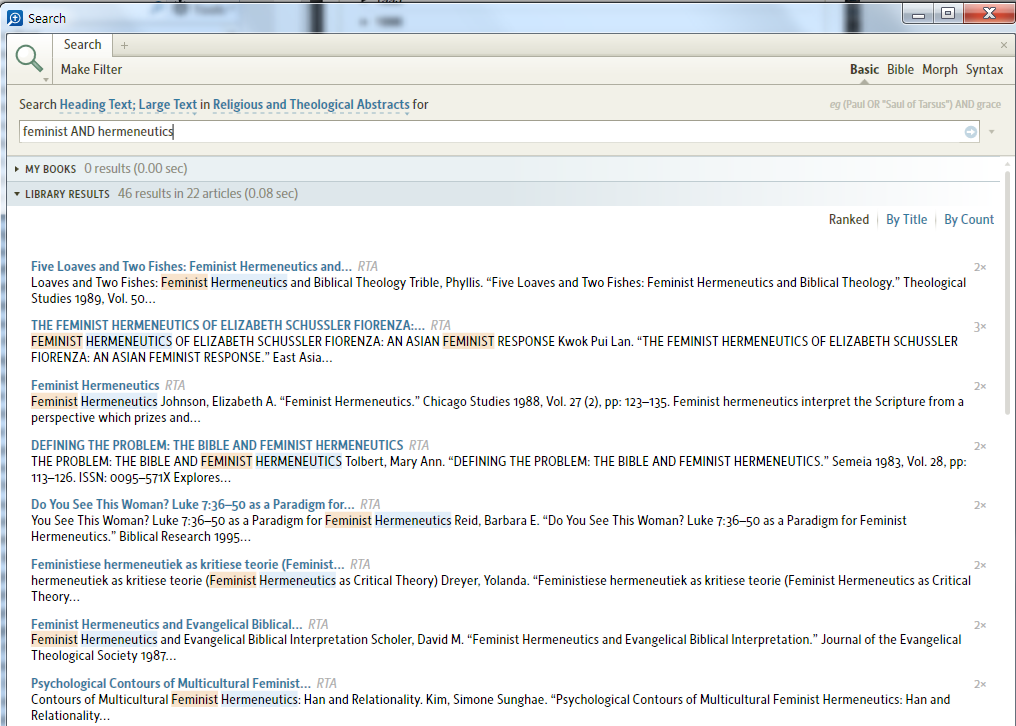
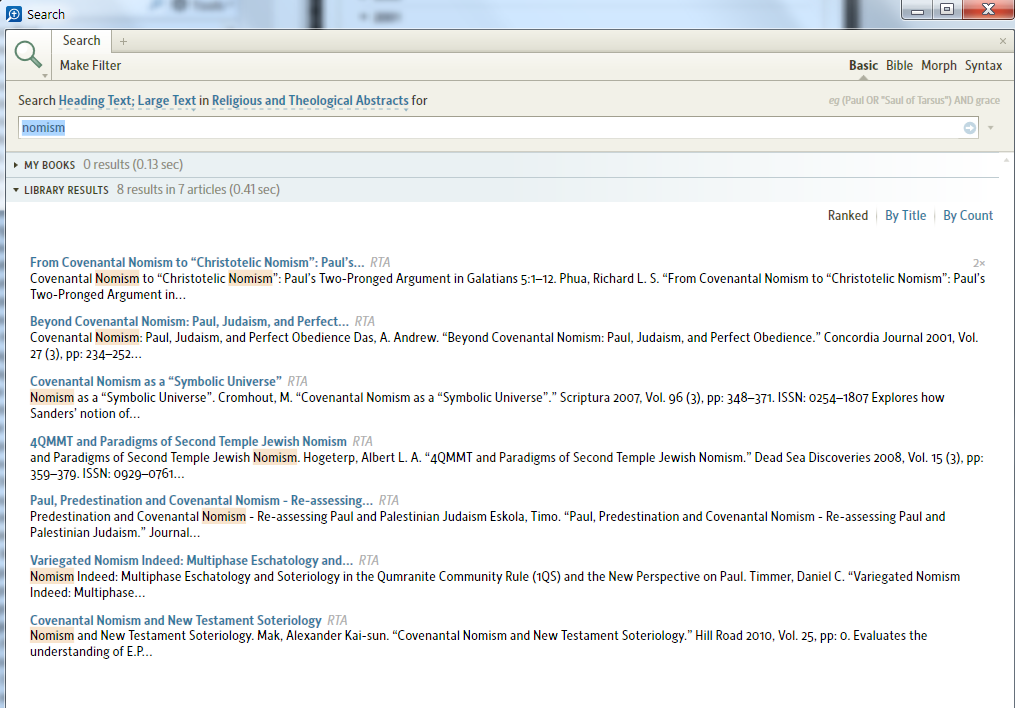
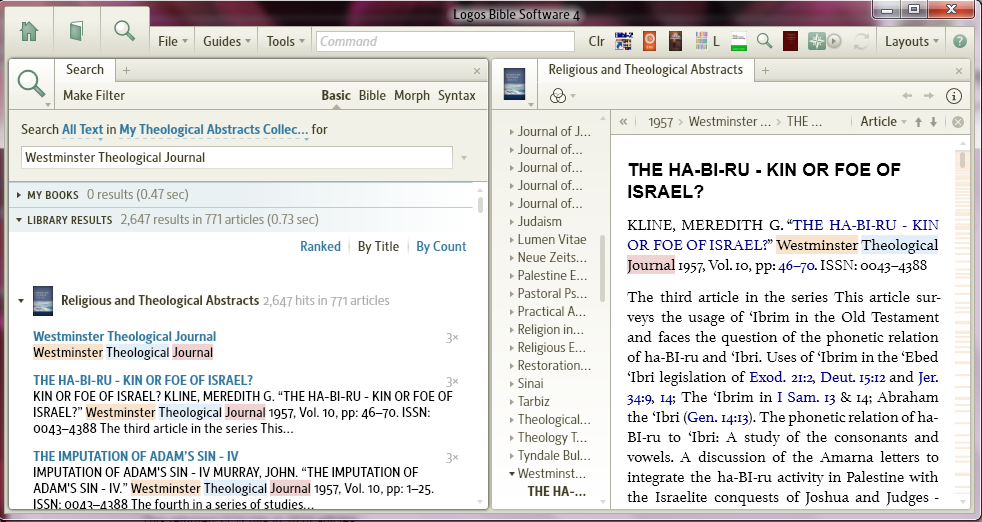
Here are a couple of sample searches (partial results shown):
In the first two searches I did not check 'Match all work forms'. I checked it in the third (although it made no difference).
One thing that would be really helpful with this resource would be to have search results expanded or rearranged so one could at least see the journal and date of publication of each hit. I will make that as a separate suggestion.
The table of contents is arranged by year and then journal title
I think (right now at least) that I would have preferred it the other way around.
An index at the end, listing all included journals, and with links to the first article of each included year, would certainly be useful.
Not all. I think they simply follow the practice of each journal. Some journals do that, some don't.
Unfortunately, the proofing seems pretty bad. The first thing I happened to do was open the Miscellaneous section at the end of the TOC, and the first thing I saw there was Revue d and Revue de l. Within minutes I had already reported half a dozen or so typos, all in headings. And that's without reporting the fact that all the French seems to be missing every single accent (let's not even talk about the Swedish). Not that impressive.
Most of it isn't Logos' fault, really, it comes from the website, but when a search doesn't turn up the most relevant hit because the word you were searching for happens to have been misspelt in that article, it doesn't much matter whose fault it is. And since it's Logos who collects our money, it's Logos who's responsible.
But other than that I expect it to be a very useful resource.
Does anyone know if this resource is going to be periodically updated?
The links to the articles in the Westminster Theological Journal appear to broken for me on the IOS application
I'm not experiencing you difficulty on Windows 7. Which brings me to the main reason for my post. I will follow-up with a post on Suggestions. It would sure be of benefit if Logos would use its established relationship with Knox to provide a librarian to help with academic questions, trouble-shooting, and suggestions on utilizing this powerful tool.
http://community.logos.com/forums/p/28193/210796.aspx#210796 (And look who wrote the post after. [:D])
Does anyone know if this resource is going to be periodically updated? http://community.logos.com/forums/p/28193/210796.aspx#210796 (And look who wrote the post after. )
http://community.logos.com/forums/p/28193/210796.aspx#210796 (And look who wrote the post after. )
That's funny.
I needed a good laugh.
Thanks.
... if you are working on a book that is also a personal name you're really going to have trouble because it's going to return author's names as well. e.g. James, Mark. Since the Scripture passages are hyperlinked, you can locate references to Mark's gospel by searching on:<Mark>with the angle-brackets. This returned 2732 hits in 1614 articles. And re changing case, if you use MS Word, Shift+F3 should cycle through case options rather than retype it.
Thanks Allen on the tip about Shift+F3. We will still have to do some editing as it's all or none. e.g. change at, of, to back to lower case. I've also since noticed that the all CAPITAL formatting changed to normal formatting between 1985/1986.
With regard to searching for articles about a particular biblical book my argument still holds because (I guess) only exact references are tagged as such. For example searching for "<Galatians>" it returns 799 articles but if you search for "<Galatians> OR Galatians" it returns 1082 articles. So you would miss 283 articles that obviously refer to Galatians (and perhaps more specifically than some of those which only include a reference). Searching for some books this way obviously won't work as I said previously.
For example searching for "<Galatians>" it returns 799 articles but if you search for "<Galatians> OR Galatians" it returns 1082 articles. So you would miss 283 articles that obviously refer to Galatians
If the tagging is correct the 283 ought to refer to Galatians as in people from Galatia. You probably don't want every reference that says something like 'unlike the Galatians, the Ephesians...', and then goes on to talk about Ephesians.
searching for "<Galatians>" it returns 799 articles but if you search for "<Galatians> OR Galatians" it returns 1082 articles. So you would miss 283 articles that obviously refer to Galatians
You may be right, Tom, in that references to the entire book are not tagged like this.
Or perhaps some of those quotes are not refering to the book but to the people--i.e the residents of Galatia, as in "The Galatians were part of the Roman empire."
Generally I would agree that results for Galatians probably wouldn't be that important but given that this is a collection of short abstracts anytime Galatians is mentioned it must be important to the article being discussed. For example, if I am interested in Galatians and Paul's opponents a search for "Galatians AND opponents" nets 51 articles but "<Galatians> AND opponents" only nets 37. Guess which search nets this article
Tyson, Joseph B. "Paul’s Opponents in Galatia". Novum Testamentum, 10 Vol., 1968 10 (1968): 241-254, 1968.
And re changing case, if you use MS Word, Shift+F3 should cycle through case options rather than retype it. Thanks Allen on the tip about Shift+F3. We will still have to do some editing as it's all or none. e.g. change at, of, to back to lower case.
Thanks Allen on the tip about Shift+F3. We will still have to do some editing as it's all or none. e.g. change at, of, to back to lower case.
That's always bugged me about Shift+F3 in Word, so a while back I wrote a macro to do Title Case correctly (with small prepositions and articles in lower case), and assigned it to Alt+Shift+F3. You can adapt it to whatever list of words you think should be in lower case in titles. (I got this initially from the web but modified it somewhat.)
Sub SmartTitleCase() Dim lclist As String Dim wrd As Integer Dim sTest As String ' list of lowercase words, surrounded by spaces lclist = " a an and amid at but by for from in into nor of on onto or over per the to unto with " Selection.Range.Case = wdTitleWord For wrd = 2 To Selection.Range.Words.Count - 1 sTest = Trim(Selection.Range.Words(wrd))
sTest = " " & LCase(sTest) & " " If InStr(lclist, sTest) Then Selection.Range.Words(wrd).Case = wdLowerCase End If Next wrdEnd Sub
EDIT: To set it up: On the Developer tab in Word (which you might need to enable in Word Options if it isn't visible), click Macros. Type in the macro name -- SmartTitleCase. Click Create. Then copy the contents of the macro above and paste it within the empty shell of a macro that got set up for you in Word. Make sure you don't duplicate the Sub SmartTitleCase() or End Sub lines. Now select File > Close and Return to Microsoft Word. Finally go to Word Options, click Customize, then next to "Keyboard shortcuts" click Customize again, scroll down in the list box on the left side and find Macros and select that, in the list box on the right select SmartTitleCase, click in the box labeled "Press new shortcut key" and type in your desired shortcut (e.g., Alt+Shift+F3), click Assign, then Close, then OK. Now you're all set to use the macro.
To use it, select a title that you want to fix the capitalization on, and press Alt+Shift+F3.
Be sure to say "yes" to save changes to normal.dot (or normal.dotx) when you exit Word after setting up the macro.
Okay, Paul. I've just had a chance to use RTA. It's well suited to purpose: good for locating journal articles on a topic you are researching. If you have a) research projects to do, and b) access to libraries that hold many of the journals, then it's a no-brainer. Invaluable.
You can search in Large Text or Heading Text to locate articles that contain your search terms in their titles. I just ran one for:apocalyptic NEAR Jesusand it took me to a great bundle of articles that related to what I was after.
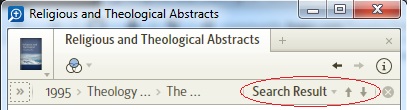
Hint: Set the up/down arrows to Search Result, to quickly jump to the previous/next match:
The links to the articles in the Westminster Theological Journal appear to broken for me on the IOS application (I have the resource and it works on dektop, although it seems to open in thw rong place (but near) sometimes)
One Thousand apologies, you are perfectly correct, Mike. I was very tired on the day I first responded to your post and thus misunderstood your observation. I affirm the following: cap headings are not linked to the headwords of articles in all the journals; I checked (Themelios, Bib Sacr, Westminster, and Ashland). Also in Westminster the citations are wrong in several of the articles I checked (they are linked by page number). Some of the articles I checked, the page numbers are not hyper-linked. I reported all of these as typos. I have a vague recollection that the reporting practice for links differs from actual typos, but I can't remember what it is. If someone can refresh my memory I'd appreciate it.
The copy editors have there work cut out for them!
Available Now
Build your biblical library with a new trusted commentary or resource every month. Yours to keep forever.