Video's for setting up and using these filters?
Can one limit the range of text when using the filters so that Logos does not get bogged down?
Just need more info and better instructions than the wiki.
Thanks.
Video's for setting up and using these filters? Can one limit the range of text when using the filters so that Logos does not get bogged down? Just need more info and better instructions than the wiki.
I note you say the wiki doesn't give you what you need but it does seem to answer your questions[:)]
At the top of the article - http://wiki.logos.com/Visual_Filter - there is a link to a video on visual filters (for L4 but the principles are the same).
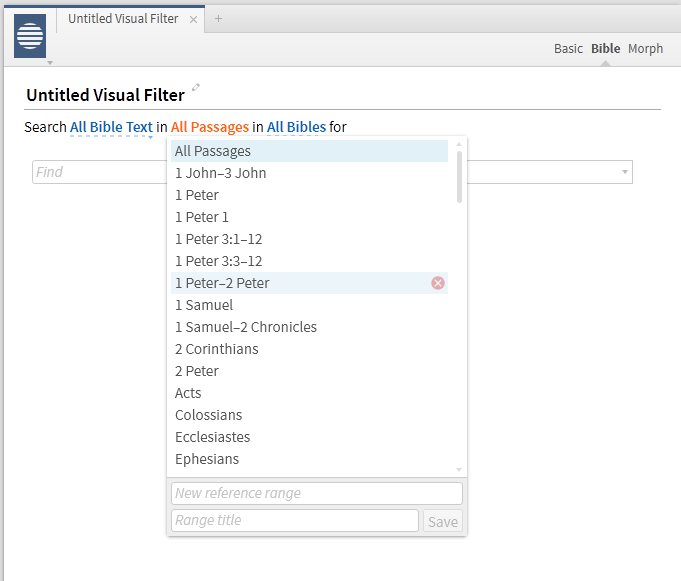
In the article itself it shows that you can change the Passage being used to restrict the range.
Are there specific things you need - apart from the range mentioned above - which is not included there?
Graham
Yes, the Bible and Morph visual filters can be set to only run on a specific passage.
Think of it like setting up a search. It just has the capability to add a custom highlight to the search.
Thanks, missed that.
Yes, having trouble understanding how to set up my own visual filters, mark-ups.
Will keep trying.
Wiki includes => http://wiki.logos.com/Extended_Tips_for_Highlighting_and_Visual_Filters#Examples_of_visual_filters
Personally learned to first create/modify Highlighting Palette and Styles, then proceed with visual filters.
Keep Smiling [:)]
These are cool!
And I expect we should be able to share visual filters eventually as the sharing capability enabled through https://documents.logos.com/ develops
KSFJ was/is correct, this is a great tool, powerful.
For many , many years I have always gone through my English texts and "marked or tagged" things by hand according to the greek texts and proper noun, pronoun, verb forms.
For instance : Ephesians 1 is a good example of the need to pay attention to proper pronouns to understand the Apostle speaks of what they ( the Apostles ) received first, and then what the community received after/through them. The personal pronouns are very important to see and be read properly.
Logos, through the visual filter's can do in seconds what takes me hours and hours to do by hand with the greek text and gramcord's parsings.
Pretty cool, I'm hooked and, for the first time, Logos is stable enough for me to try these features. Would never try them in version 4 as it was so unstable, basically just used it as an e-reader.
I'm loving the visual filters!
Pretty cool, I'm hooked and, for the first time, Logos is stable enough for me to try these features. Would never try them in version 4 as it was so unstable, basically just used it as an e-reader. I'm loving the visual filters!
Understand visual filters hook, line, ....
Thankful that Logos can effectively combine hundreds of search results for simultaneous display in English and Greek resources. With verbs and things highlighted, easy to correlate between English and Greek along with "seeing" both languages in context.
Phillipians 4 has a number of imperative to ponder.
Dear KSFJ: Yep.
Hey, one of the things I really like doing in Accordance is having the NA27 open "side by side" with the NASB and tracking together. Putting my curser on an English word, highlights the greek and, vis-versa. Sort of like an interlinear , but without the distractions.
Then, I can work with Lexicons/Dictionaries from either direction, or both, with a great deal of ease.
It's just something I like, It's really simple, fast and the flow "just works" for me.
Is there a way to do something similar in Logos?
The drop down interlinear really "bogs down" scrolling and pretty much Logos in general, so I just use it "as needed".
I am used to useing both programs together, so no problem if this is not feasible.
Next: It seems to me that you use several layouts and , I get the idea you can switch between different set-ups, for different things or, have more than one open at a time and move between them. Am I correct and if so, how does one go about having more than one layout open at a time.
Thanks so much, let me know if this needs to move to another thread or, am asking too many questions.
Grace and Peace.
Hey, one of the things I really like doing in Accordance is having the NA27 open "side by side" with the NASB and tracking together. Putting my curser on an English word, highlights the greek and, vis-versa.
Wiki has => http://wiki.logos.com/Sympathetic_highlighting
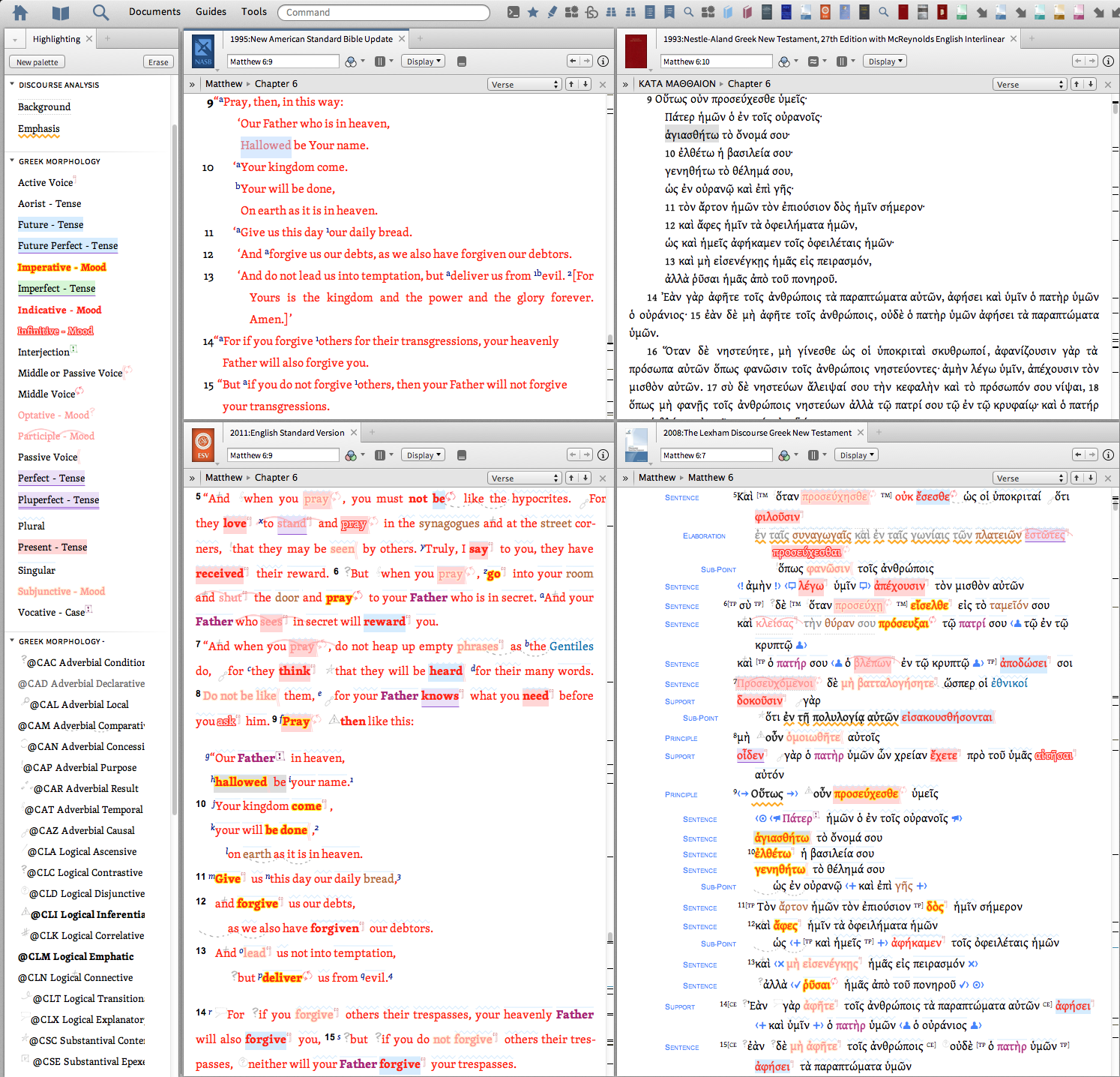
With sympathetic highlighting turned on in resources with morphological tagging, can highlight word(s) in one resource for sympathetic highlighting in other(s). By way of example, turned on Sympathetic Highlighting in four resources then highlighted Hallowed in NASB. Noticed visual filter does not highlight be in ESV, but Sympathetic Highlighting does.
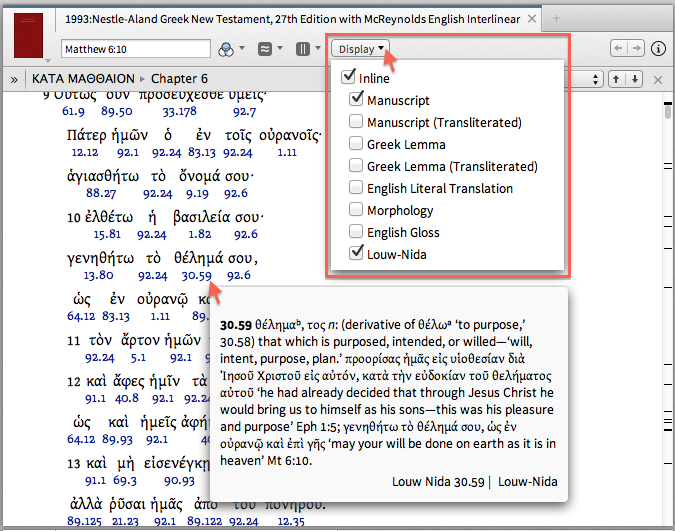
In contrast, visual filter highlighting can simultaneously highlight English and Greek for quick cross reference. In Matthew 6:9-13, personally "seeing" seven imperative moods in Greek and English. When want pop-up with contextual range of meaning for Greek words, use Display menu to show Surface and Louw-Nida so can hover mouse on Louw-Nida # for a pop-up with contextual range of word meaning.
Then, I can work with Lexicons/Dictionaries from either direction, or both, with a great deal of ease. It's just something I like, It's really simple, fast and the flow "just works" for me. Is there a way to do something similar in Logos?
Logos has right click menu, which can be used to quickly open a number of item(s), including Power Lookup across Lexicons and Dictionaries.
Next: It seems to me that you use several layouts
Depends on what want to do in Logos. Layout(s) are a saved arrangement of open item(s) with bookmarked location(s).
When working on collections, personally use one layout that has two tabs that extend across the entire screen for Collections and Library.
For forum replies, tend to start with a blank layout in Logos, then open item(s) as appropriate to illustrate.
Part of using Logos effectively is having minimal item(s) open, knowing how to quickly open more item(s) as desired, then arrange appropriately.
Thanks, will work with that a bit and see how it works out for me.
Thanks again for your help.
Sadly for you, I will be getting back to you-smile.
Thankful for many friendly forum discussions about using Logos Bible Software; have learned a lot plus have a lot to learn. Looking forward to more discussions.
Thankful for awesome Bible Study capabilities in Logos.
I always want to try these visual filters.. but I am SO scared that I might mess up something
In the worst case, can delete visual filter(s) and highlighting palette(s) then start over.
Personally started by creating one highlighting palette and one Logos Greek Morphology visual filter. Later choose to split one Greek palette into three and create more visual filters so have option for selectively highlighting. Thankful for a thread discussion => Visual Filter for what to do and not do that provided impetus to improve verbal visual filter.
Logos is stable enough for me to try these features
That statement is wonderful news, no matter what feature you mean. Pleased that you finally have a stable Logos application.
Thanks Jack. Me too, pretty nice being able to try all the things others have talked about and seen the screenshots of.
Really liking the visual filters, these are going to be quite the handy tool.
Blessings,
Available Now
Build your biblical library with a new trusted commentary or resource every month. Yours to keep forever.