I purchased the Bible Study Library LE, downloaded and installed. All I get is a blank search screen
Jonathan,
Yes...the Alpha mac version shows a "blank" homepage....soon to be a real homepage.
Uncheck box in the lower lefthand corner called "show the homepage at startup" and go right to logos...then when you have your windows arranged like you like them...shut logos down after your studies and it will open up to that layout when you restart.
Hi Robert, thanks for your advice. Have unchecked the 'homepage' box and tried without success to 'go' right to Logos. Typed in web address etc - nothing happens ...?
Jon,
No...I meant "go to a blank layout"
Sorry for the confusion.
Logos loads either to: the homepage OR a "last used layout"
In your case, you want to have it NOT load the homepage but DO load to your open resources.
Hi Robert
I'm feeling a bit stupid here, but isn't the package that I purchased supposed to come with resources? Or is it just a resource/info managing application and I still have to buy/download other resources/bibles?
yes..it's got resources.
If you have the CD and installed...they are in your library.
If you downloaded from the web...they need to download and index...
how long ago did you download or install?
PS: that has nothing to do with your blank homepage issue....
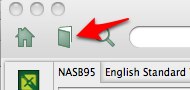
Try clicking on the 'open book' logo on the top of the blank page - this will take to your library.
Otherwise look at the program menu at the top of the screen and click on 'Guides - Passage Guide and type into the new input box a bible reference eg Matt 1 1-10.
Tootle pip
Mike
HI Robert I downloaded about 4 hours ago - and i am on quite a quick connection
Click the book icon at the top of the page and you should see a list of the resources you have available.
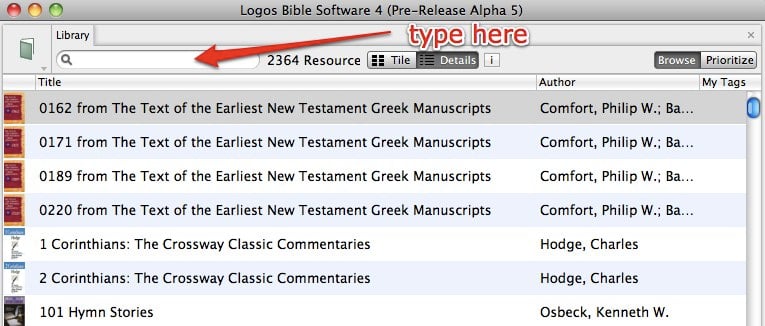
With the Library window open you should see a list of all the resources you have available. Type into the box to find specific resources. Double click them to open them.
In just 4 hours, I don't believe that downloading and indexing have completed yet. I also have a fast connection, and those operations took overnight. Of course, that was with Alpha 1. Alpha 5 is much faster. In using Alpha software, patience is the most important attribute you can develop.
In fact, Mac Alpha will either help develop patience, or you will give up, weeping. It worked for me—somewhat. [8-|]
I agree with Jack - my download took a couple of hours and my indexing took almost 30 hours - yikes (Alpha 2). I don't think your has finished yet. You should see a small Logos 4 icon up in your menu bar. if you hover over it, it will show you how long you have to go to finish downloading or indexing.
if you hover over it, it will show you how long you have to go to finish downloading or indexing.
However, please note that this time is only an estimate. Whatever times is says, it actually means, "Hey, I'll still busy here!" It's kind of like when I say "Honey, where do you want to eat" and she replies "Anywhere, you pick". Don't believe that for one second. All that means is that she is hungry, and she wants you to keep guessing until something sounds good to her. [:D] (As you can probably guess, my wife does not read this forum)
Available Now
Build your biblical library with a new trusted commentary or resource every month. Yours to keep forever.