HI,
Is there a way to import a PDF or a Doc or even an ebook into your logos library?
Thanks,
Hans
We've got Personal Book Builder https://www.logos.com/support/logos5/personal-books. The source file needs to be a .docx file. We don't support .pdf here.
Its a shame no PDF conversion into Logos- I have 5,000 personal articles including diagrams which are left out of my resource library- maybe one day.
PDF's are very different than .docx files and ebooks. A "PDF" is a "portable document folder." Many are basically photographs. The text isn't editable and doesn't flow. The advantage of a PDF is that it ALWAYS looks the same from one computer to the next. Not so with ebooks and word documents. There is NO "silver bullet" for converting PDF's into any other format.
I have a PDF version of an out of print book that I would love to have as an ebook... The best conversion I could come up with isn't very good. I haven't decided if it would be easier to type it out manually over using the converted file! [:s]
Wiki has => https://wiki.logos.com/Personal_Books and
User contributed Personal Books => https://wiki.logos.com/User_Contributed_Personal_Books
Keep Smiling [:)]
Text doesn't flow, huh? Always looks the same? I think it depends. But that'd be your point.
Alabama-
I have started re-typing a lot of notes and resources- man it is tedious- hind sight is 20/20- would not have done PDF- but it was the best at the time to save for almost forever
So far I have either reproduced into "notes" or "PBB" 500 resources- it is very, very tedious- but also, very rewarding- cost versus reward- very much worth it.
I have class notes from George Zemek in his theology series 1, 2 and 3- man wish I could get him to actually write a Theology series- I have his class outlines and listen to his lectures trying to produce a Systematic Theology, which is really more like a "biblical theology" text.
PDF conversion just does not work very well- but it does elementate a lot of work.
Text doesn't flow, huh? Always looks the same? I think it depends.
The PDF format was designed so that a document would ALWAYS look the same no matter what device you opened it up on. The text does NOT "flow," which would defeat the purpose of the PDF in the first place.
Other file formats, including .docx documents, the text does "flow." Two users opening up the SAME document might have different page counts depending upon a number of factors including the version of the software being used and the typefaces installed.
The best conversion I could come up with isn't very good. I haven't decided if it would be easier to type it out manually over using the converted file!
My wife is working with a project to transcribe the Gaelic Bible. Evidently the OCR of the PDF scan did not pick up the fadas (acute accent marks) very well. My wife has to enter them manually into a .Docx file. It takes about an hour to do one chapter. [O]
The issue I had wasn't anything that complicated ST. Most of the problem related to initial caps, pull quotes, multiple columns, etc. The book in question is a book of quotes, so it isn't in traditional paragraph formatting.
Now, Alabama. I was trying to let you re-phrase. But you double-downed.
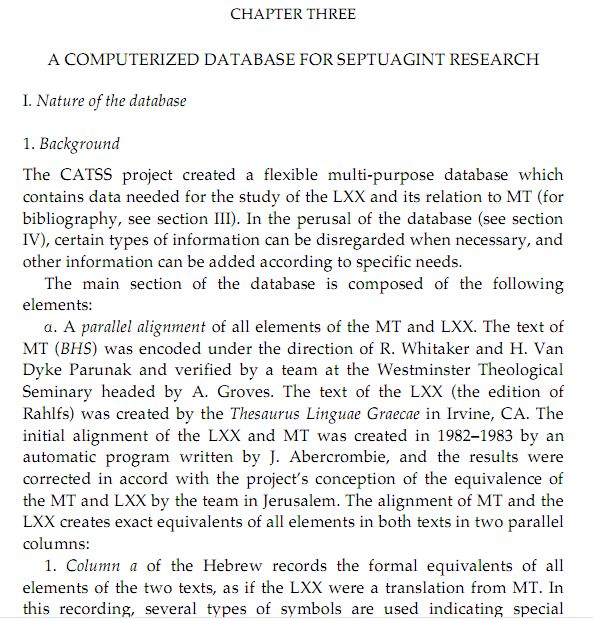
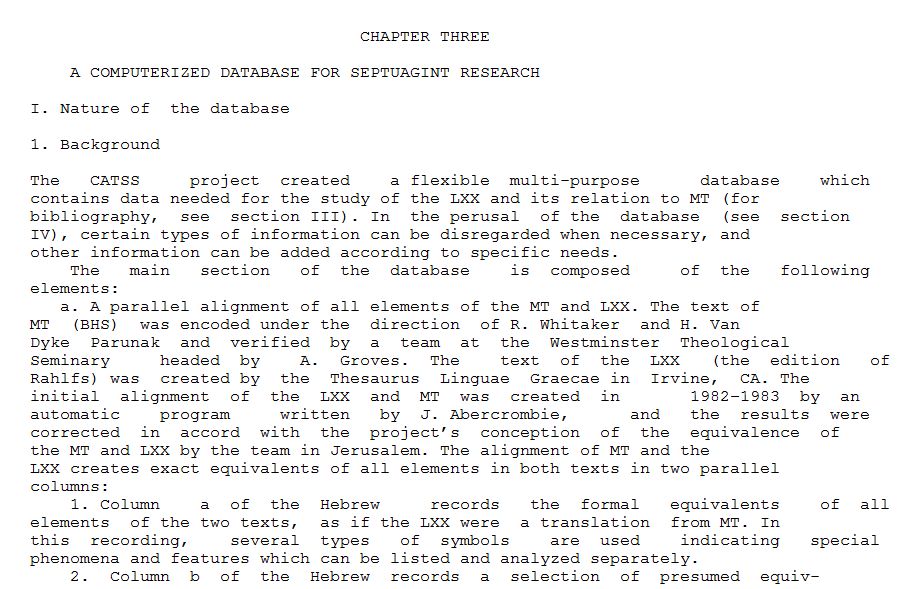
Here's two images from a PDF. One as you describe; the other with the text re-flowed. It depends (as I said) on whatever the PDF creator wanted. And if I had used a narrowed panel, it would have re-paragraphed (and the hard-returns easily removed).
..
Denise,
If I squint my eyes and stare at it applying gematrian values, I see something prophetic here.
Well, that's easy. Just don't squint your eyes and you can de-propheticize the text.
By the way (yes, I do enjoy needling), the text re-flow above is from my Bible software .... which moves the text flow into my library in the form of RTFs. Automatically. Hello.
Both of those are from the SAME pdf? How did you change typefaces?
Yes 'SAME' pdf. I'm not sure why this comes as a surprise? PDF readers have had re-flow going all the way back. Main use for me was in early Windows Mobile where it was a pain to move the horizontal scroll bar back and forth. It's typical to use a fixed font (as in the example) on the reflow view.
PDF readers have had re-flow going all the way back.
Interesting. I have never seen that. By "PDF readers," do you mean Adobe Acrobat, or something else?
I'm not sure why this comes as a surprise?
From Adobe's website: "When you convert documents, forms, graphics, and web pages to PDF, they look just like they would if printed."
The whole point of a PDF is that it will ALWAYS look the same. When you say "PDF readers," you mean a third party reader solution which messes with the PDF, right? I don't have any such reader installed on my computer.
My point above, however, was that many PDF's are really just a photograph and the text isn't editable. (see linked file below). Since Whyndell created the PDF's, they were probably from some form of word processor and would potentially be easier to convert to .docx.
5531.TryThis.pdf
Available Now
Build your biblical library with a new trusted commentary or resource every month. Yours to keep forever.