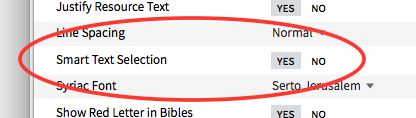
Now when I begin selecting text, it often automatically selects the whole paragraph :-( How do I turn off this automatic 'feature' - particularly a problem when highlighting a phrase in bible text!
This is "smart select" - you can turn it on / off using the "Smart Text Selection" toggle in Program Settings
Alternatively, if you press Alt (on Windows) or Opt (on Mac) smart selection will be disabled for the current selection.
Thanks :-)
This was heavily advertised as a new feature. They are calling it 'Smart Selection' or something like that.
I've always hated it in Word, etc. (I must be in the minority.) They said it could be turned off, but I don't have my crossgrade downloaded yet, so I don't know how to do that.
Hi Hugh
If you want to turn it off temporarily you can hold down the 'Alt' key BEFORE starting to select the text.
If you want to turn if off permanently
is your friend.
If you turn it off permanently but regret it temporarily then you can re-engage it for a selection session by holding down the 'Alt' key BEFORE starting to select the text.
You can actually toggle smart selection in the middle of selecting text (if you have it on in program settings, the Alt (Option on Mac) key will turn it off; if you have it off in program settings, pressing Alt/Option will turn it on). Note that the selection will only change between smart and normal if you press the Alt/Option and move the cursor to update the selection.
Hope that provides some clarity. Thanks!
Available Now
Build your biblical library with a new trusted commentary or resource every month. Yours to keep forever.