I have had a "!" on my synchronization button since yesterday. I have restarted and it continues....is there an issue with the servers?
Syncing is working for me.
Perhaps we should take a look at your logs. Please enable Logging (http://wiki.logos.com/Diagnostic_Logging ), replicate the problem,close Logos but do not restart Logos until you've moved or uploaded your logs. (Logos rewrites logs when it starts).
Zip them and upload them here when you're finished by clicking on the paperclip icon.
Perhaps we should take a look at your logs.
I am still having this problem (although it doesn't seem to affect syncing) I have not been able to submit logs because it's so confusing, can someone walk me through it. I have read the link above, but I don't know how to generate the logs.
can someone walk me through it. I have read the link above, but I don't know how to generate the logs.
Happy to do it.
I will assume you're on PC since you didn't state it.
In order to turn on logging permanently ( a good idea anyhow) download this file:
http://downloads.logos.com/LBS4/Installer/EnableLogging.js
once downloaded, locate it, and run it by double clicking on it.
You may get a warning that you're going to execute a javascript, or modify your registry. It's ok you really are doing both. I just now read the script and it is safe, it's just adding the "dword" needed to activate logging.
Now, simply start Logos, and you're logging!
In order to locate your logs, they will be in the \Logos Log Files directory of your DOCUMENTS directory.
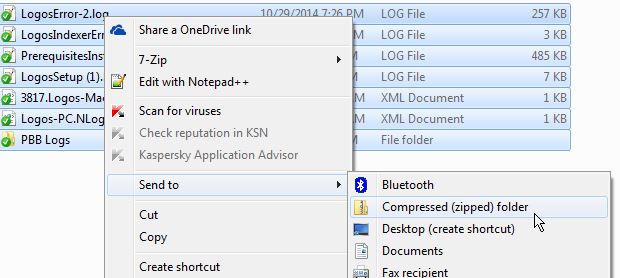
In order to submit them, you'll need to select them by clicking and dragging all of them.
Then right click and send to "compressed zipped folder".
Then to upload them, look for the paperclip icon in the Logos forum editor.
Click that, locate your Log file and upload it.
I got the same this morning for the first time; I restarted and it went away. I'm curious to see what your logs will reveal.
I have had this happen quite a few times on L6. Each time I close Logos and Reopen and it starts working again.
Happy to do it. I will assume you're on PC since you didn't state it.
I'm sorry, I am on a mac. I believe I am to hold down a button and restart, it's where to find the logs that I can't figure out. No hurry on a reply, I have a bible study to prepare for. Thank you for your willingness to help. This forum is incredible!
I'm sorry, I am on a mac.
it's where to find the logs that I can't figure out.
Ah, well then, navigate to ~/Library/Application Support/Logos4/Logging
Note that it is under your home (~) folder. You may need to check the instructions for your specific OS for revealing hidden folders if those are hidden from view.
As before compress and upload the files.
Find a post by Alabama, and use the link in his signature.
https://www.logos.com/support/logos6/mac/report-problem
deleting duplicate post
OP is seeking clarification on locating and uploading logs from a mac.
No need to locate them. Better to use the Logging Utility.
THANKS! Is that all there was to it!? Man, I messed around the other night trying to figure it out, boy I feel foolish
Here are my logs (first time ever) 1616.LogosLogs.miketourangeau.20141105-120506.zip
Here are my logs (first time ever)
Thanks Mike - well done[Y]
However, there is no logos.log file - did you run step 2 in the link above ("Run the Utility") and did you restart Logos afterwards?
It looks like a problem with a "Custom Dictionary".
Hopefully the full log will tell more - or someone may be able to determine more from the logs you did provide.
did you run step 2
I didn't "Sample"......thought it was an example. Here are the logs 8244.LogosLogs.miketourangeau.20141105-123307.zip
Note I did have a massive PB dictionary from Mark Barnes that I deleted (sorry Mark) you mentioned that there was a custom dictionary mentioned.....maybe this will help?
Available Now
Build your biblical library with a new trusted commentary or resource every month. Yours to keep forever.