Hello,
I was very happy to see the new functionality in Logos 6.8 concerning the copying of footnotes. Here is what the release notes say:
Added Copy Footnotes As setting. This setting has the following options:
Auto – Footnotes will be copied to the clipboard in a format compatible with most word processors.
Footnotes – Footnotes will be copied as footnotes. This requires full footnote support in the target application.
Text – Footnotes will be copied as regular text. This works well with applications that don’t support footnotes.
It seems relatively straightforward, but when I try these options, all of them don't do what I would expect:
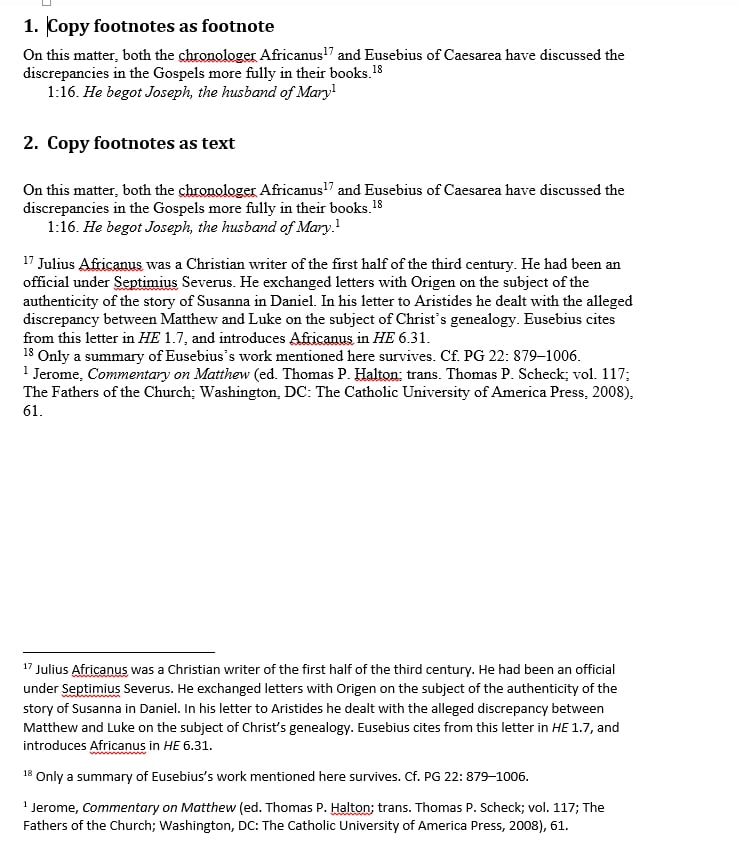
- When I enable "Copy Footnotes" and choose "Text" as the option, I still see unlinked text numbers in the body of the copied excerpt, like this: "On this matter, both the chronologer Africanus and Eusebius of Caesarea have discussed the discrepancies in the Gospels more fully in their books.18"
- When I enable "Copy Footnotes" and choose "Auto" or "Footnote" as options, I see the same exact thing. The footnotes do not translate to Microsoft Word, which is clearly able to handle footnotes.
- When I disable "Copy Footnotes" altogether, I still see the same thing — unlinked text numbers in the body of the excerpt.
From these tests, it seems to me this functionality is broken, because all of the options produce the same result.
For reference, I am using Logos 6.8 on a MacBook Pro running the latest stable version of OS X "El Capitan" and the latest version of Microsoft Word. The resource I am using for all of these tests is the Fathers of the Church Series.
Any ideas what might be going on?
Thank you kindly for your help.