7840.LogosCrash.zip8836.Logos.zip
3750.LogosCrash.zip
7723.LogosError.zip
Hi Brett - and welcome to the forums
Sorry to hear you are having problems.
Your log shows:
2018-09-25 13:05:01.0960 1 Info LocalFileDatabase Found existing database at C:\Users\Client\AppData\Local\Logos\Data\dfsxjuer.e3f\UpdateManager\Updates.db2018-09-25 13:05:01.1030 1 Error ApplicationUtility SQLite Error 1: no such table: Info2018-09-25 13:05:01.1589 1 Error LocalFileDatabase Processes locking C:\Users\Client\AppData\Local\Logos\Data\dfsxjuer.e3f\UpdateManager\Updates.db: "C:\Users\Client\AppData\Local\Logos\System\Logos.exe"2018-09-25 13:05:01.1718 1 Error ApplicationUtility Will mark database as corrupt due to error executing: select Version from Info limit 1; ~SQLiteException: SQL logic error or missing database: no such table: Info2018-09-25 13:05:01.1848 1 Info LocalFileDatabase Setting 'C:\Users\Client\AppData\Local\Logos\Data\dfsxjuer.e3f\UpdateManager\Updates.db' as corrupt in the registry.2018-09-25 13:05:01.1898 1 Error ApplicationUtility Error opening database at 'C:\Users\Client\AppData\Local\Logos\Data\dfsxjuer.e3f\UpdateManager\Updates.db'. ~DatabaseVersionException: Error upgrading to schema version 152018-09-25 13:05:01.2018 1 Info UpdatePipelineManager (138ms) Creating update manager.2018-09-25 13:05:01.2077 17 Info StartupUtility (166ms) Startup step: StartPostSetServiceClientsWork2018-09-25 13:05:01.2147 17 Info StartupUtility (2391ms) Startup step: StartServices2018-09-25 13:05:01.2357 17 Error ApplicationUtility Unhandled exception in async work System.AggregateException: One or more errors occurred. ---> Libronix.Utility.Data.DatabaseVersionException: Error upgrading to schema version 15 ---> System.Data.SQLite.SQLiteException: SQL logic error or missing database: no such table: Info
Try deleting C:\Users\Client\AppData\Local\Logos\Data\dfsxjuer.e3f\UpdateManager\Updates.db and restarting Logos.
Graham
Thanks for helping me Grahm, but there is no AppData folder.
Brett
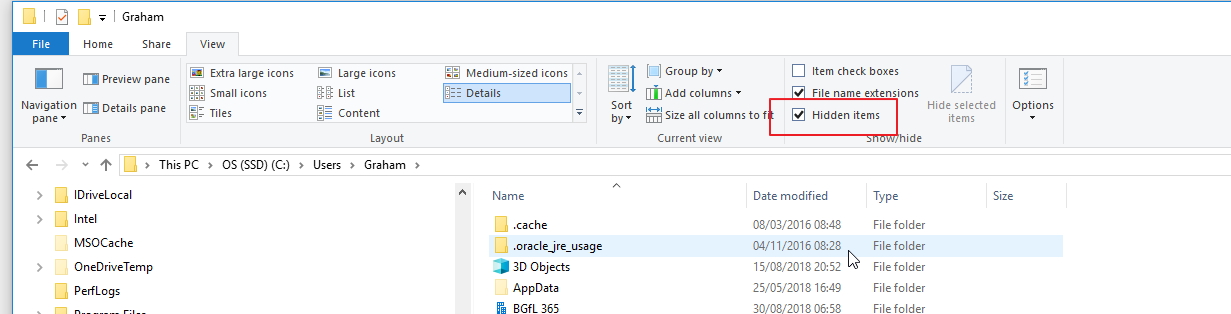
To see if in Windows Explorer you need to ensure that "Hidden items" is selected
Wait a minute, in my Search Tools I get as far as C:\Users\Client\AppDataLocal\Logos and the only files it brings up are the following:
1. cc_20170823_113029
2. LogosCrash text file
3. LogosCrash compressed and zipped file
What now?
okay, I didn't see your last message let me try that.
Hey! You got it. Thanks! I'm back in business.
Excellent[:)]
Available Now
Build your biblical library with a new trusted commentary or resource every month. Yours to keep forever.