I just installed my Logos Bible 4 on my Mac; it won's open the program at all. Do anyone have any suggestions?
After download, personally dragged Logos4 to Applications folder - would not run from downloaded dmg file.
Otherwise - console messages and any logs would be helpful:
http://community.logos.com/forums/t/6731.aspx
Also, keep in mind that the program won't run on a Power PC Mac or any OS under 10.5.8
I'm having same problem; using macbook pro running snow leopard. Downloaded Logos 4 installer program but it won't open, even after dragging it to applications. Please pass on solution if you find it. thanks
Is this the first time ever opening L4 Mac? Have you ever used L4 Win? The reason I ask is because I believe a similar problem arose and was fixed the other day, To solve this problem, the guy had to delete a corrupt .db file. Here is what I would do if the answer to either of those questions is yes:
1) Post your logs to the forum instructions are posted here: http://community.logos.com/forums/t/6731.aspx Just in case you are having a different problem. Also, post logs even if this is your first time using the program
2) Go through every folder in /Users/<your id>/LIbrary/Application Support/Logos 4 and delete all .db files you find (Note: begin the whitchunt in the Logos 4 folder)
3) Try firing up the app again once you finish. The .db files should be rebuilt.
Hope this Helps
Michael Kares
Also note that you can skip the ridiculously large resource folder that that is full of .logos4 files. I don't think there is a .db file in that folder
Thanks for the response Michael: I've never (to my knowledge) used L4 (through I did have an old libronix program IVP Collection, 4 years old I used on my mac via a virtual machine). When I go to the Logos 4 file ("Library/Application Support/Logos4/Logging which you will find under your home folder") there are no .db file in it or any other files for that matter. Only the nlog.config file I'd dragged in. So I also can't find any logging folder in order to file reports on log messages.
I hope this helps clarify the problem better.
Thanks for the help.
Living and learning - launching "Logos Bible Software 4" from dmg file does prompt for Application installation.
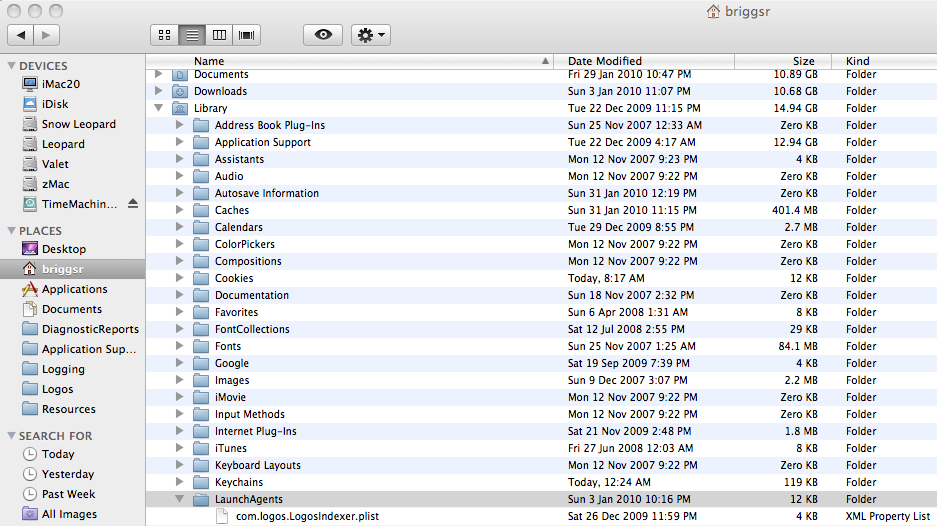
Remember forum poster having launch problems since could not create com.logos.LogosIndexer.plist inside LaunchAgents:
My iMac "Library/Application Support/Logos4" folder has 5 folders inside:
Data, Documents, Logging, Shared, and Users.
Also wonder if dialog box appears asking for Logos account ? If not, console messages likely would help identify issue.
Keep Smiling [:)]
My iMac "Library/Application Support/Logos4" folder has only one folder inside: "Logging" so its missing "Data, Documents,, Shared, and Users". When I try to launch there is no response including a dialog box asking for Logos account info. I'm no technician but I opened the console messages but didn't see anything with "logos 4". What would I be looking for in these messages? thanks
I take that back. I found a few messages in the console messages:
2/1/10 9:03:30 PM com.apple.launchd.peruser.502[141] ([0x0-0x28028].com.logos.Logos_Bible_Software_4[269]) Exited: Killed
2/2/10 6:45:56 PM [0x0-0x155155].com.logos.Logos_Bible_Software_4[3384] ERROR:shared.c:521:shm_semaphores_init: assertion failed: (tmp_shared != NULL)
2/1/10 9:30:08 PM com.apple.launchd.peruser.502[140] ([0x0-0x28028].com.logos.Logos_Bible_Software_4[301]) Exited: Killed
2/1/10 9:55:52 PM com.apple.launchd.peruser.502[144] ([0x0-0x28028].com.logos.Logos_Bible_Software_4[334]) Exited: Killed
Curious - can a file be copied to your "Library/LaunchAgents" folder ?
Observation: Apple launch daemon killing Logos Bible Software - perhaps permission issue with LaunchAgents (or software running on Mac to prevent surprise installation).
By the way, google search for shm_semaphores_init tmp_shared finds some Mono items.
I had same problem and mac support had me make new admin user account and try running install and it worked. I am trying to figure out why it won't on my account now but this may help you get it at least on your mac.
I cked the "LaunchAgents" folder but i didn't see any L4 appearing files there. I'm not sure what you meant: "Apple launch daemon killing Logos Bible Software - perhaps permission issue with LaunchAgents (or software running on Mac to prevent surprise installation)."
Hi Ryan, are you referring to "mac support" at Logos customer technical service? Thanks for the help
What does the following command in Terminal print?
ls -ld ~/Library/LaunchAgents
Also, if you can post your entire Console Messages.log or any crash report, that would be really helpful as well.
Hi Ryan, thanks for jumping in to help. I don't understand your question re: command in Terminal print, but I copied my Console Messages (BTW I don't think I'm able access any crash report):
2/1/10 8:47:08 PM Logos Bible Software 4[269] Setting ulimit for open files to 10240
2/1/10 8:47:09 PM [0x0-0x28028].com.logos.Logos_Bible_Software_4[269] ** (process:269): CRITICAL **: _wapi_shm_file_open: shared file [/Users/davidpillar/.wapi/shared_data-MacBook-Pro-24ghzs-MacBook-Pro.local-Darwin-i386-312-12-0] open error: No such file or directory
2/1/10 8:47:09 PM [0x0-0x28028].com.logos.Logos_Bible_Software_4[269] ** (process:269): CRITICAL **: _wapi_shm_attach: shared file [/Users/davidpillar/.wapi/shared_data-MacBook-Pro-24ghzs-MacBook-Pro.local-Darwin-i386-312-12-0] open error
2/1/10 8:47:09 PM [0x0-0x28028].com.logos.Logos_Bible_Software_4[269] **
2/1/10 8:47:09 PM [0x0-0x28028].com.logos.Logos_Bible_Software_4[269] ERROR:shared.c:521:shm_semaphores_init: assertion failed: (tmp_shared != NULL)
2/1/10 8:53:51 PM Logos Bible Software 4[304] Setting ulimit for open files to 10240
2/1/10 8:53:51 PM [0x0-0x2b02b].com.logos.Logos_Bible_Software_4[304] ** (process:304): CRITICAL **: _wapi_shm_file_open: shared file [/Users/davidpillar/.wapi/shared_data-MacBook-Pro-24ghzs-MacBook-Pro.local-Darwin-i386-312-12-0] open error: No such file or directory
2/1/10 8:53:51 PM [0x0-0x2b02b].com.logos.Logos_Bible_Software_4[304] ** (process:304): CRITICAL **: _wapi_shm_attach: shared file [/Users/davidpillar/.wapi/shared_data-MacBook-Pro-24ghzs-MacBook-Pro.local-Darwin-i386-312-12-0] open error
2/1/10 8:53:51 PM [0x0-0x2b02b].com.logos.Logos_Bible_Software_4[304] **
2/1/10 8:53:51 PM [0x0-0x2b02b].com.logos.Logos_Bible_Software_4[304] ERROR:shared.c:521:shm_semaphores_init: assertion failed: (tmp_shared != NULL)
2/1/10 9:03:27 PM com.apple.launchd.peruser.502[141] ([0x0-0x2b02b].com.logos.Logos_Bible_Software_4[304]) Exited: Killed
2/1/10 9:12:12 PM Logos Bible Software 4[254] Setting ulimit for open files to 10240
2/1/10 9:12:12 PM [0x0-0x25025].com.logos.Logos_Bible_Software_4[254] ** (process:254): CRITICAL **: _wapi_shm_file_open: shared file [/Users/davidpillar/.wapi/shared_data-MacBook-Pro-24ghzs-MacBook-Pro.local-Darwin-i386-312-12-0] open error: No such file or directory
2/1/10 9:12:12 PM [0x0-0x25025].com.logos.Logos_Bible_Software_4[254] ** (process:254): CRITICAL **: _wapi_shm_attach: shared file [/Users/davidpillar/.wapi/shared_data-MacBook-Pro-24ghzs-MacBook-Pro.local-Darwin-i386-312-12-0] open error
2/1/10 9:12:12 PM [0x0-0x25025].com.logos.Logos_Bible_Software_4[254] **
2/1/10 9:12:12 PM [0x0-0x25025].com.logos.Logos_Bible_Software_4[254] ERROR:shared.c:521:shm_semaphores_init: assertion failed: (tmp_shared != NULL)
2/1/10 9:17:12 PM com.apple.launchd.peruser.502[140] ([0x0-0x25025].com.logos.Logos_Bible_Software_4[254]) Exited: Killed
2/1/10 9:27:27 PM Logos Bible Software 4[301] Setting ulimit for open files to 10240
2/1/10 9:27:27 PM [0x0-0x28028].com.logos.Logos_Bible_Software_4[301] ** (process:301): CRITICAL **: _wapi_shm_file_open: shared file [/Users/davidpillar/.wapi/shared_data-MacBook-Pro-24ghzs-MacBook-Pro.local-Darwin-i386-312-12-0] open error: No such file or directory
2/1/10 9:27:27 PM [0x0-0x28028].com.logos.Logos_Bible_Software_4[301] ** (process:301): CRITICAL **: _wapi_shm_attach: shared file [/Users/davidpillar/.wapi/shared_data-MacBook-Pro-24ghzs-MacBook-Pro.local-Darwin-i386-312-12-0] open error
2/1/10 9:27:27 PM [0x0-0x28028].com.logos.Logos_Bible_Software_4[301] **
2/1/10 9:27:27 PM [0x0-0x28028].com.logos.Logos_Bible_Software_4[301] ERROR:shared.c:521:shm_semaphores_init: assertion failed: (tmp_shared != NULL)
2/1/10 9:56:13 PM Logos Bible Software 4[339] Setting ulimit for open files to 10240
2/1/10 9:56:13 PM [0x0-0x2b02b].com.logos.Logos_Bible_Software_4[339] ** (process:339): CRITICAL **: _wapi_shm_file_open: shared file [/Users/davidpillar/.wapi/shared_data-MacBook-Pro-24ghzs-MacBook-Pro.local-Darwin-i386-312-12-0] open error: No such file or directory
2/1/10 9:56:13 PM [0x0-0x2b02b].com.logos.Logos_Bible_Software_4[339] ** (process:339): CRITICAL **: _wapi_shm_attach: shared file [/Users/davidpillar/.wapi/shared_data-MacBook-Pro-24ghzs-MacBook-Pro.local-Darwin-i386-312-12-0] open error
2/1/10 9:56:13 PM [0x0-0x2b02b].com.logos.Logos_Bible_Software_4[339] **
2/1/10 9:56:13 PM [0x0-0x2b02b].com.logos.Logos_Bible_Software_4[339] ERROR:shared.c:521:shm_semaphores_init: assertion failed: (tmp_shared != NULL)
2/1/10 9:58:47 PM Logos Bible Software 4[358] Setting ulimit for open files to 10240
2/1/10 9:58:48 PM [0x0-0x2e02e].com.logos.Logos_Bible_Software_4[358] ** (process:358): CRITICAL **: _wapi_shm_file_open: shared file [/Users/davidpillar/.wapi/shared_data-MacBook-Pro-24ghzs-MacBook-Pro.local-Darwin-i386-312-12-0] open error: No such file or directory
2/1/10 9:58:48 PM [0x0-0x2e02e].com.logos.Logos_Bible_Software_4[358] ** (process:358): CRITICAL **: _wapi_shm_attach: shared file [/Users/davidpillar/.wapi/shared_data-MacBook-Pro-24ghzs-MacBook-Pro.local-Darwin-i386-312-12-0] open error
2/1/10 9:58:48 PM [0x0-0x2e02e].com.logos.Logos_Bible_Software_4[358] **
2/1/10 9:58:48 PM [0x0-0x2e02e].com.logos.Logos_Bible_Software_4[358] ERROR:shared.c:521:shm_semaphores_init: assertion failed: (tmp_shared != NULL)
2/1/10 10:00:01 PM com.apple.launchd.peruser.502[144] ([0x0-0x2e02e].com.logos.Logos_Bible_Software_4[358]) Exited: Killed
2/1/10 10:00:15 PM com.apple.launchd.peruser.502[144] ([0x0-0x2b02b].com.logos.Logos_Bible_Software_4[339]) Exited: Killed
2/1/10 10:01:02 PM Logos Bible Software 4[381] Setting ulimit for open files to 10240
2/1/10 10:01:02 PM [0x0-0x34034].com.logos.Logos_Bible_Software_4[381] ** (process:381): CRITICAL **: _wapi_shm_file_open: shared file [/Users/davidpillar/.wapi/shared_data-MacBook-Pro-24ghzs-MacBook-Pro.local-Darwin-i386-312-12-0] open error: No such file or directory
2/1/10 10:01:02 PM [0x0-0x34034].com.logos.Logos_Bible_Software_4[381] ** (process:381): CRITICAL **: _wapi_shm_attach: shared file [/Users/davidpillar/.wapi/shared_data-MacBook-Pro-24ghzs-MacBook-Pro.local-Darwin-i386-312-12-0] open error
2/1/10 10:01:02 PM [0x0-0x34034].com.logos.Logos_Bible_Software_4[381] **
2/1/10 10:01:02 PM [0x0-0x34034].com.logos.Logos_Bible_Software_4[381] ERROR:shared.c:521:shm_semaphores_init: assertion failed: (tmp_shared != NULL)
2/1/10 10:01:11 PM com.apple.launchd.peruser.502[144] ([0x0-0x34034].com.logos.Logos_Bible_Software_4[381]) Exited: Killed
2/1/10 10:36:06 PM Logos Bible Software 4[229] Setting ulimit for open files to 10240
2/1/10 10:36:07 PM [0x0-0x26026].com.logos.Logos_Bible_Software_4[229] ** (process:229): CRITICAL **: _wapi_shm_file_open: shared file [/Users/davidpillar/.wapi/shared_data-MacBook-Pro-24ghzs-MacBook-Pro.local-Darwin-i386-312-12-0] open error: No such file or directory
2/1/10 10:36:07 PM [0x0-0x26026].com.logos.Logos_Bible_Software_4[229] ** (process:229): CRITICAL **: _wapi_shm_attach: shared file [/Users/davidpillar/.wapi/shared_data-MacBook-Pro-24ghzs-MacBook-Pro.local-Darwin-i386-312-12-0] open error
2/1/10 10:36:07 PM [0x0-0x26026].com.logos.Logos_Bible_Software_4[229] **
2/1/10 10:36:07 PM [0x0-0x26026].com.logos.Logos_Bible_Software_4[229] ERROR:shared.c:521:shm_semaphores_init: assertion failed: (tmp_shared != NULL)
2/1/10 10:42:20 PM com.apple.launchd.peruser.502[104] ([0x0-0x26026].com.logos.Logos_Bible_Software_4[229]) Exited: Killed
2/2/10 6:37:10 PM Logos Bible Software 4[3359] Setting ulimit for open files to 10240
2/2/10 6:37:11 PM [0x0-0x14e14e].com.logos.Logos_Bible_Software_4[3359] ** (process:3359): CRITICAL **: _wapi_shm_file_open: shared file [/Users/davidpillar/.wapi/shared_data-MacBook-Pro-24ghzs-MacBook-Pro.local-Darwin-i386-312-12-0] open error: No such file or directory
2/2/10 6:37:11 PM [0x0-0x14e14e].com.logos.Logos_Bible_Software_4[3359] ** (process:3359): CRITICAL **: _wapi_shm_attach: shared file [/Users/davidpillar/.wapi/shared_data-MacBook-Pro-24ghzs-MacBook-Pro.local-Darwin-i386-312-12-0] open error
2/2/10 6:37:11 PM [0x0-0x14e14e].com.logos.Logos_Bible_Software_4[3359] **
2/2/10 6:37:11 PM [0x0-0x14e14e].com.logos.Logos_Bible_Software_4[3359] ERROR:shared.c:521:shm_semaphores_init: assertion failed: (tmp_shared != NULL)
2/2/10 6:45:13 PM com.apple.launchd.peruser.502[104] ([0x0-0x14e14e].com.logos.Logos_Bible_Software_4[3359]) Exited: Killed
2/2/10 6:45:56 PM Logos Bible Software 4[3384] Setting ulimit for open files to 10240
2/2/10 6:45:56 PM [0x0-0x155155].com.logos.Logos_Bible_Software_4[3384] ** (process:3384): CRITICAL **: _wapi_shm_file_open: shared file [/Users/davidpillar/.wapi/shared_data-MacBook-Pro-24ghzs-MacBook-Pro.local-Darwin-i386-312-12-0] open error: No such file or directory
2/2/10 6:45:56 PM [0x0-0x155155].com.logos.Logos_Bible_Software_4[3384] ** (process:3384): CRITICAL **: _wapi_shm_attach: shared file [/Users/davidpillar/.wapi/shared_data-MacBook-Pro-24ghzs-MacBook-Pro.local-Darwin-i386-312-12-0] open error
2/2/10 6:45:56 PM [0x0-0x155155].com.logos.Logos_Bible_Software_4[3384] **
2/2/10 7:02:46 PM com.apple.launchd.peruser.502[104] ([0x0-0x155155].com.logos.Logos_Bible_Software_4[3384]) Exited: Killed
No Apple Care.
I don't have apple care so do mean new admin user account w/Logos or a mac account? thanks
I had to make a new mac user admin. They had me go into accounts and make a new user name and give it administrator title. They also had me turn on "show fast user switching" and make it say "icon" in down carrot box. This lets you switch to other account while leaving your account open in background. I then ran install on new "dummy" user account and it went through all the processes and works. The problem is it ONLY works in that new user account. It will still not let me run it on my user account.
Hope this helps!
Please excuse computer geek babbling - trying to interpret part of console messages: launchd is Apple's Launch Daemon.
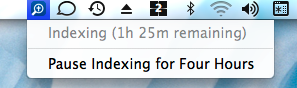
When Logos 4 application starts, early item is writing "com.logos.LogosIndexer.plist" file into LaunchAgents folder then requesting Apple Launch Daemon to start LogosIndexer process using parameter list (plist) file. If LogosIndexer process running, blue icon appears in menu bar (right side of screen) - image shows Logos 4 icon and indexing status (clicked on icon):
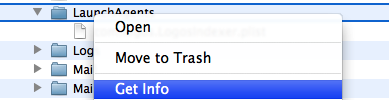
Good way to check LaunchAgents folder permissions: right click on folder => click "Get Info":
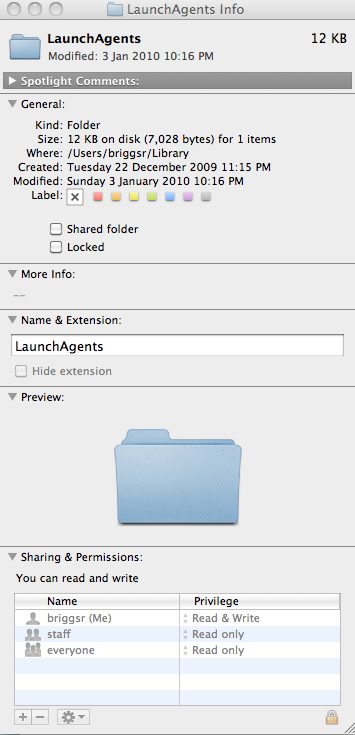
Bottom of Get Info window shows "Sharing & Permissions":
Now wonder about user's LaunchAgents folder permissions - from console messages, suspect LaunchAgents folder has permissions problem preventing Logos4 from writing "com.logos.LogosIndexer.plist" file.
Also wonder if Logos 4 can be installed using new user account ? (likely new account has appropriate permissions for user's Library/LaunchAgents folder)
My permissions look same as yours in pic you posted?!
Thanks for the explanation. Would this Launch Agent problem relate to Ryan's solution of creating a new mac user name w/ administrator title?
Ryan, by chance was your old apple user name the same as your user name or password on your Logos account?
no i made random name and generic password. I plan on deleting it when i get it working on my user account.
Following on Tom's post, wonder about terminal output for working and non-working user accounts:
iMac20:~ briggsr$ ls -ld ~/Library/LaunchAgents
drwxr-xr-x 2 briggsr staff 136 Jan 3 22:16 /Users/briggsr/Library/LaunchAgents
iMac20:~ briggsr$ ls -l .wapi
total 5768
-rw------- 1 briggsr staff 79880 Feb 2 21:42 shared_data-iMac20.local-Darwin-i386-312-12-0
-rw------- 1 briggsr staff 2867204 Feb 2 21:42 shared_fileshare-iMac20.local-Darwin-i386-28-12-0
iMac20:~ briggsr$
Ryan, I'm a novice mac user and a bit leery of messing around my machine. Does this link describe what you did in changing your user/admin name? thanks
http://mac101.net/content/how-to/how-to-changing-a-username-on-the-mac/
2) Go through every folder in /Users/<your id>/LIbrary/Application Support/Logos 4 and delete all .db files you find (Note: begin the whitchunt in the Logos 4 folder) 3) Try firing up the app again once you finish. The .db files should be rebuilt.
Thank you so much! This step really solved it. My Logos 4 is now up and running! Immensely grateful.
Available Now
Build your biblical library with a new trusted commentary or resource every month. Yours to keep forever.